6
Installation
7. Securely mount the amplifier to the vehicle or amp rack. Be careful not to mount the
amplifier on cardboard or plastic panels. Doing so may enable the screws to pull out from
the panel due to road vibration or sudden vehicle stops.
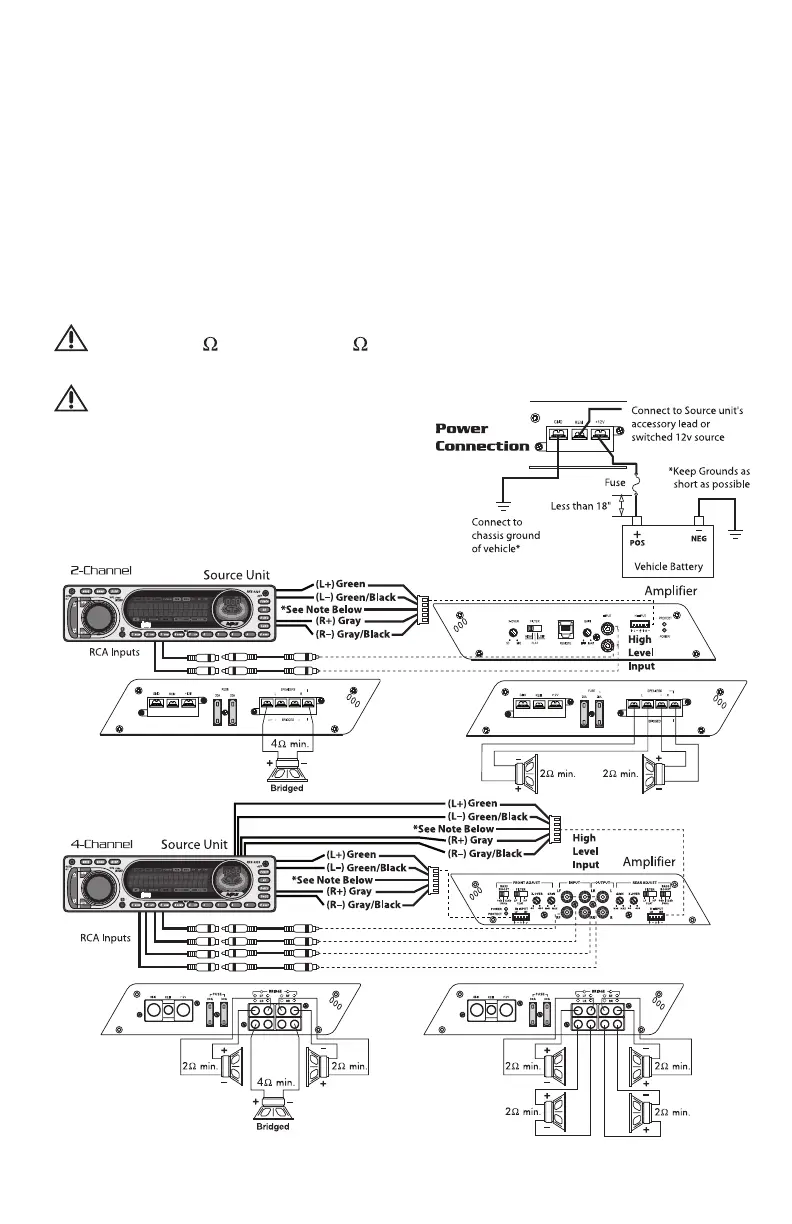
8. Connect the source signal to the amplifier by plugging the RCA cables/high level inputs into
the input jacks at the amplifier.
9. Connect the speakers. Strip the speaker wires 1/2" and insert into the speaker terminal
and tighten the set screw to secure into place. Be sure to maintain proper speaker polarity.
DO NOT chassis ground any of the speaker leads as unstable operation may result.
10. Perform a final check of the completed system wiring to ensure that all connections are
accurate. Check all power and ground connections for frayed wires and loose connections
which could cause problems.
NOTE: Follow the diagrams for proper signal polarity.
CAUTION: These amplifiers are not recommended for impedance loads below
2 stereo and/or 4 bridged (mono).
CAUTION: Use only one input
configuration. Using
both the RCA and
High Level inputs will
cause undesirable
operation.





 To Next Page