28
OPTIONAL COMPONENTS
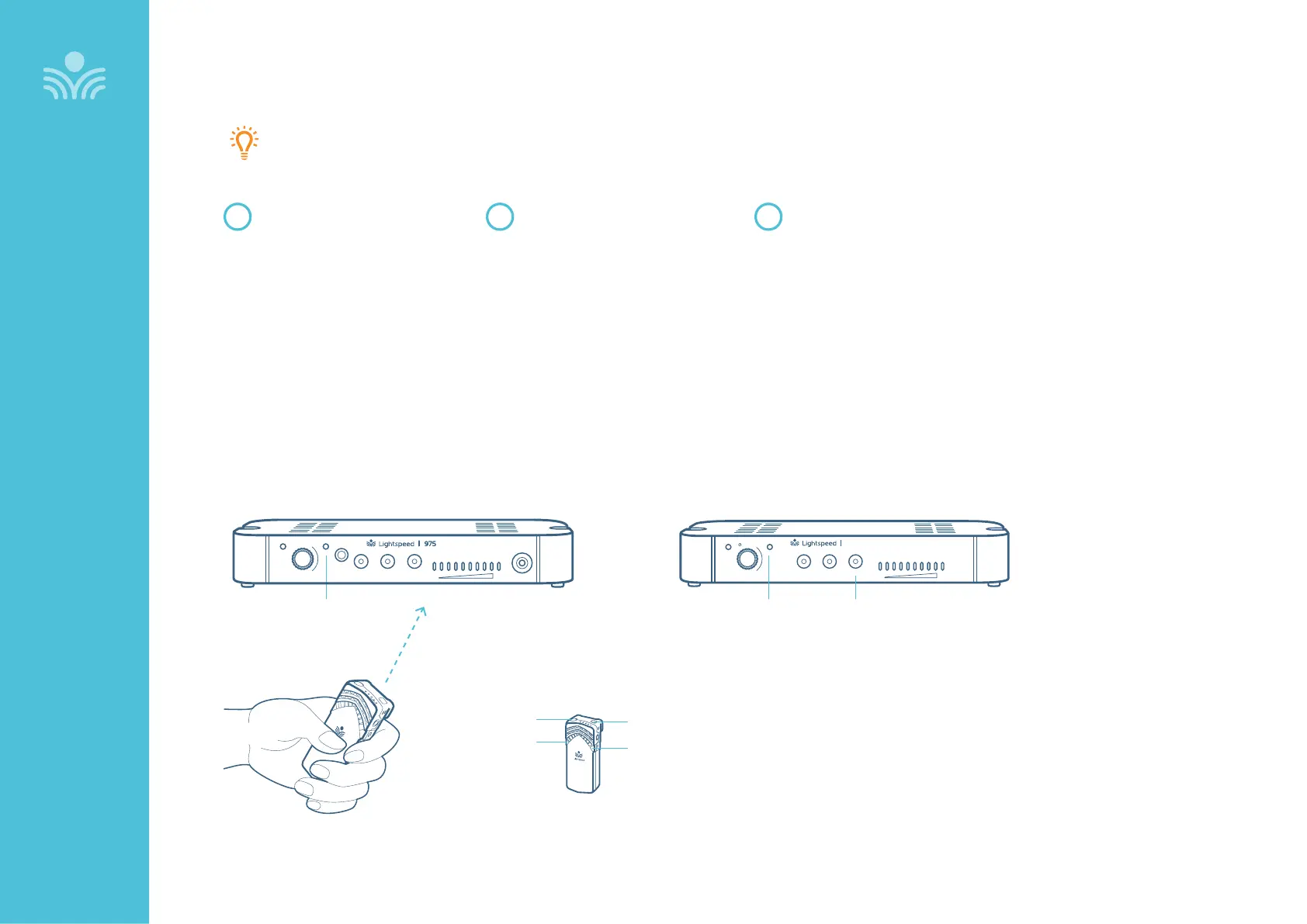
Pairing 975 to Media Connector
FLEXMIKE
From a powered o state, point
the IR transmitter lens toward
the 975 (for Sharemike, the
transmitter lens is located on
the back of the microphone).
1
Press and hold the Flexmike
power button for 5 seconds until
the mic 1 and mic 2 lights start
flashing, then release the button.
At this point, the status light on
Topcat will blink for 30 seconds.
If aer 30 seconds the status light
blinks rapidly, you will need to
start the pairing process again.
2
Press and hold the Tone selector
button for 5 seconds to put it into
pairing mode.
When the status lights are solid
on both the 975 and Media
Connector, pairing is successful.
3
Audio
Input
Audio
Output
Tone
Level
Push
StatusPower
Media
Connector
STATUS LIGHT TONE SELECTOR
BUTTON
STATUS LIGHT
975 MEDIA CONNECTOR
MIC 2
MIC 1
POWER
IR TRANSMITTER
Your system is shipped with microphones and base units pre-paired for quick and easy use.
If, for any reason, you need to pair new components, follow this pairing process:
Audio
Input
Audio
Output
Audio
Output
Tone
Level
Push
StatusPower



 To Next Page