17
Setting the Pre-Condition Countdown
Your Lightstat TME has the ability to come on before the lights do.
Note: The Lightstat TME must be powered Off and On in order to “read” a
change of switch settings.
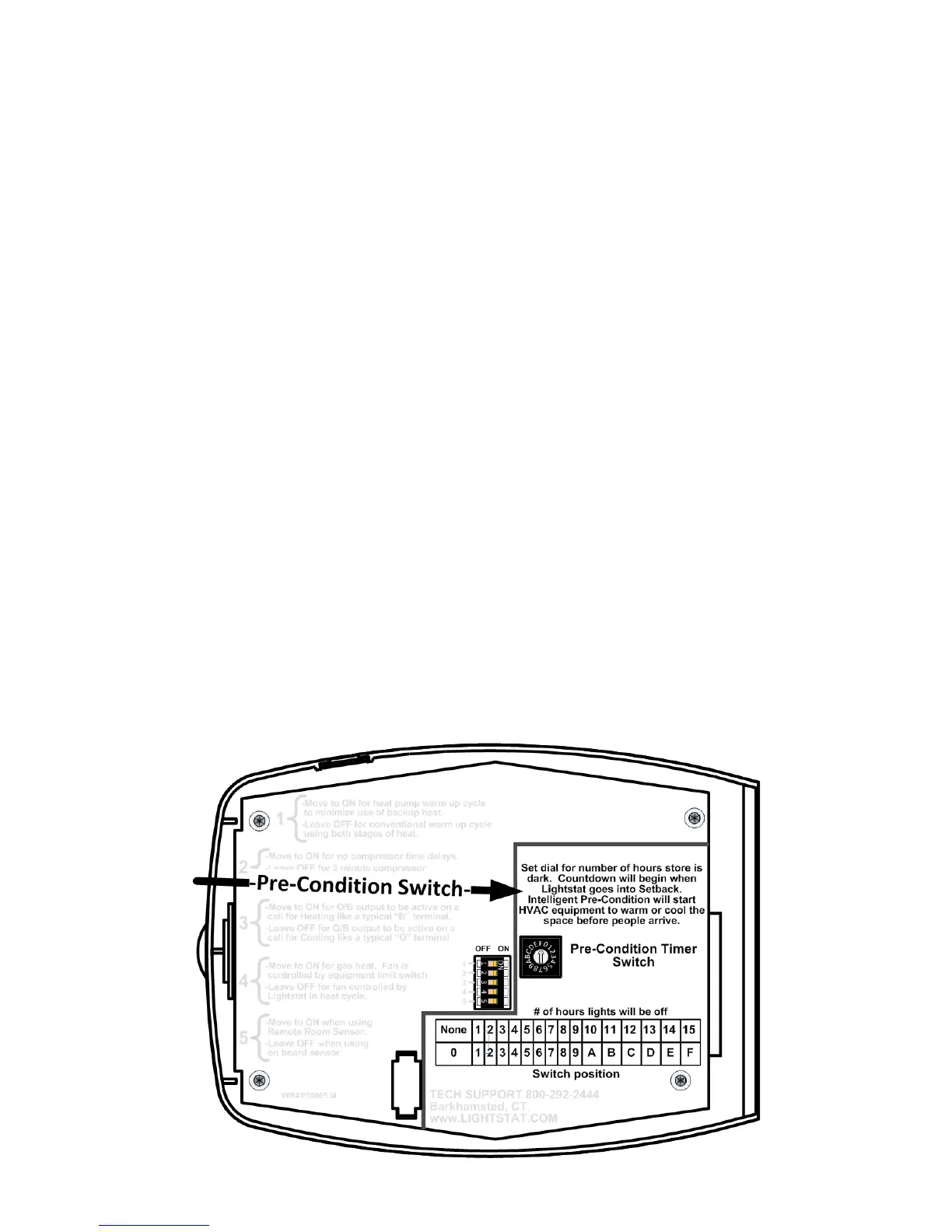
Set the dial for the number of hours that the lights in the facility will be off when it
is closed, and the Lightstat TME will automatically come on early enough to bring
up the heat or cool down before occupancy.
Choose the number of hours the facility is unoccupied from the top list. Set the
dial to the corresponding character from the lower list.
The Lightstat TME looks at how long the time is before occupancy and how far
away from the heating and cooling setpoints the temperature is. It calculates how
long it will take to heat up or cool down, and operates the equipment accordingly.
Remember to count the total average time of darkness expected during
unoccupied times. If all the days do not have the same length of darkness,
choose the period used for most days of the week. The Lightstat TME can only
remember one schedule.
For example, if your facility is occupied from 8:30 AM to 9:30 PM from Monday to
Saturday but only open a few hours on Sunday; choose 11 hours and set the dial
to “B”.
The Lightstat TME will go back into Setback if the lights remain off after the Pre-
Condition period. Thus, if a facility is closed on Sunday, the Lightstat TME will go
back into Setback and pre-condition for Monday.


 To Next Page