Determining Your Lightstat TME Setback Control
If your Lightstat TME has a clear window then go to Adjusting the Light
Sensitivity below.
If your Lightstat TME does not have a clear window, then it will not respond to
light changes. It is most likely controlled by the Lightstat TME Automatic Lighting
Control (ALC), customer supplied switch or alternate contact closure. No action
is required.
Adjusting the Light Sensitivity
You will want to make sure the Lightstat TME sets back temperatures when the
lights are turned down in the room where the Lightstat TME is located.
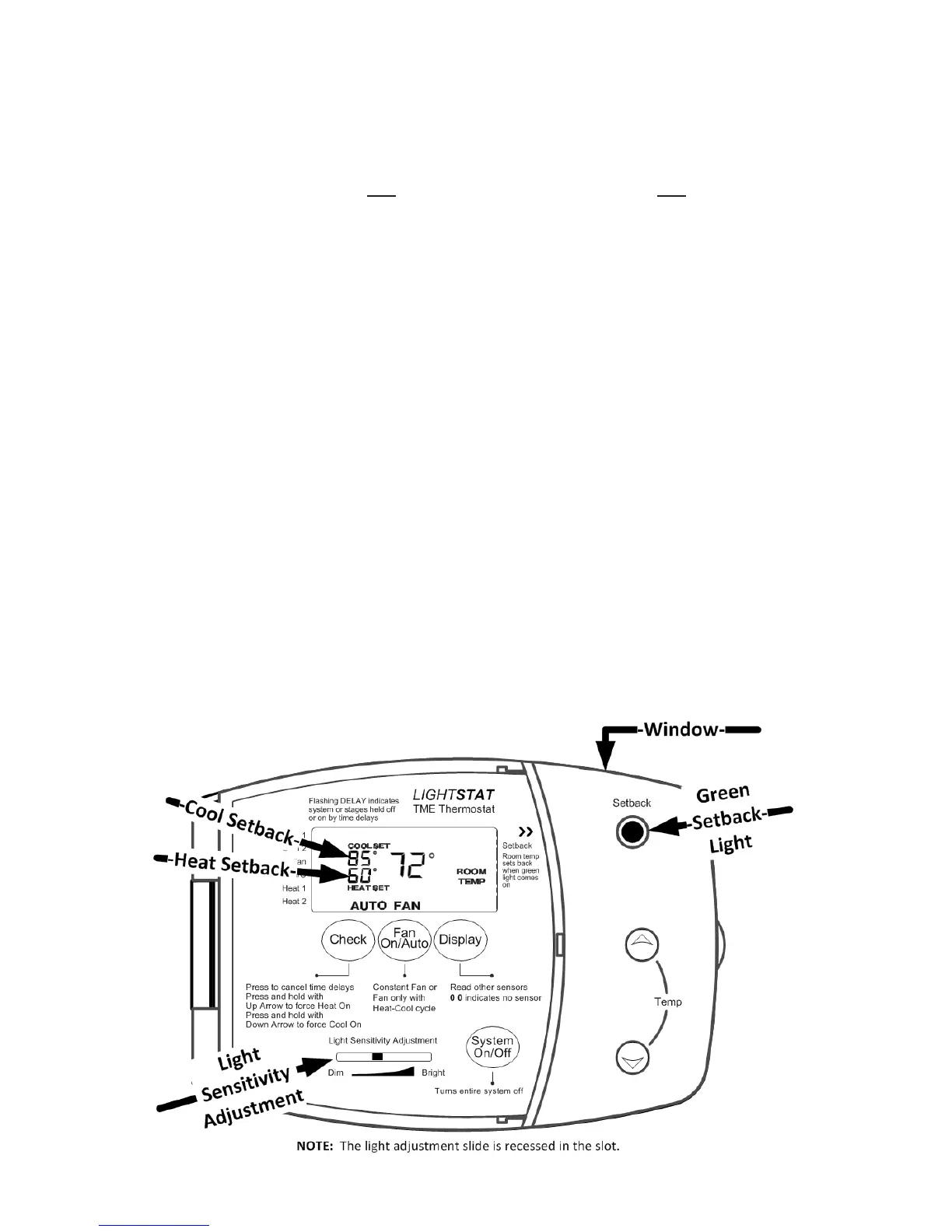
The clear plastic window on the top of your Lightstat TME is where it senses the
light. If you shadow the window at the top of the Lightstat TME, it will cause it to
shift to the Setback mode. It will signal this by turning on the GREEN SETBACK
LIGHT. When the Setback light is on, the Cool Set and Heat Set temperatures
will show the Setback temperatures, which are model specic and not adjustable.
You will make the Lightstat TME go into Setback mode more easily by moving
the LIGHT SENSITIVITY ADJUSTMENT slide to the right, toward BRIGHT.
If the Lightstat TME goes into Setback mode when the room is occupied, you
can make it less sensitive by moving the LIGHT SENSITIVITY ADJUSTMENT
slide to the left, toward DIM.
Turn off the lights in the room around the Lightstat TME and make sure that the
GREEN SETBACK LIGHT comes on.
19


 To Next Page