4
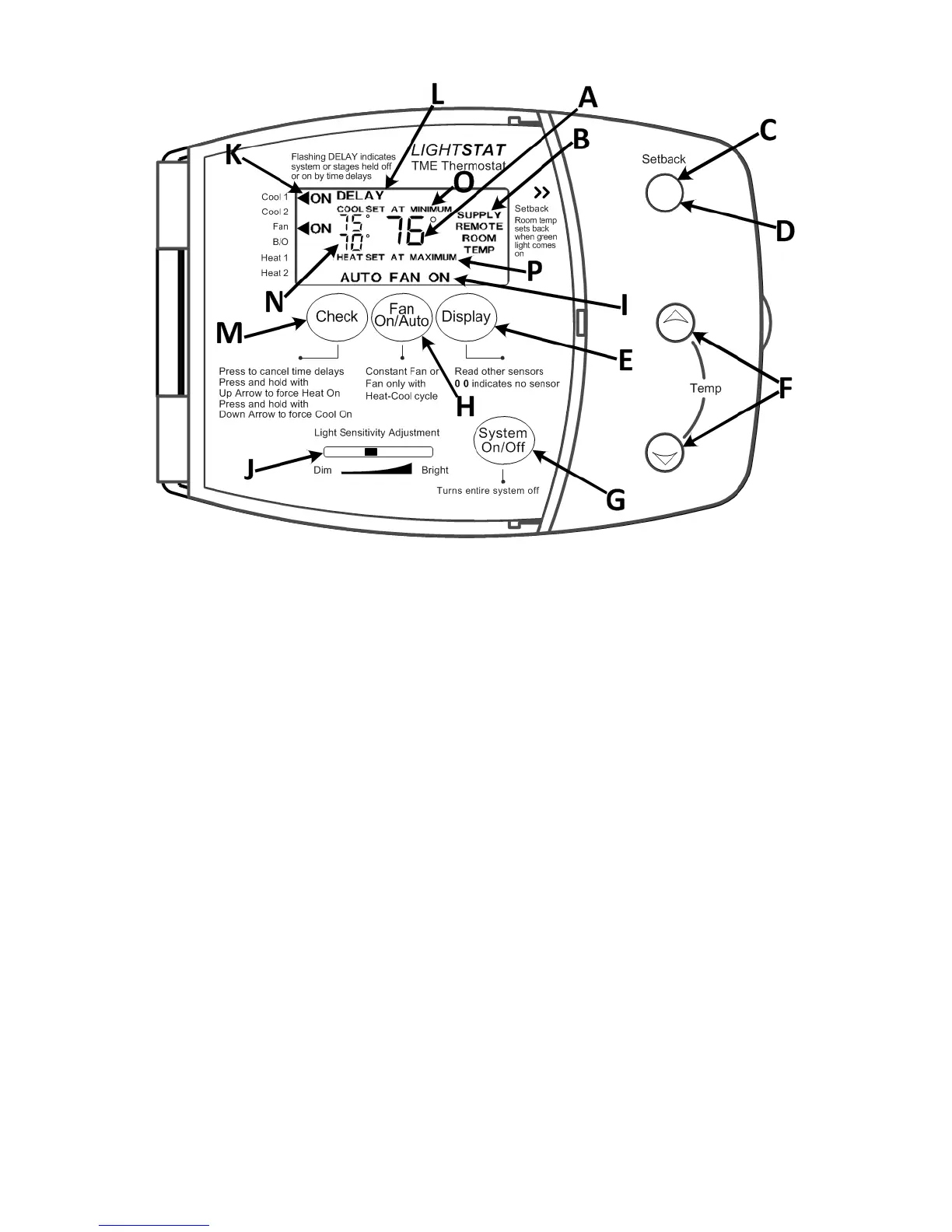
Description
A - Current temperature.
B - Indicates if SUPPLY, REMOTE, or ROOM temperature is being displayed.
C - Setback indicator light. Glows green during Setback.
D - Visual Alarm light. Flashes red during a Roof Top Alarm signal.
E - Toggles temperature display between ROOM and SUPPLY air.
F - Temperature adjustment buttons.
G - System power button.
H - Fan ON/AUTO button.
I - Fan ON/AUTO Indicator.
J - Light Sensitivity Adjustment.
K - Illuminated ON and arrow (◄) indicate which outputs are currently ON.
Flashing arrow indicates time delay.
L - Flashing DELAY indicates the stages are held ON or OFF by a time delay.
M - Press Check button to cancel any active time delay(s).
N - Indicates temperature setpoints. Standard 5º dead-band between heat and
cool setpoints.
O - Flashes to indicate cool setpoint is at the minimum temperature limit.
P - Flashes to indicate heat setpoint is at the maximum temperature limit.


 To Next Page