1.3 - THE CONTROLS
12
1. 3 - THE CONTROLS
2
1
A. Gear lever
1 Forward drive
•
Neutral
2 Reverse gear
To go forwards, push the lever in the direction
of forward drive "D" until it engages and then
accelerate gradually. A "D" indicator light will
illuminate on the dashboard screen.
ATTENTION!
(FOR VEHICLES WITH THE DCI ENGINE
ONLY).
In neutral "N", the rpm engine can
be increased only when : the brake
pedal is simultaneously pressed OR
a door is opened OR the handbrake
is engaged.
!
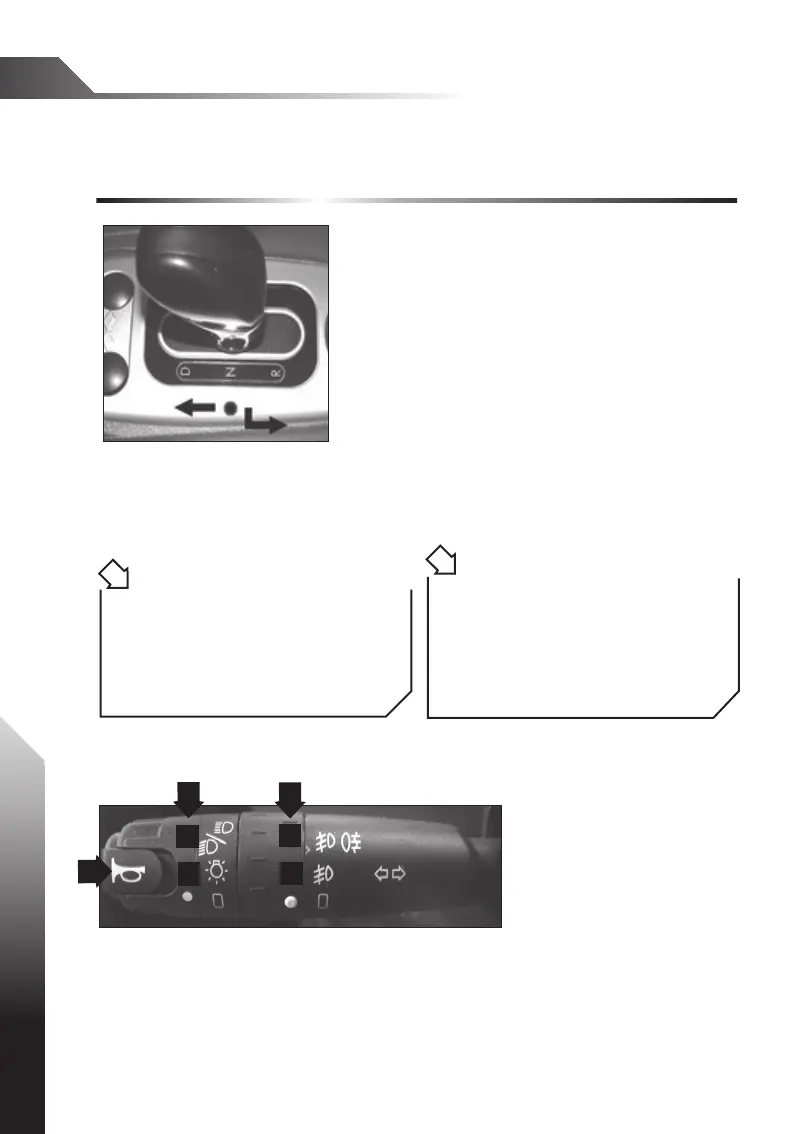
Turn the white round of the trimmer B in position 1 to switch on the side lights
front and rear, in position 2 to switch on the dipped beam, pull the levertowards
you to switch on the full beam headligths.
Turn the white round of the trimmer C in position 3 to switch on the front fog
lamps, in position 4 to switch on rear+front fog lamps.
Push up the lever will switch on the right indicator light, push down the lever will
switch on the left indicator light.
ATTENTION !
It is obligatory to push the gear lever
only when the engine rpm is in slow
motion, vehicle not in motion.
!
A
1
2
3
4
B
C
B. Full/dipped beam switch
A : Press this button to
activate the horn.
To put the vehicle into reverse, push down on the top of the gear lever and
then pull it backwards until it engages in the "R" position.
If tted to the vehicle, the beep of the reversing sensor will sound. A "D"
indicator light will illuminate on the dashboard screen.



 To Next Page