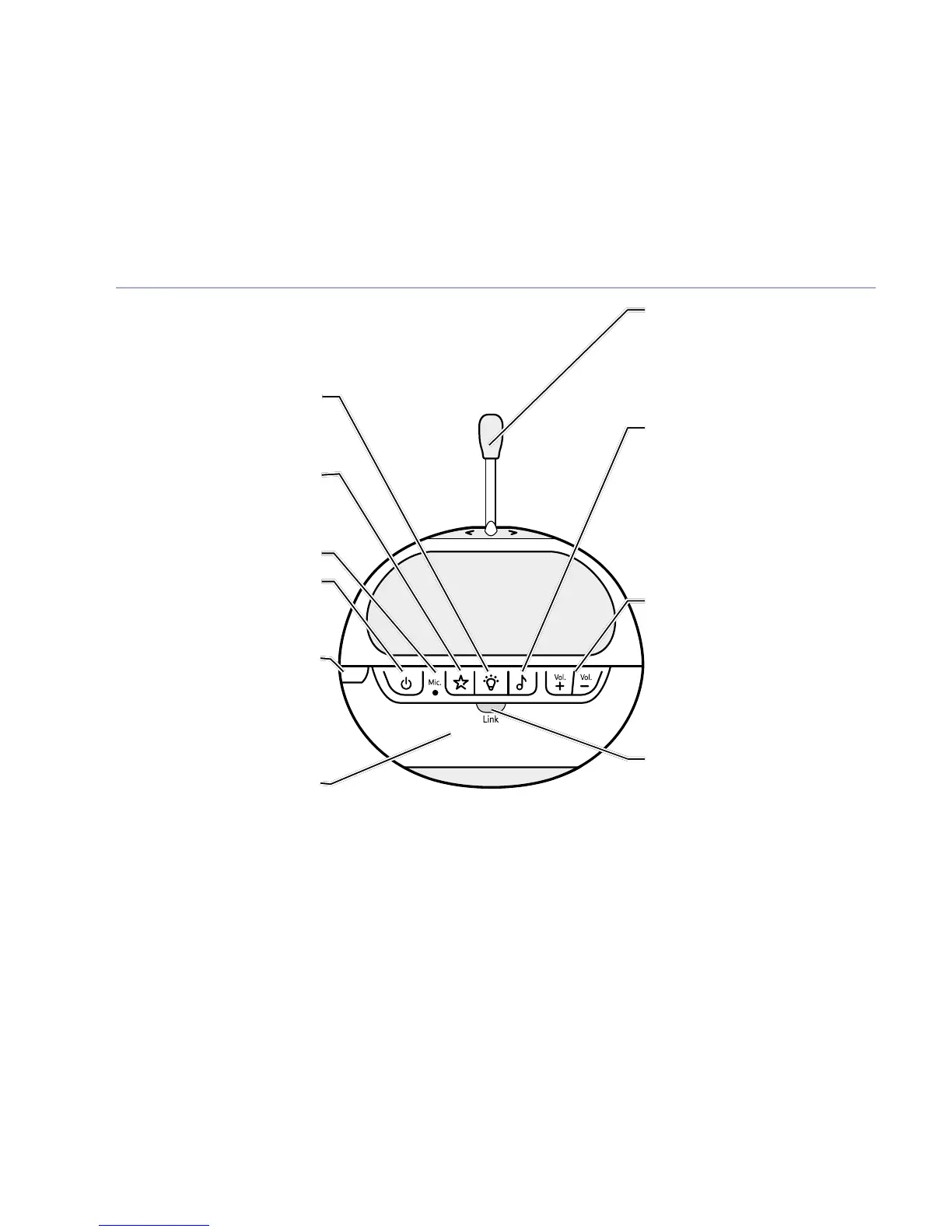
Your BT Digital Baby Monitor & Pacifier
If you experience any problems, please call the Helpline on Freephone 0808 100 6554* or visit www.bt.com/producthelp
10
find
Nightlight
Press to switch the
Nightlight on or off.
Lightshow
Press to switch the
Lightshow on or off.
Microphone
Power on/off
Press and hold to switch
the power on or off.
Find
(on side of unit)
Press to emit an alert
beep from the Parent unit–
useful for finding the Parent
unit if you’ve misplaced it.
Nightlight
Illuminates around the base.
Temperature sensor
Make sure the sensor is placed
with clear space around it and
not in contact with any surfaces
to ensure it works effectively.
Music
Press to switch music
on at the Baby unit
(the music and duration will
be as last set at the Parent unit).
Press again to switch
the music off.
Volume +/–
Increase or decrease the
loudspeaker volume for playing
music or for parental talk back.
Link indicator
Steady green indicates that
the Baby and Parent units are
linked. Flashes green if no link
established for 30 seconds.
Flashes red if no link established
after 30 seconds. Also flashes
green when the Talk button is
pressed on the Parent unit to
initiate parental talk back.
Baby unit



 To Next Page