1
Getting Started
li.me/owners
help.li.me/hc/requests/new
How to use your Lime E-Scooter and the Lime Ap
1: Download the Lime app from the Apple App Store (iOS) or Google Play Store (Android)
2: Create a Lime account if you do not have one already and be sure to include an email address when signing up - (you will
need this to register your scooter). If you already have a Lime account, please be sure that your account has an email address
connected to it - you will need an email address to register your scooter). You can add an email address to your account by
tapping the Menu icon in the app ( ) and navigating to Settings
3: Visit this article on our website for instructions on how to link your scooter to your Lime account. You can also
nd the registeration link in your purchase conrmation email
4: Fully charge your scooter. The indicator light on your scooter charger will turn green when it is done charging. It may take up
to 6 hours to fully charge
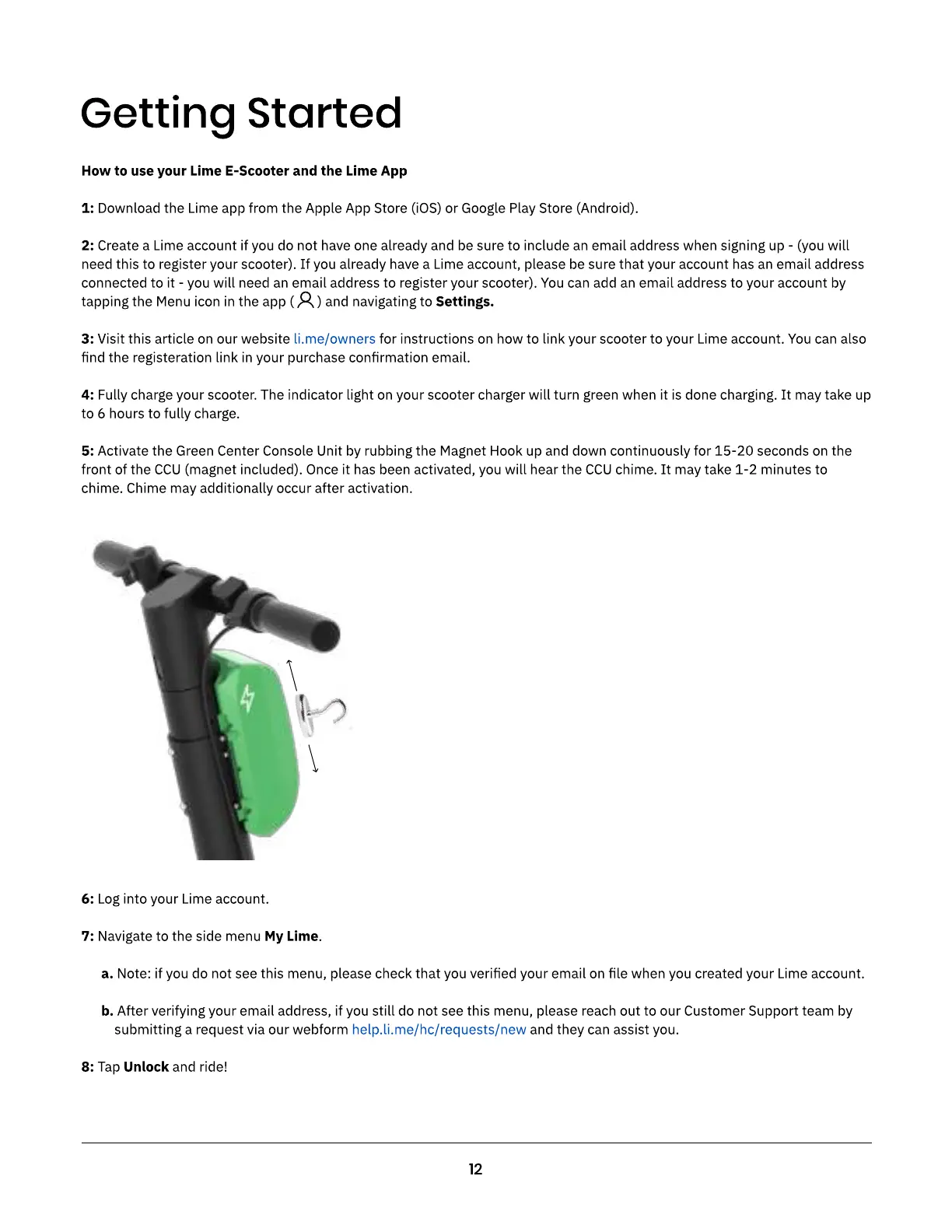
5: Activate the Green Center Console Unit by rubbing the Magnet Hook up and down continuously for 15-20 seconds on the
front of the CCU (magnet included). Once it has been activated, you will hear the CCU chime. It may take 1-2 minutes to
chime. Chime may additionally occur after activation.
6: Log into your Lime account
7: Navigate to the side menu My Lime
a. Note: if you do not see this menu, please check that you veried your email on le when you created your Lime account
b. After verifying your email address, if you still do not see this menu, please reach out to our Customer Support team by
submitting a request via our webform and they can assist you
8: Tap Unlock and ride



 To Next Page