13
How to Ride
http://bit.ly/LimeHTR
Once you’ve fully charged your scooter, you can unplug it from the charger and start riding
Remember, your smartphone must have a good mobile internet network connection in order to unlock and lock your scooter
For your safety, always wear a helmet while riding. Be sure to inspect your scooter for damage and perform the safety check
described on page 18.
Starting and Stoppin
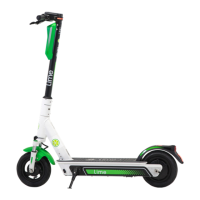
Take hold of the handlebars with both hands. Place one foot on the footboard and kick with the other to propel forward. Hold
down the throttle with your right thumb to accelerate (up to 15 mph). Use the hand brake to slow down and to stop. Use the
kickstand when you park
Where to Rid
We recommend riding in bike lanes or close to the curb in the street. Some states and cities don’t allow e-scooter riding or
parking; please be sure to familiarize yourself with local rules and laws and always follow them. Make sure to avoid sharp
bumps, potholes, drainage grates, and rail tracks, and to monitor for sudden surface changes or changes in the condition of
the road due to weather or construction sites. Do not carry any objects that may cause you to lose balance while riding, and do
not ride with more than one passenger
For more information on how to ride, open your Lime app, navigate to the main menu, then tap on Safety Center, and then tap
on How to Ride or visit this article:
After Your Rid
Once you’re done riding, you can park and lock your Lime scooter. This will lock the front wheel and turn off the lights. Please
note that when your scooter is locked, it is still powered on and will eventually deplete the battery, so we recommend charging
it once you’ve completed your trip.



 To Next Page