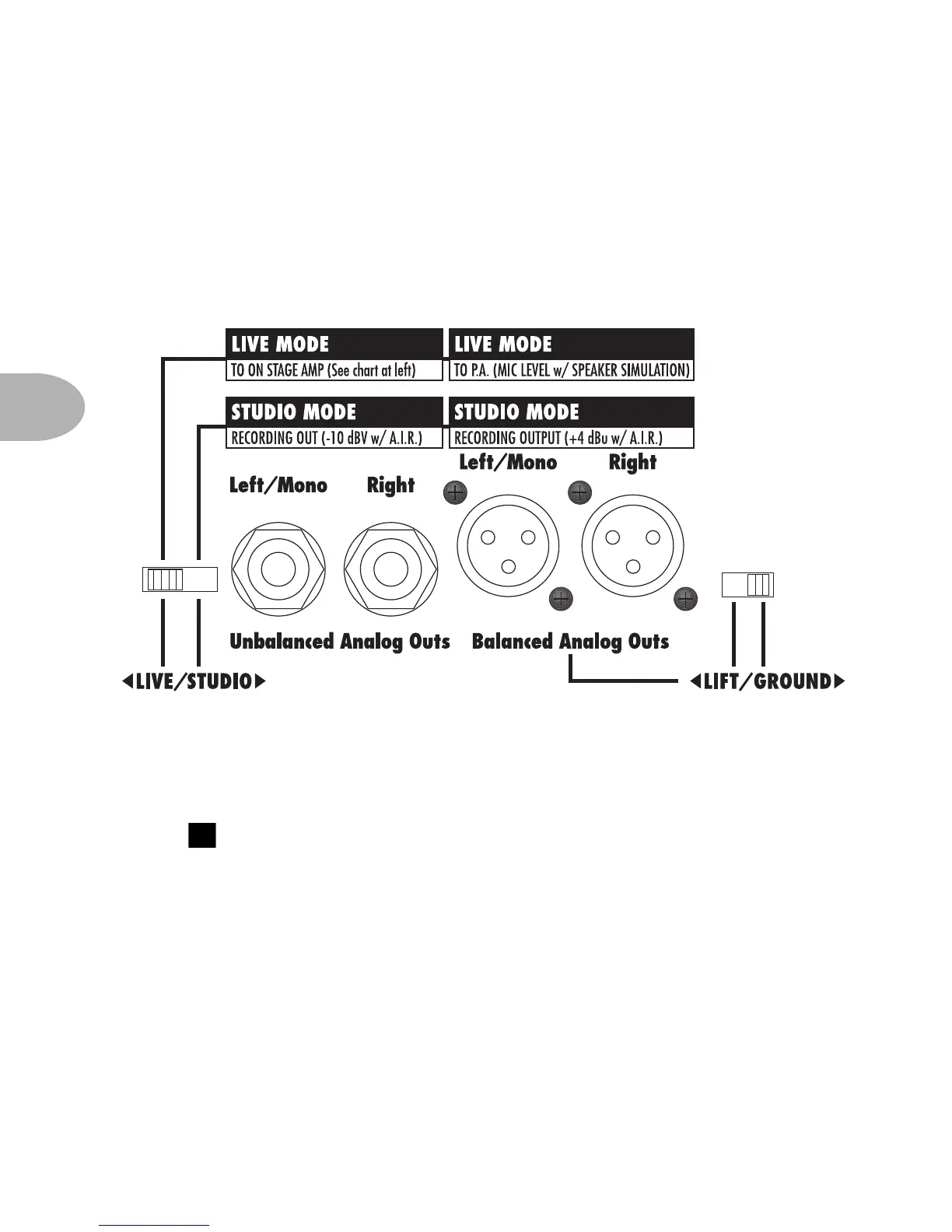
LIVE SETUPS: OUTPUTS
4 • 4
Analog Stereo Outputs – Your POD gives you two pairs of stereo outputs
to use in Live Mode. One pair feeds your on-stage power amp and speaker
cabinets, and the other pair sends a separate direct out to the house mixer or
P.A. Be sure to set the Live/Studio switch to the Live position.
Connect your on-stage power amp and speaker cabinets to the 1/4 inch
outputs. These deliver the amp-and-effects tones of your POD without the
speaker simulation that’s present at the XLR outs. The front panel Output
knob determines the levels at these outputs. For best signal quality,
you generally want this knob high, and your power amp’s output level low, as
oppsosed to the other way around. Or just set ’em both high for ultra volume.
The XLRs give you a direct signal specially-compensated to feed a house
mixer or P.A. These are mic level, ready to plug into the typical mic snake
feeding from the stage to the house system, or into mic level inputs on your
P.A. or mixing board. If you’re getting ground-loop hum, try the Lift/Ground
switch to lift the grounds.
2



 To Next Page