Transmission Distance
Note: T568B straight-through Category cable is recommended.
Cable Type Range
Cat 5e/6 or above 100m/330ft
HDMI Input/Output: 5m/16ft
Panel Descriptions
Transmitter
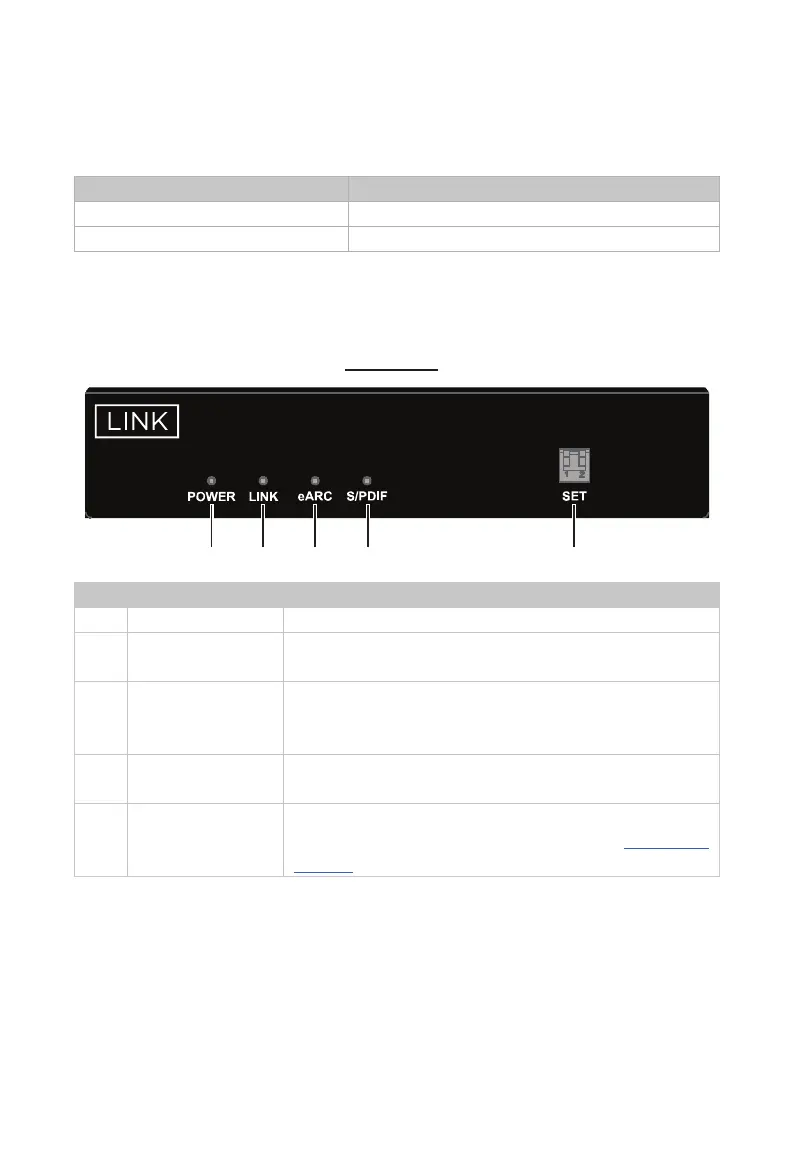
Front Panel
1 2 3 4 5
EXT100-eARC
eARC Audio-Only Extender
TRANSMITTER
DISPLAY
No. Name Description
1 POWER LED On/Off: The device is powered on/off.
2 LINK LED
On: UTP link is normal.
Off: No UTP link or link error.
3 eARC LED
On: The eARC audio is being transmitted.
Blinking: The ARC audio is being transmitted.
Off: No eARC and ARC audio are being transmitted.
4 S/PDIF LED
On: The S/PDIF audio is being transmitted.
Off: No S/PDIF audio is being transmitted.
5 SET
For eARC/ARC audio output channel selection.
Note: Detail information, please refer to “DIP Switch
Settings” section.



 To Next Page