DIP Switch Settings
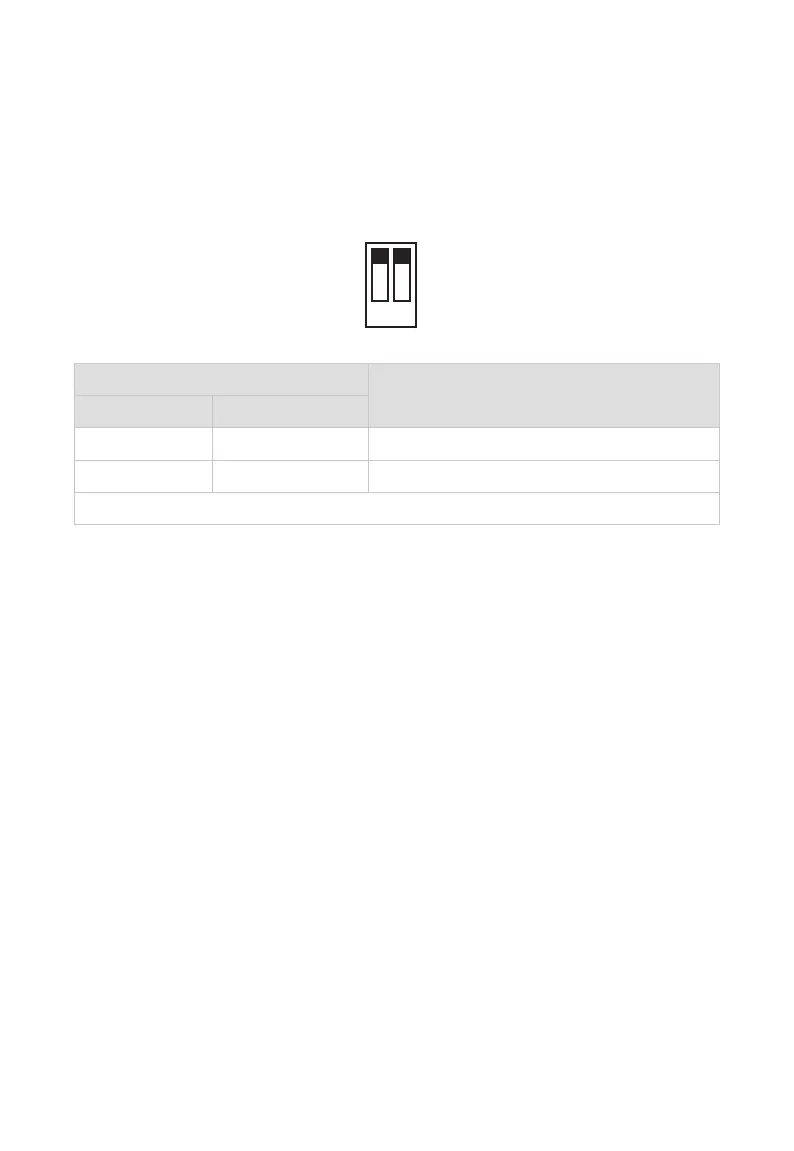
Before powering on the kit, using DIP Switch on front panel of the transmitter
to select the channel to output the eARC/ARC audio.
1 2
Please refer to the following table to set:
Transmitter Function
1 2
Up - eARC/ARC Channel (default)
Down - S/PDIF Channel
“-“ indicates the position of this DIP switch has no influence on the function.
Note:
1) When select output eARC audio, audio format supported is as follows:
Up to 8ch L-PCM of 24 bit, 192kHz audio;
Support HBR audio formats, such as Dolby True-HD, Dolby Atmos
and DTS-X.
2) When output ARC audio, audio format supported is as follows:
Supports 5.1ch compressed audio, such as Dolby Digital, DTS 5.1,
and Dolby Digital Plus;
Supports 2.0ch uncompressed PCM audio.
3) When output the return audio through S/PDIF port, audio format
supported i
s as follows:
Supports 5.1ch compressed audio, such as Dolby Digital, DTS 5.1,
and Dolby Digital Plus;
Supports 2.0ch uncompressed PCM audio.



 To Next Page