Transmission Distance:
Note: T568B straight-through Category cable is recommended.
Cable Type Range Supported Video
HDMI
Input/Output:15m/50ft 1080P@60Hz
Input/Output: 10m/33ft 4K@60Hz 4:2:0
Cat 5e/6 60m/200ft 1080P@60Hz
35m/115ft 4K@60Hz 4:2:0
Cat 6a/7 70m/230ft 1080P@60Hz
40m/130ft 4K@60Hz 4:2:0
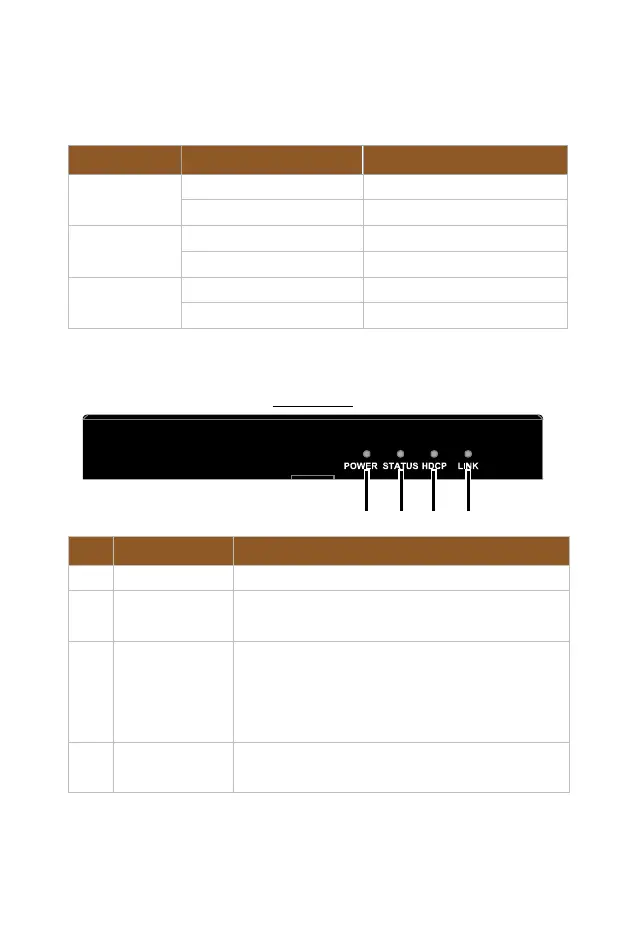
Panel Description
Front Panel
No. Name Description
1 Power LED
On/Off: The device is powered on/off.
2 Status LED
On: The device is working properly.
Off: The device is not working properly.
3 HDCP LED
On: HDCP protected content is being transmitted.
Blinking: Non-HDCP protected content is being
transmitted.
Off: No content is being transmitted.
4 Link LED
On: HDBT link is normal.
Blinking/Off: No HDBT link or link error.


 To Next Page