Adapter configuration
Let's assume the followings:
Your PBX company domain is mycompany.com (provided by Cluana).
Your PBX hostname is myserver.cluana.com (provided by Cluana)
Your analog adapter User ID / Auth ID is fxo_1 (your choice)
Your analog adapter password is : password (your choice)
Your phone line PSTN number is YOUR_NUMBER (0733784374 in the picture below)
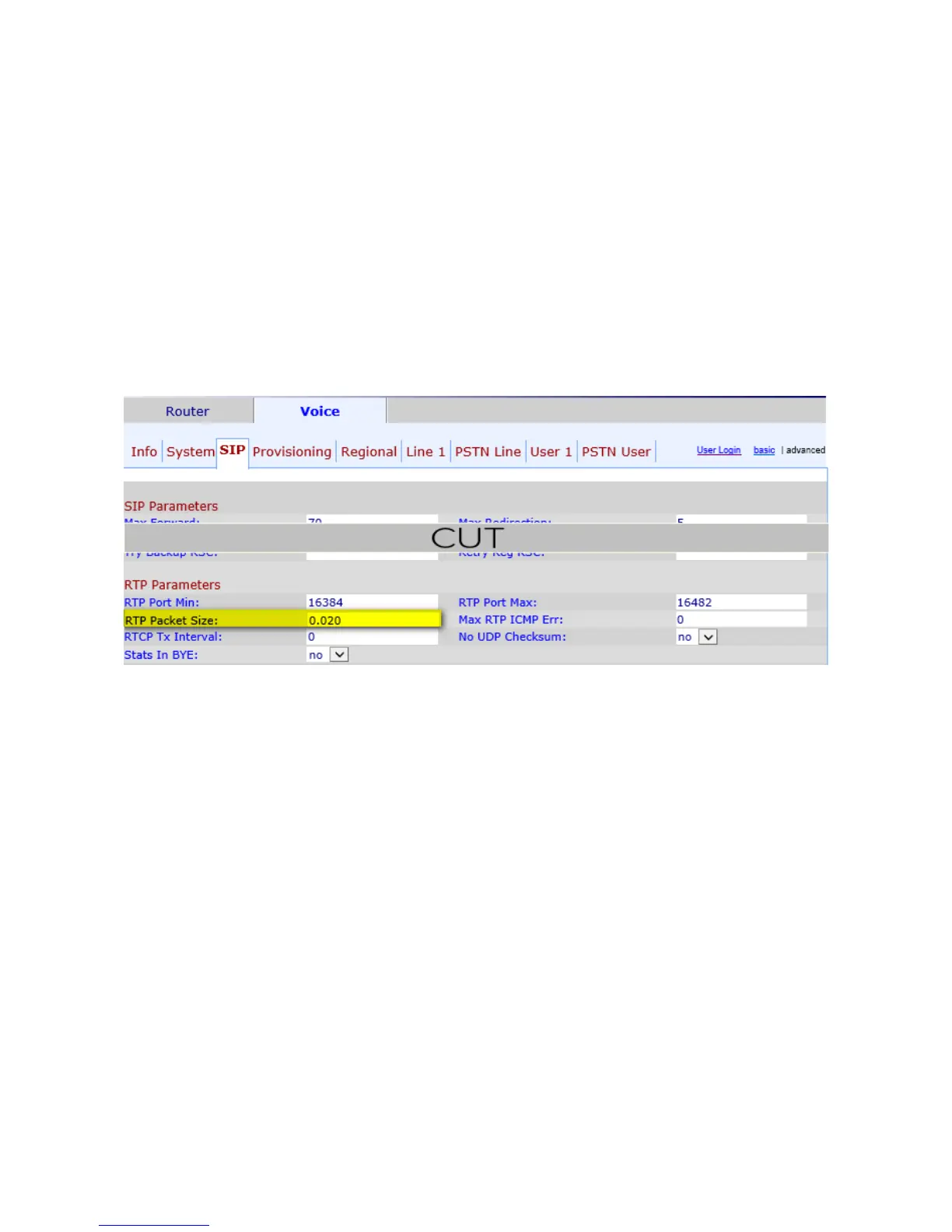
Open SIP tab
RTP Parameters section
RTP Packet Size: 0.020
Open PSTN Line tab
Proxy and Registration
Proxy: mycompany.com:5061
Outbound Proxy: myserver.cluana.com:5061
Use Outbound Proxy: Yes
Register: Yes
Register Expires: 120
Subscriber Information
Display name: FXO_1
User ID: fxo_1
Password: password
Use auth ID: Yes
Auth ID: fxo_1
Audio Configuration
Preferred Codec: G711a (G711u for USA)
Dial Plans
Dial Plan 2: (S0<:YOUR_NUMBER>)
PSTN-To-VoIP Gateway Setup
PSTN Ring Thru Line 1: no
PSTN CID For VoIP CID: yes







 To Next Page