DVD Control Panel Buttons
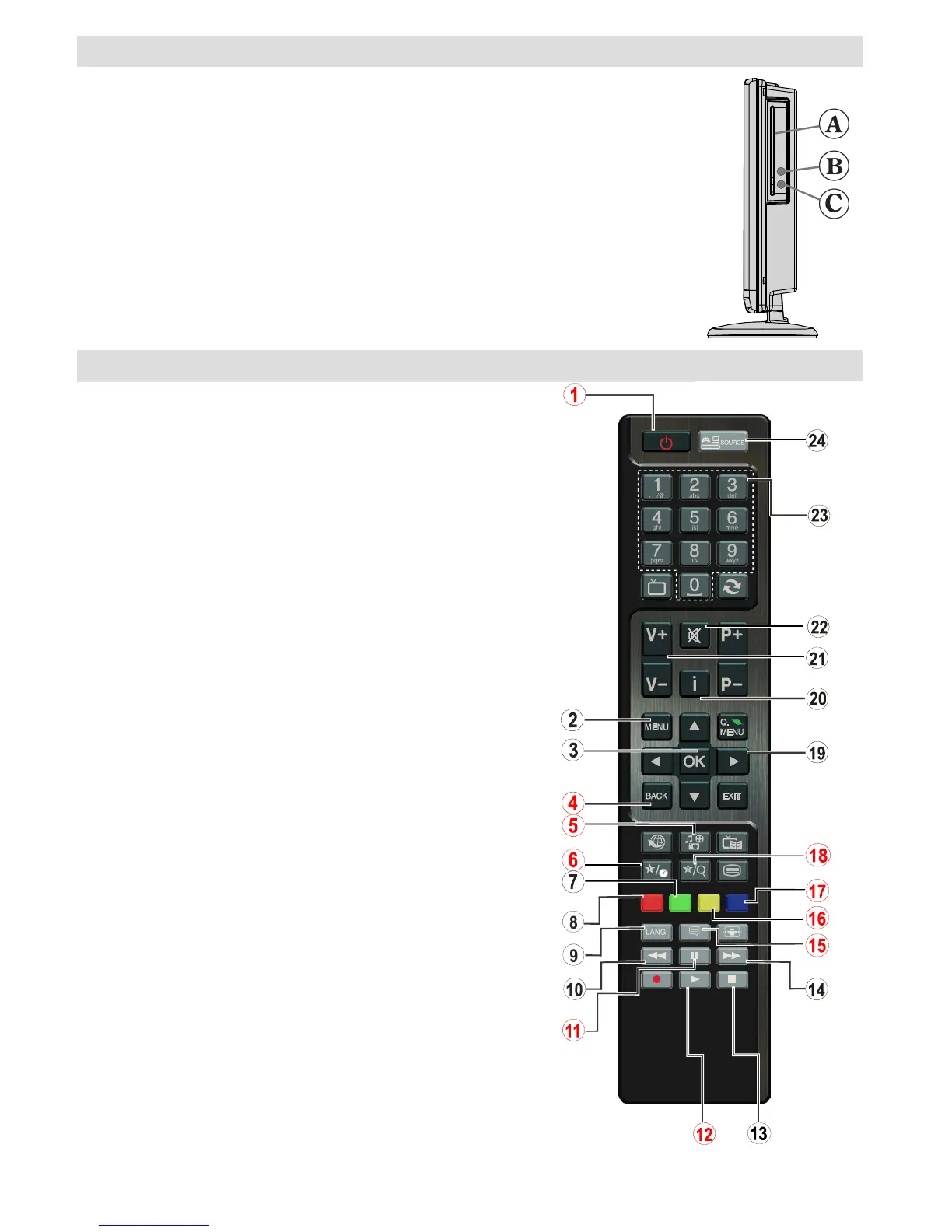
A. Disc loader
B. Play / Pause
Plays/pauses the disc. When DVD menu (root menu) is active, this button functions
as “button select” (selects the highlighted item in menu) if this is not prohibited by the
disc.
C. Stop / Eject
Stop playing disc / Eject or Load the disc Note:
• You cannot eject the disc via the remote control.
• While playing a le, you should press STOP button three times to eject.
Overview of the Remote Control
1. Standby
2. Menu
3. OK / Select
4. Return / back
5. Angle
6. Display
7. Repeat
8. Zoom
9. Lang.
10. Rapid reverse
11. Pause
12. Play
13. Stop
14. Fast forward
15. Subtitle
16. Root
17. Title
18. Search Mode
19. Navigation buttons
20. Info
21. Volume up/down
22. Mute
23. Numeric buttons
24. Source selection


 To Next Page