3. Select the button "Remove the device".
- Select "Disconnect and delete all data".
- Press "Confirm".
Troubleshooting
In the event of faults that you cannot rectify yourself, contact our Service Centre. You
will find the contact details on the enclosed warranty card.
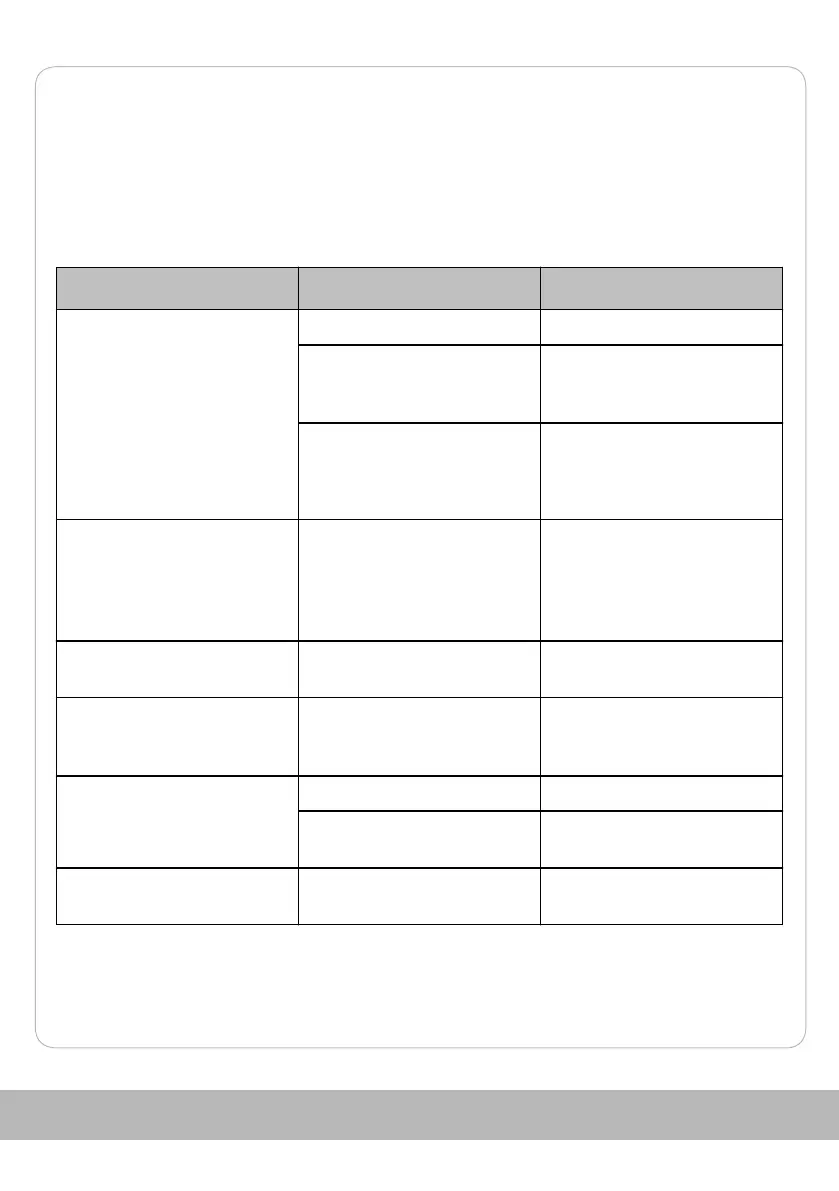
Problem Possible cause Troubleshooting
The product cannot be
switched on.
The charge level is too low. Fully charge the product.
The ambient temperature is
lower than 0 °C.
Operate the product at an
ambient temperature of 0 - 40
°C.
Charging is not possible. Check the power supply to
the charging station.
Charging is not possible. The charging station has no
power or the charging
contacts are dirty.
Check the power supply to
the charging station and clean
the contacts on the charging
station and the Robot Vacuum
Cleaner.
The product does not return
to the charging station.
There is a fault. Switch off the Robot Vacuum
Cleaner and restart it.
The product does not run as
usual.
The side brushes are blocked
or dirty.
Check the side brushes for
blockage and dirt. Clean the
parts accordingly.
Insufficient cleaning
performance
The filter is dirty. Clean or replace the filte r.
The suction opening is
blocked.
Clean the suction opening.
The product makes unusual
operating noises.
The dust container is full. Remove and clean the dust
container.
121


 To Next Page