10 | CONTROLS AND CONNECTIONS
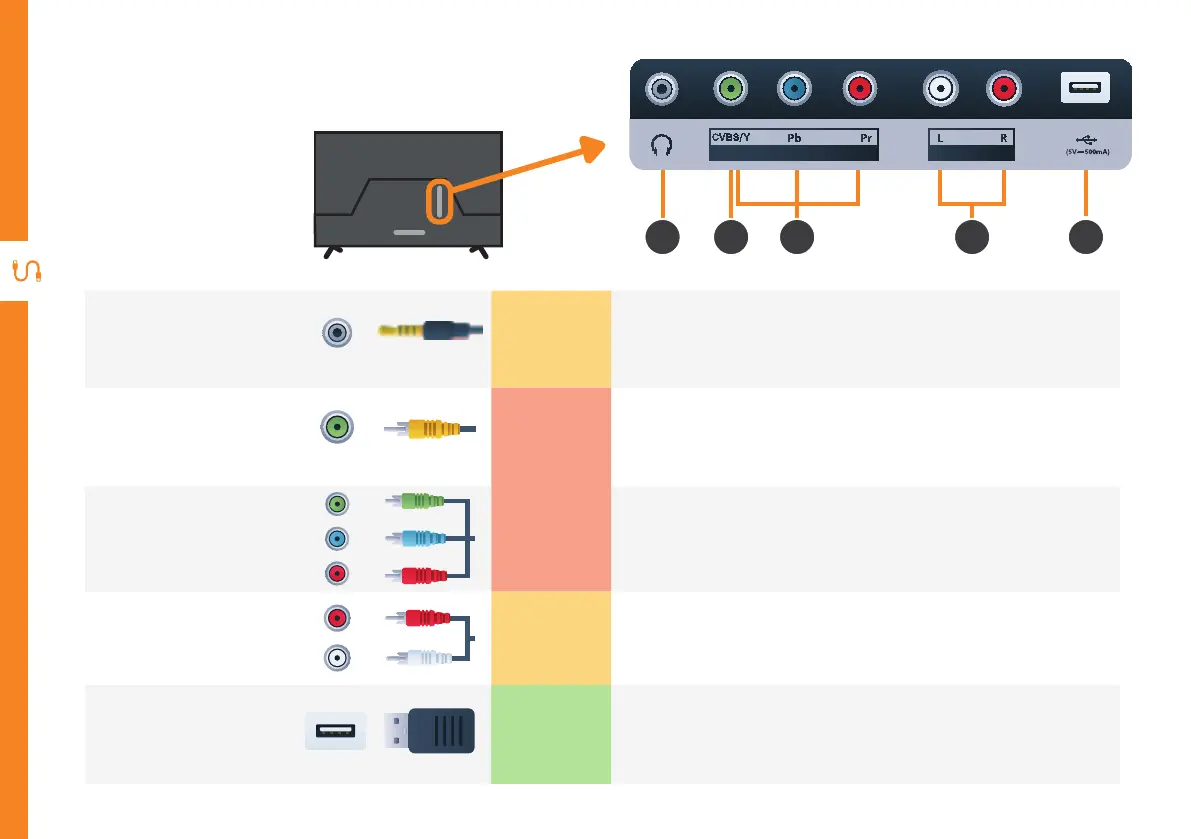
Ports on the TV
2 3 4 5
1
1
Headphone
Jack
SOUND
Connect to your headphones, amplifier or audio device, using
an AUX cable (not included).
2
AV IN
CVBS/Y
PICTURE
You can use this to connect your DVD player. Supports Standard
Definition (SD) resolution. Requires an AV cable (included).
3
COMPONENT
IN
PICTURE
You can use this to connect your DVD player. Supports Full High
Definition (FHD) resolution. This also requires a component
cable (not included).
4
AUDIO IN
SOUND
You can use this to connect audio to your TV for AV or
component video inputs. Requires an RCA stereo audio cable
(not included). However you can also use the supplied AV cable.
5
USB
STORAGE
• PVR record and pause live TV
• Play your stored media files (supported file codecs and
extensions may vary)
• Software updates
AUDIO INAV/COMPONENT IN
(5V 500mA)



 To Next Page