14 | REMOTE CONTROL
1 2
3
4
5
7 8
0
AUDIO
6
9
GUIDE
INFO
LIST
QMENU
OK
SOURCE
MENU EXIT
1 2
3
4
5
7 8
0
AUDIO
6
9
GUIDE
INFO
LIST
QMENU
OK
SOURCE
MENU EXIT
REC
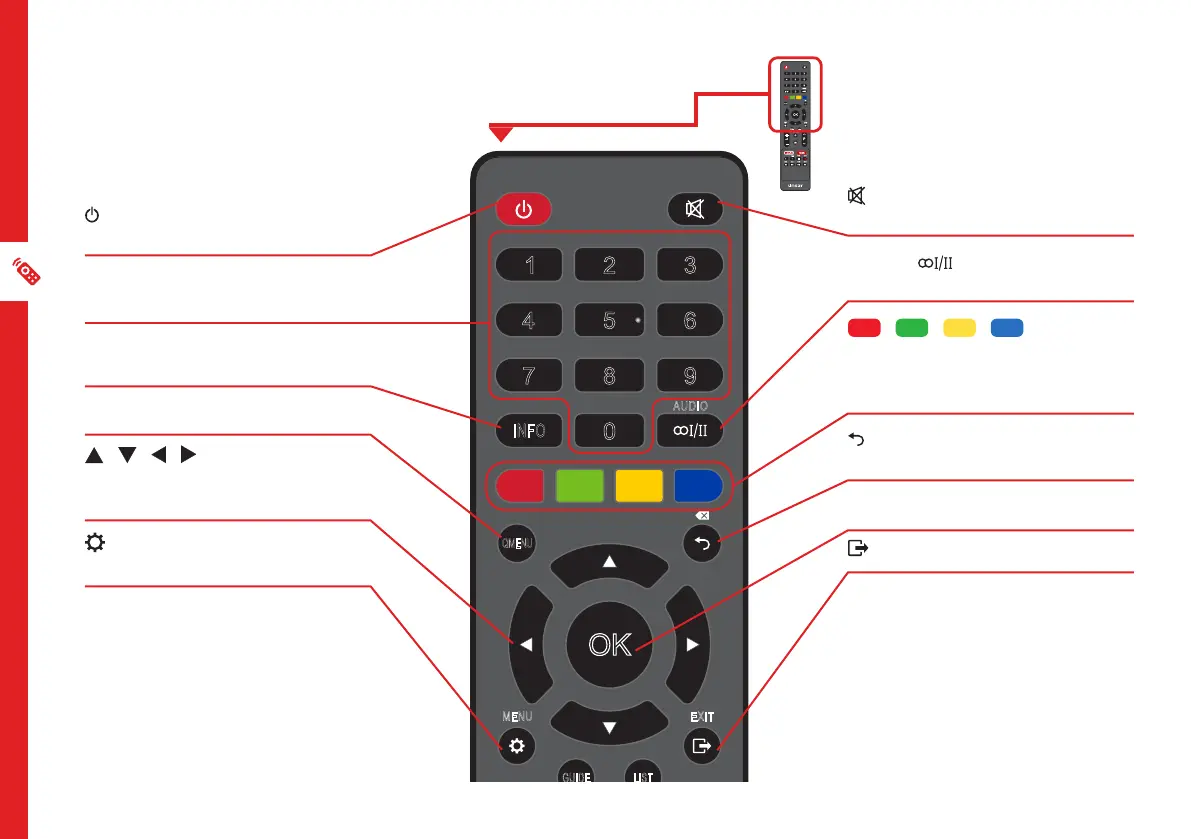
Remote Control
ON: Switch the TV to On or
Standby.
NUMBER BUTTONS: Key in a
TV channel number.
INFO: Display program
information.
QMENU: Enter the Quick Menu.
/ / / : Press the UP/
DOWN/LEFT/RIGHT buttons to
navigate.
(MENU): Enter the main
settings menu.
(MUTE): Mute or restore
sound.
AUDIO : Select an audio
language (if available).
/ / / RED/
GREEN/YELLOW/BLUE:
Functions are according to the
on-screen display.
: Return to the previous screen
or channel.
OK: Confirm your selection.
: Exit/Quit the current screen.



 To Next Page