Running your powered locomotive in the TrainMaster Command
Control environment
TrainMaster Command operations
Y
our Command-equipped powered
locomotive comes factory-programmed
with an ID# of “1.” To operate your powered
locomotive (without the non-powered
locomotive), set PowerMasters to CMD or set
all power supplies on full (no more than
20 volts). Press ENG and 1 on your
CAB-1. Turn the throttle or press any
command button; your powered locomotive
is ready for Command operations.
Address Locomotive #1
PowerMasters set to CMD or traditional
power supplies ON FULL (no more than
20 volts)
Press ENG
Press 1 (the ID#)
Throttle up/press any command
button
Example
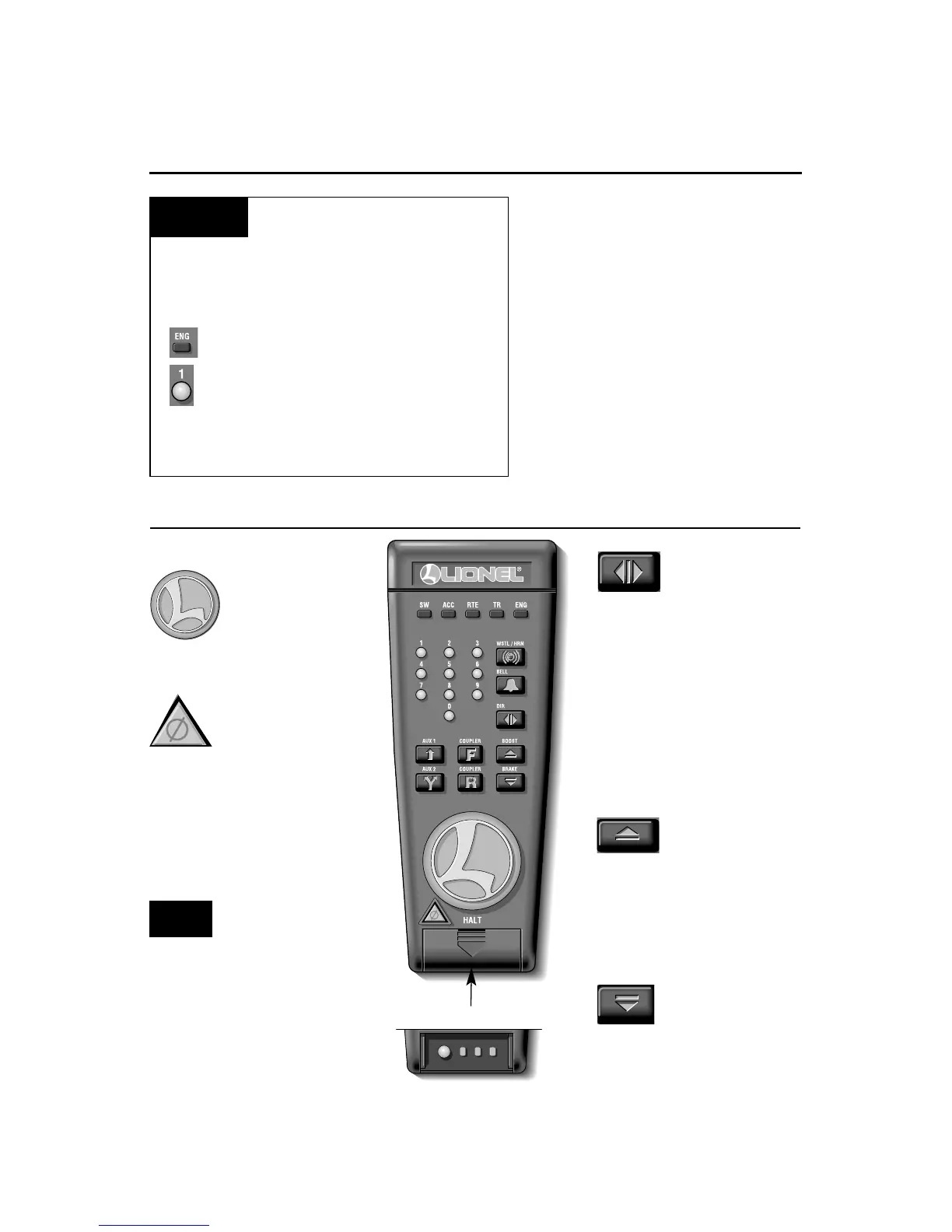
Press HALT to shut down
all PowerMaster
electrical output on
your railroad. Stops all
Command-equipped Lionels in
operation.
Turn the THROTTLE
to the right to
accelerate, left to
decelerate.
CAB-1 commands for your locomotive
Press DIR—the
locomotive
decelerates to a complete
stop; turn the throttle up,
and the locomotive will
accelerate in the new,
opposite direction. There is
no neutral state.
Press and hold
BOOST for extra
power. Release BOOST and
return to the locomotive’s
previous speed.
Press and hold
BRAKE to slow
down or stop. Release
BRAKE and return to the
previous speed.
Use HALT only in
emergency
situations.
Note!










 To Next Page