Rev: 10.20.20 Page 8 CCD-0001526
Callout Description
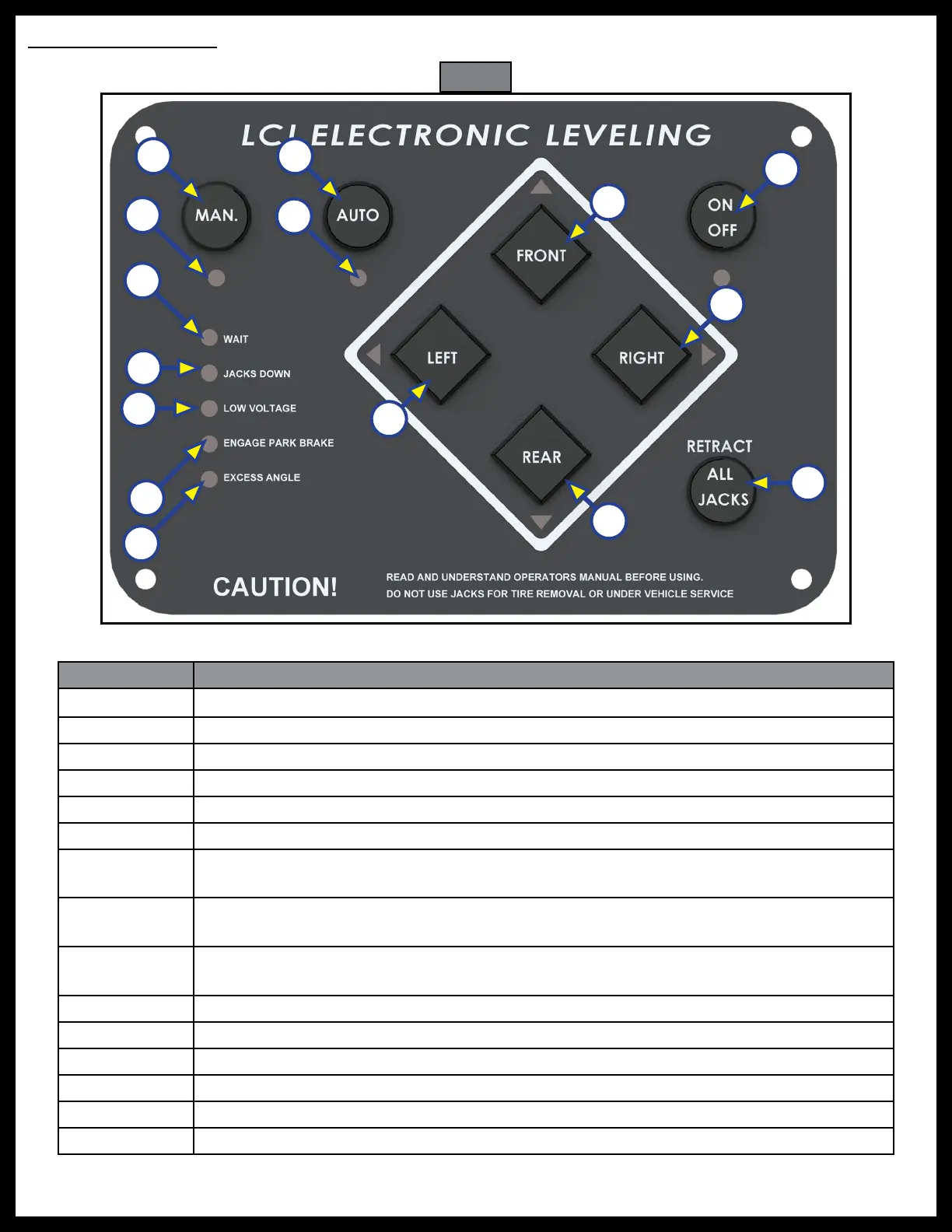
A Manual Operation - Places touchpad in manual operation mode.
B Manual Operation LED - Indicates touchpad in manual operation mode.
C Automatic Operation - Places touchpad in automatic operation mode.
D Automatic Operation LED - Indicates touchpad in automatic operation mode.
E Wait LED - Indicates to the operator to pause operation until the LED turns off.
F Jacks Down LED - Indicates jacks are not fully retracted.
G
Low Voltage LED - Indicates voltage has dropped below safe operable level. Solid
LED indicates voltage is too low to operate system.
H
Engage Park Brake LED - Flashes when park brake is disengaged; off when park brake
has been engaged.
I
Excess Angle LED - Coach may not be able to level in current location and must be
moved to a more level location.
J Front Button - Controls operation of both front jacks.
K Left Button - Controls operation of both left jacks.
L Right Button - Controls operation of both right jacks.
M Rear Button - Controls operation of both rear jacks.
N Power Button - Turns system on and off.
O Retract All Jacks - Retracts all jacks automatically.
O
N
L
J
A C
D
K
F
G
I
H
M
Fig. 10
E
B
Touchpad Operation



 To Next Page