CAMERA
VIDEO CAMERA
MEMORY CARD
BATTERY LIFE
NUMBER OF
FILES
ENG-5
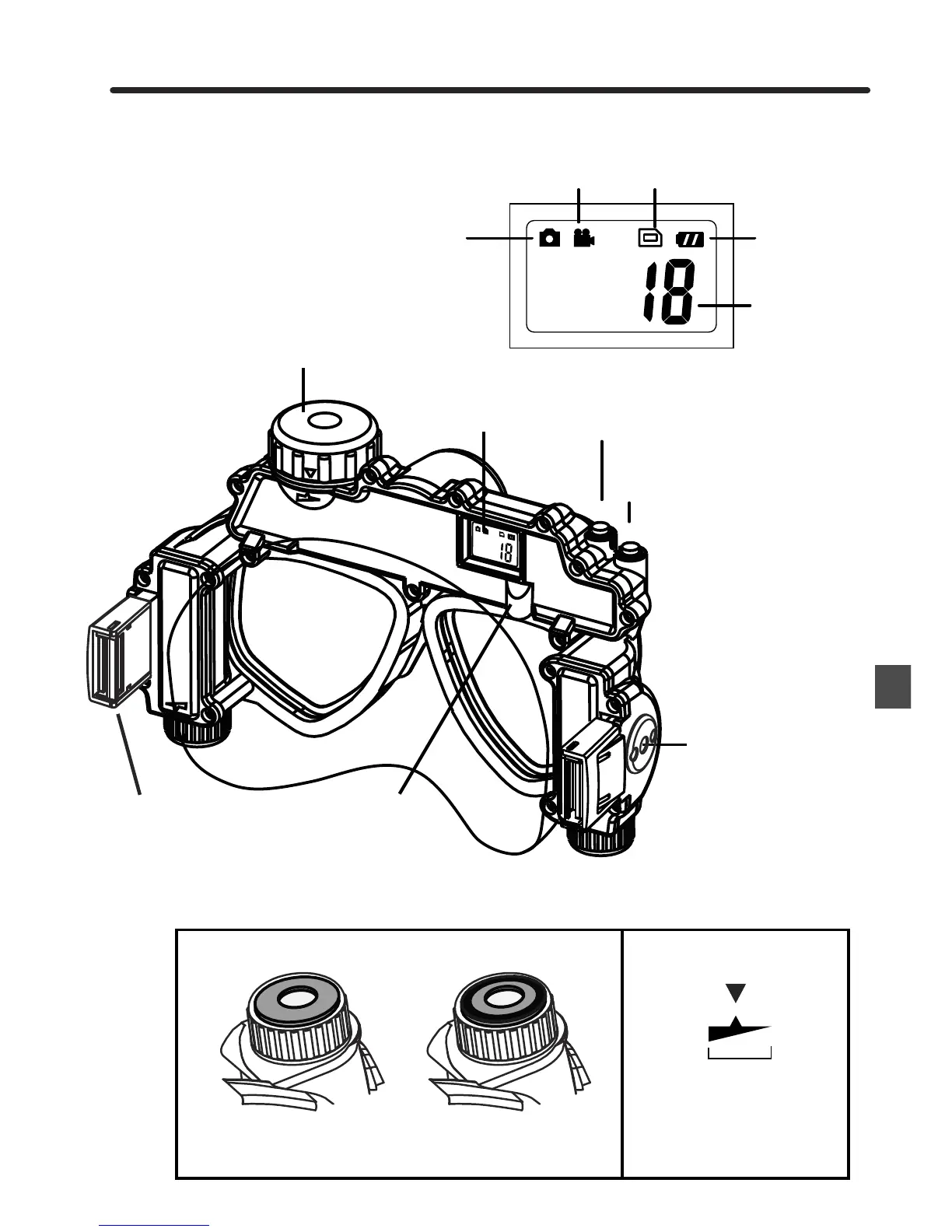
2.3 Part Names - Back View
STRAP
CLIP
MEMORY
COMPARTMENT
LCD DISPLAY
MODE LIGHT
INDICATOR
(red - still image)
(blue - video)
POWER/MODE
BUTTON
SHUTTER/SELECT
BUTTON
ATTACHMENT
CONNECTOR
FOR SIDE
LIGHTS
(SIDE LIGHTS -
NOT INCLUDED)
Make sure to close caps to
within the water proof range.
Do not overtighten caps.
WATER PROOFING CAPS
Not Water Proof Water Proof Water Proof
Rotate cap until you see the black ring show through
the clear caps. This is a visual indication that the cap
is waterproof.


 To Next Page