EasyManua.ls Logo

LNS QL Servo 80 S2 - User Manual

LNS QL Servo 80 S2
143 pages
Print Icon
To Next Page IconTo Next Page
Loading...
For CNC machine tool peripherals,
it’s
LNS
, then all the rest
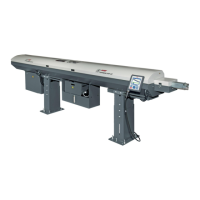
QUICK LOAD SERVO 80 S2 BARFEED
Service Manual
9.020.02.EN.US

Table of Contents

Questions and Answers

Summary

General Information

About This Service Manual

Describes the maintenance and setting procedures for the bar feeder.

Who Is This Manual For?

Identifies the target audience for the service manual, including technicians and engineers.

Other Applicable Documents

Lists documents relevant to integrated components and their compliance.

Damage During Transportation

Outlines LNS's responsibility and procedures for handling transport damage.

Symbols and Warning Labels

Explains warning labels and consequences of non-compliance with safety instructions.

Conventional Terms and Symbols

Defines terms and symbols used throughout the manual for clarity.

Copyright and Liability

Details manual reproduction rights and LNS's liability limitations.

Safety Instructions

Provides essential safety guidelines for operating and maintaining the bar feeder.

Procedures

Setup, Alignment, and Anchor Procedure

Guides on installing and securing the bar feed system for proper operation.

Pusher Changeover Procedure

Details the steps for replacing the pusher assembly on the bar feeder.

Belt Tension Adjustment

Explains how to adjust the belt tension for optimal performance and longevity.

Home Position Proximity Switch SQ5 Adjustment

Covers the adjustment of the home position sensor for accurate referencing.

Diameter Adjustment Motor Proximity Switch SQ4

Details the adjustment for the diameter adjustment motor proximity sensor.

Measuring Cell Adjustment SQ3

Explains the calibration procedure for the measuring cell sensor.

Pusher Reversing Distance

Describes setting the distance for pusher retraction to avoid spindle contact.

Reference Procedure

Outlines the steps to re-establish the system's reference point for positioning.

Calibration of the Loading Table

Details how to calibrate the loading table's centerline for accurate bar feeding.

Locker Adjustment

Explains how to adjust the locker assembly for proper unlocking functionality.

Software and PLC Version Check

Describes how to check the software and PLC versions installed on the unit.

Software Update

Provides step-by-step instructions for updating the machine's software.

PLC Battery Replacement

Details the procedure for replacing the PLC's backup battery.

Mechanical Equipment

Loading Magazine

Describes the function and structure of the loading magazine for bar stock.

Slope of the Magazine Table

Explains how to adjust the magazine table slope for different bar profiles.

Limiters and Variable Bar Loading

Details limiters for bar stock and guidance for loading variable lengths.

Constant Bars and Profiled Bars Loading

Provides instructions for loading constant and profiled bar stock.

Pusher Carrier and Loading Pusher

Describes the carrier for pushers and the function of the loading pusher.

Feeding Pusher

Details the types and operational ranges of the feeding pushers.

Pusher Carrier Layout

Illustrates the components and designations of the pusher carrier.

Feeding Pusher Layout

Shows the components and designations of the feeding pusher.

Tubing

Discusses loading tubing with standard or special pushers.

Retraction

Explains the retraction mechanism and safety switch for system positioning.

Shaft Loading Kit (Option)

Details the optional kit for loading shafts of defined, constant length.

Additional Shaft Loading Pusher (Option)

Describes an optional pusher for loading shafts of different lengths.

V-Extension Kit 120° (Option)

Details an optional kit to extend the guiding length of the bar stock.

Front Protection Cover (Option)

Describes the optional front protection cover for protecting the working gap.

Orientation Kit for Square Stocks (Option)

Details an option for accurately orienting square bar stocks to 90 degrees.

Electrical Equipment

Safety Components

Lists components installed to ensure safe operation of the bar feeder.

Electrical Cabinet

Shows the layout of electrical components within the control cabinet.

Main Power Switch and Circuit Breaker

Explains the function of the main power switch and circuit breaker.

Transformers 230 V and 24 VDC

Describes the function of power transformers T1 and T2 for the bar feed system.

Remote Control

Explains the function and use of the remote control as a primary interface.

Remote Control Display

Describes the liquid crystal display and its icons for operator information.

Remote Control Function Keys

Explains the usage of function keys F1-F4 on the remote control.

Remote Control Direction Keys

Describes the function of the directional and numeric keys for input.

Emergency Stop Button

Details the function and operation of the emergency stop button.

Stop Key

Explains the function of the stop key for interrupting sequences.

Servo Amplifier

Describes the servo amplifier's role in motor control and data saving.

Programmable Logic Controller (PLC)

Explains the PLC's function in processing information and controlling operations.

Accessory Components

Lists components that perform tasks based on control instructions.

Table Lifting Motor

Explains the motor that raises and lowers the loading table.

Servo Motor

Describes the servo motor's function in driving the notched belt.

Finger Adjustment Motor

Details the motor that positions the magazine fingers.

Sensors

Explains how to identify sensors using signaling plates.

Identification Markings - Type of Material

Lists material types with corresponding identification markings.

Connections

Details power supply requirements and lathe interface signals.

Signals from the Lathe to the Barfeed System

Describes input signals from the lathe to the bar feeder's PLC.

Signals from Bar Feeder to Lathe

Describes output signals from the bar feeder to the lathe.

Bar Feed System Emergency Stop

Explains the bar feed system's emergency stop button connections.

Options

Lists optional signals for optimizing production conditions.

Interface Safety Instructions

Summarizes safety guidelines related to the lathe interface.

Settings

Description and Access to Functions

Introduces parameters and guides on accessing setup functions.

Part Setup

Details parameters for defining part characteristics like shape and diameter.

Part Setup Parameters

Explains setting parameters for loading, diameter, and length.

Clamping Device Openings

Explains tracking clamping openings for machining.

Top-Cut Position

Describes setting the bar position outside the clamp.

Pusher Reversing Distance

Details setting the pusher retraction distance after feeding.

Auxiliary End of Bar

Covers optional settings for auxiliary end of bar.

Part Feed Out Length

Explains setting part feed out length after auxiliary EOB.

Application Setup

Guides on selecting and configuring preconfigured applications.

Position; Torque Settings

Explains settings for end of bar, top-cut, and torque.

Miscellaneous Functions

Covers language selection, units, and reference point requests.

Service Parameters

Details service parameters for configuration and interface adaptation.

End of Bar Position

Defines the end of bar position for initiating the loading cycle.

Top-Cut Position

Explains setting the bar position outside the clamp.

Request for Reference Point

Guides on locating the system's origin points for positioning.

Application Setup

Facilitates quick selection of preconfigured applications.

Settings Related to Machined Parts

Covers parameter settings for specific machined parts.

Example 1: Round Bars

Demonstrates parameter setup for round bar stock.

Example 2: Hexagonal Bars

Demonstrates parameter setup for hexagonal bar stock.

Example 3: Square Bars

Demonstrates parameter setup for square bar stock.

Parts Library

Outlines requirements and functions of the LNS Parts Library.

Adding Parts

Details the procedure for adding parts to the library.

Loading and Deleting Parts

Explains how to load and delete part files from the library.

Deleting Parts

Describes the process for removing parts from the library.

Start-Up

Explains the initialization process for the Parts Library.

FTP Parts Library Backup

Guides on backing up the parts library using FTP.

Accessing Files via FTP

Details how to access PLC files using FileZilla.

Maintenance

Inspections

Provides a schedule for routine maintenance checks.

Updating the Program on a PLC

Details the procedure for updating the PLC program.

Technical Characteristics

Disposal

Machine Disposal

Outlines environmentally responsible disposal procedures for the machine.

Troubleshooting

Alarms

Lists detected alarms, their descriptions, input status, and solutions.

Sequence Listing

Illustrates operational sequences and associated alarms.

Mitsubishi Alarm List MRJ-4

Provides a detailed list of Mitsubishi MRJ-4 servo alarms.

Mitsubishi Warning List MRJ-4

Lists Mitsubishi MRJ-4 servo warnings and their causes.

PLC Inputs;Outputs

Details PLC inputs, outputs, and interface signals.

Product Manuals Access

Guides on accessing product information via QR code and Dropbox.

Direct Download for Product Manuals

Provides steps for directly downloading product manuals.

After-Sales Service

Lists contact information for customer and parts service.

Appendices

Glossary

Defines terms used throughout the service manual.

Wiring Diagram 020-40-620 K CE MRJ-4

Electrical wiring diagram for the specific model 020-40-620K CE MRJ-4.

Wiring Diagram 020-40-650 B CE DCS MRJ4

Electrical wiring diagram for the specific model 020-40-650B CE DCS MRJ4.

Order Form

Form for ordering parts or services from LNS.

LNS QL Servo 80 S2 Specifications

General IconGeneral
BrandLNS
ModelQL Servo 80 S2
CategoryIndustrial Equipment
LanguageEnglish

Related product manuals