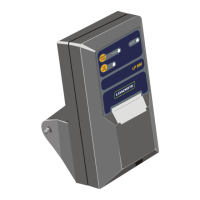
3. PRINTER OPERATION
3.1. PRINTER MODES
Normal Mode
The printer is ready to receive data to be printed. When the printer is printing data, the LED light will be lit green.
Spool Mode
The printer will automatically enter Spool Mode when the paper has run out, the lid is open or if an error has occurred. When
in Spool Mode, the LED light will flash and the printer will receive and store data, but not print it. To exit Spool Mode, press the
Paper Feed button twice.
3.2. PRINTER FEATURES
Paper Feed Button
This button is used to fast-feed the paper out of the printer. It may be used when required during paper loading.
When in Idle Mode, press the Paper Feed button twice to print a demonstration message which include the firmware
version, encoded calibration data and the supported character set.
When in Spool Mode, press the Paper Feed button to print remaining stored data, then enter Idle Mode.
LED Light
The LED light has a number of color combinations to indicate the status of the printer.
3.3. PAPER ROLL REPLACEMENT
The LOADRITE Printer uses standard 57mm wide thermal paper with a maximum roll diameter of 55mm.
To replace the paper roll, complete the following:
1) Slide the Lid Release button until the lid springs open.
2) Unroll a small amount of paper from the roll, then insert the paper roll into the printer with the unrolled portion close to the
serrated metal edge.
3) Close the lid ensuring that the unrolled portion of paper protrudes through the slot by the serrated metal edge. The lid will
click into place.
4) Press the Paper Feed button and check that the paper is straight and feeds properly.
5) Tear off any excess paper by pulling the paper sharply towards the serrated metal edge.



 To Next Page