26
Enter Setting screen
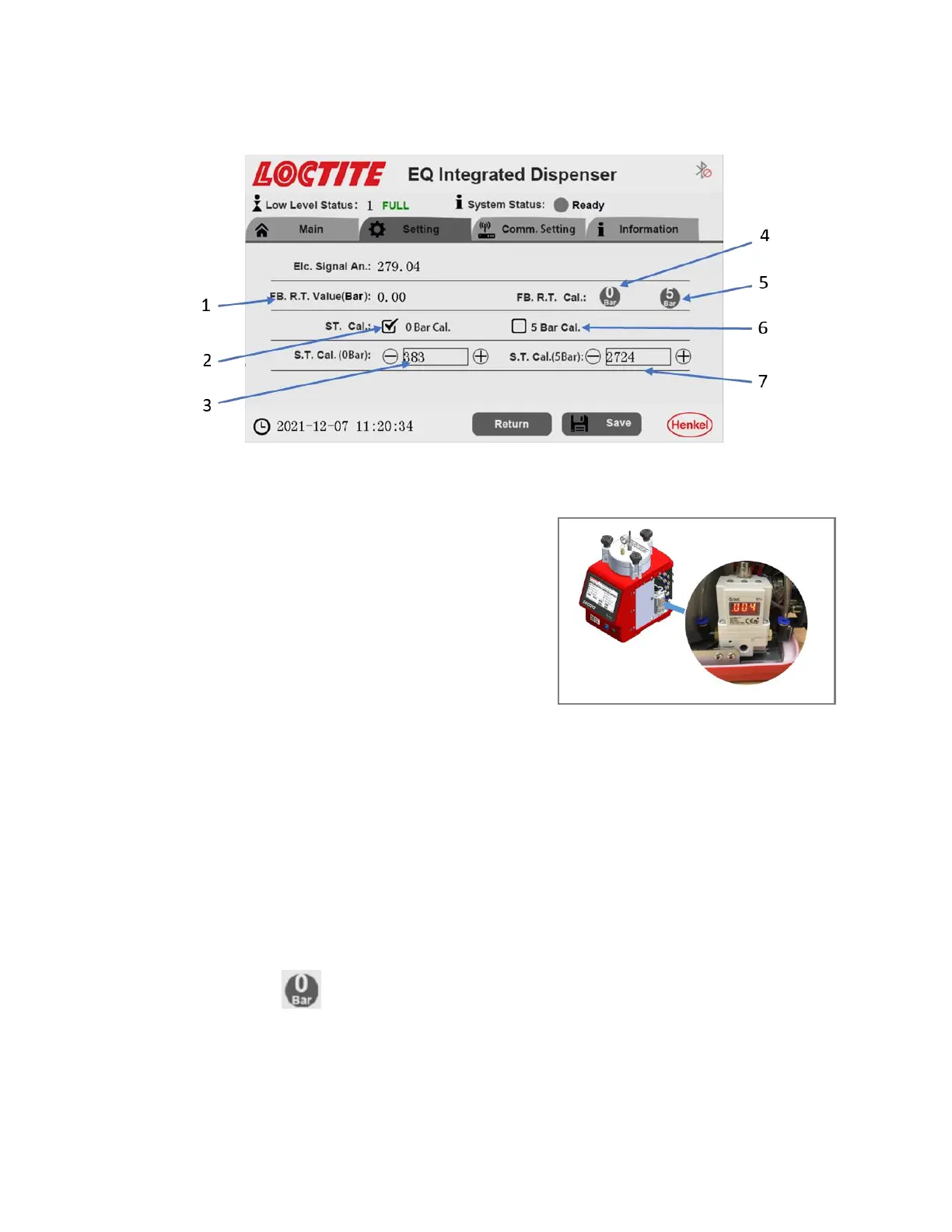
- “Select 0 bar Cal. (2) for ST. Cal. (Set calibration), then check the actual value of
digital regulator (internal parts in the
reservoir, see the right figure).
- Compared the difference between the
actual value of digital regulator and ‘0 bar’,
then click “+”/“-“(3) to increase/decrease
the value until the reading of “actual value
of digital regulator” is “0” bar. For larger
changes, touch the number field (3) and enter a new value directly.
Note that the 0 bar setting is the critical one, there is a range of about 0 – 370 of
the number, where the reading is close to 0(the prop reading always shows a
small increase, it is acceptable that there is some uncertainty of the display
reading of about +/- 0.02bar(0.0002Mpa) considering the accuracy of pressure
regulator.). The correct adjustment is achieved by increasing the number field (3)
until the prop regulator starts to increase from zero point.
- Click the “ ” (4) to record the actual reading as 1st “reference” point.
- “Select 5 bar Cal. (6) for ST. Cal., it will take several 10s for the pressure to
stabilize after setting to 5 bar. then check the actual value of digital regulator.


 To Next Page