16
Loewe bild v | Operating manual 2
deutsch
english
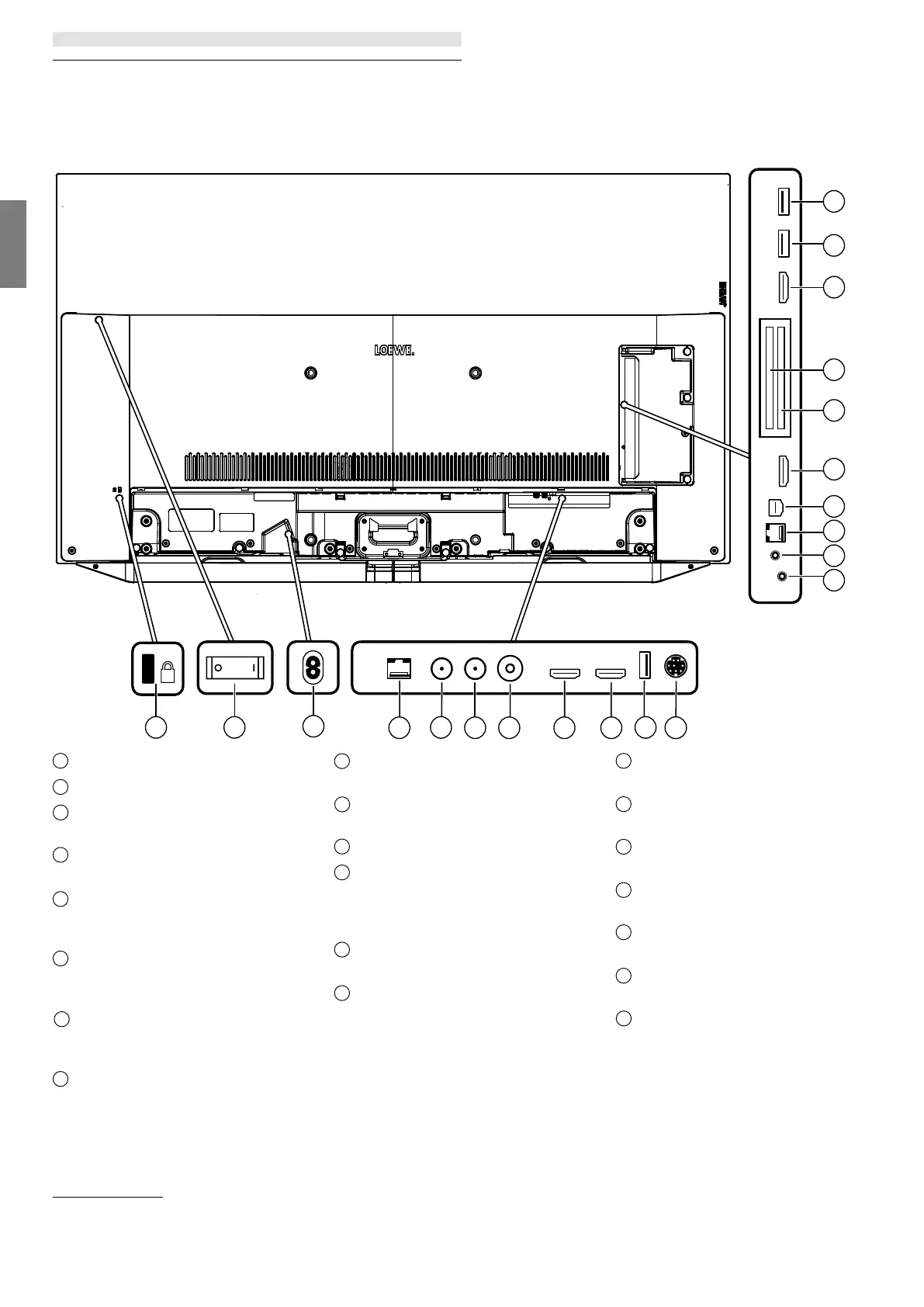
Position and function of the connections
1
Slot for Kensington lock
2
Mains switch
3
AC IN - Mains connection
Mains socket – 220-240 V ~ 50 / 60 Hz
4
LAN - Network connection
RJ-45 – Ethernet / Fast Ethernet
5
ANT SAT 1 - Satellite antenna
(Sat tuner 1) DVB-S/S2
F socket – 75 Ohm / 13/18 V / 500mA
6
ANT SAT 2 -Satellite antenna
(Sat tuner 2) DVB-S/S2
F socket – 75 Ohm / 13/18 V / 500mA
ANT TV - Antenna/cable analogue /
DVB-T / T2 / DVB-C
IEC socket – 75 Ohm / 5 V / 80mA
8
HDMI 1 - HDMI input 1
(1
(with Audio Return Channel)
HDMI – Digital Video IN/Audio IN/OUT
9
HDMI 2 - HDMI input 2
(1
HDMI – Digital Video IN/Audio IN
10
USB 3.0 - USB connection
USB type A – USB 3.0 (max. 2A
(4
)
11
MOTOR UNIT - rotating stand control
12
AUDIO OUT/TOSLINK - Audio output
(analogue/digital)
(3
Jack 3,5 mm (analogue) L/R
Mini Toslink (digital)
13
HEADPHONE - Headphone connection
Jack 3,5 mm – Headphones 32–200 Ohm
RS-232C - Serial interface
(2
– (RJ12)
AV - Center IN
(2
Micro AV socket
16
HDMI 3 - HDMI input 3
(1
HDMI – Digital Video IN/Audio IN
17
COMMON INTERFACE -CI slot 1
(standard V1.4)
18
COMMON INTERFACE -CI slot 2
(standard V1.4)
HDMI 4 - HDMI input 4
(1
HDMI – Digital Video IN/Audio IN
USB 2.0 - USB connection
USB type A – USB 2.0 (max. 2A
(4
)
21
USB 3.0 - USB connection
USB type A – USB 3.0 (max. 2A)
K
1 2
15
19
18
16
17
13
14
20
12
21
3
4
5
7
9
6
10
8
11
Position and function of the connections
(1
Before connecting an external device, please be aware that the individual HDMI ports can work with a range of different signals, see online User handbook, chapter Technical data, section bild (across sets) –
Signals via HDMI/AV (PC IN).
(2
The adaptor is available as an accessory from your dealer.
(3
The analogue or digital output signal at the AUDIO OUT connector cannot be used simultaneously.
(4
The maximum current of 2A is only accessible if one USB port is used. If both USB ports are in use, the maximum current is divided between them.


 To Next Page
 Loading...