92
English
Connecting other equipment – selecting video equipment
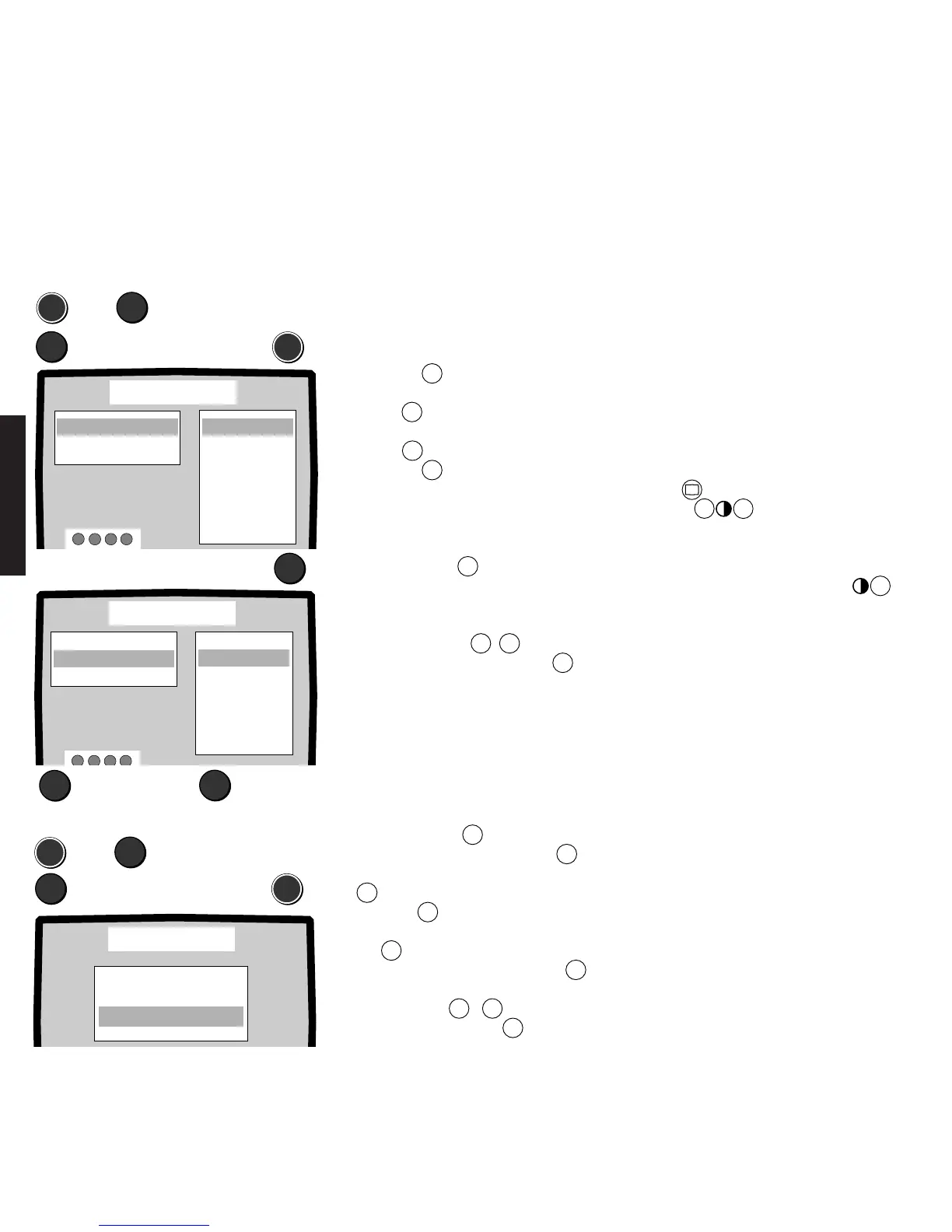
Which audio/video equipment can you connect to the EURO-AV sockets or the
S-Video socket?
Call the „Video - Installation“ menu. You will be given a view of the connectable
equipment or signal types for every video connecting socket.
You can connect up to three audio/video units for the three AV connections.
Selecting socket and signal type:
Call the menu:
1. Press the
MEN
button.
2. Select the „Video“ line with the blue
button
▼
.
3. Select „Installation“ with the yellow
button
▼
.
4. Press the
MEN
button.
If „AV 1“ is marked in blue, you can view
the list of connectable equipment.
5. Select the EURO-AV socket to which you
want to connect an audio/video unit with
the blue button
▼
.
6. Select the signal type, e.g. for SVHS
video recorders signal type Y/C or for
VHS recorders signal type FBAS, with
the yellow button
▼
▲
.
7. Exit the menu by pressing the
TV
button, the settings are then stored.
The additional „S“ means these units have a
Y/C output and transmit the signal in S-
Video. When connecting a Photo CD unit
simply select the signal type „Photo CD S“
to obtain the best picture quality. Select
<Photo CD> with the Picture functions
button . Set <Photo CD on> with the
buttons
–
+
. You can also increase
the sharpness of the picture. We also re-
commend that you select the <S-Contrast>
setting especially for freezes, this is how you
do it: Keep the Contrast button
+
pressed until <S-Contrast> is displayed.
The RGB signal type, i.e. the signals red,
green and blue, can only be selected for the
EURO-AV socket 1 (AV1).
A Pay-TV decoder, e.g. for the Première
program, can be connected to the EURO-AV
socket 1 or 2.
MEN
➪
▼
Select „Video“
▼
Select „Installation“
➪
MEN
Installation
▲
M
▲
AV2: VHS / 8 mm
AVS: VHS / 8 mm
AV1: VHS / 8 mm
SVHS / Hi 8
Photo CD
Photo CD S
Laser Disk
Laser Disk S
Receiver
Receiver S
Decoder
RGB
VHS / 8 mm
or: EURO-AV socket 2, AV 2:
▼
Installation
▲
M
▲
AV1: VHS / 8 mm
AVS: SVHS / Hi 8
AV2: SVHS / Hi 8
VHS / 8 mm
Photo CD
Photo CD S
Laser Disk
Laser Disk S
Receiver
Receiver S
Decoder
SVHS / Hi 8
▼
TV
Setting mono/stereo VTR and AV sound:
MEN
➪
▼
Select „TV setup“
▼
MEN
Volume corr. O
Colour corr. O
Signal Cinch variable
AV Sound Sound 1
VTR Stereo
Special functions
Select „Special functions“
Setting mono or stereo video recorders and selecting sound for 2 Sound
To record the TV sound, select whether a mono or stereo video recorder is connected
and which sound you want to record in the case of 2 Sound broadcasts.
1. Call the „TV setup - Special functions“
menu. Press the
MEN
button.
2. Select the „TV setup“ line with
▼
.
3. Select the „Special functions“ line with
▼
.
4. Press the
MEN
button, select the „VTR“
line and set „Mono“ or „Stereo“ with
the
X
button.
5. Select the „AV sound“ line with
▼
.
6. Set „Sound 1“, „Sound 2“ or „Sound
1+2“ with the
+ –
buttons.
7. End programming with
TV
.
Select signal type End
For Sound 1+2, sound 1 is on the left and
sound 2 on the right cinch socket. Both
sounds are transmitted through the EURO-
AV socket.
It is advisable to set sound 1 (main sound)
or sound 2 (foreign language) for a mono
recorder because both languages will be
recorded simultaneously with sound 1+2.









 To Next Page