97
English
Connecting other equipment – copying
Copying functions
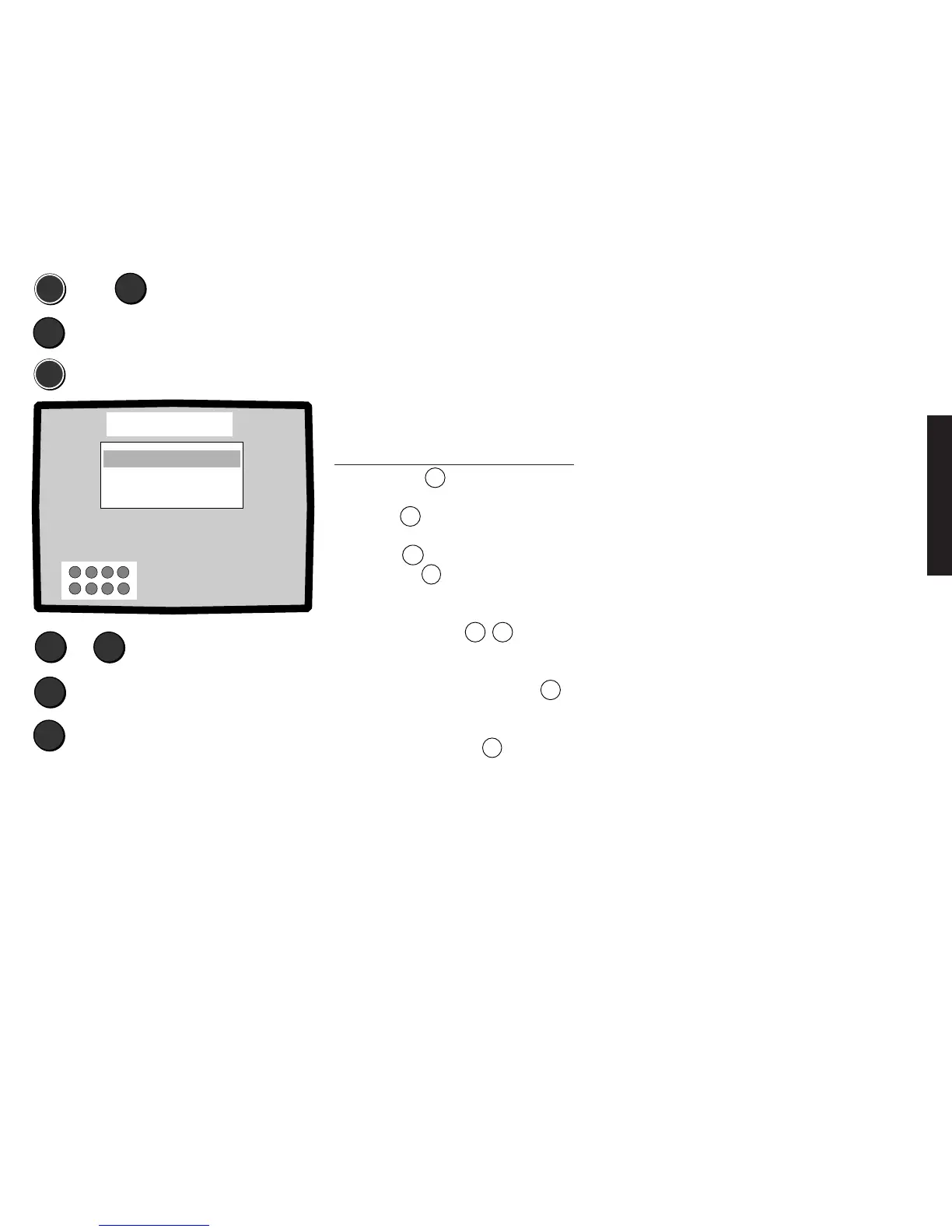
The „Copy functions“ menu allows you to set up the copying direction. This saves you
changing over the plugs on the connected equipment.
For example: Copying from the EURO-AV socket 1 to EURO-AV socket 2 or from the front
socket „S-TERMINAL“/„AVS“ or the cinch socket „Video in“ to AV 1 etc.(AVS not available
in model Profil 2570Z).
Calling the „Copy functions“ menu:
MEN
▼
▼
MEN
▲
▼
X
TV
AV2 -> AV1 off
AVS -> AV1 off
AVS -> AV2 off
AV1 -> AV2 Off
Copy functions
▲
▼
M
X
Select copy direction
Copy On or Off
Exit menu
➪
Select „Video“
Select „Copy functions“
Copying possibilities
VHS recorders and 8 mm camcorders transmit CVBS
signals through the video out socket (EURO-AV or
cinch). SVHS or Hi8 video recorders transmit Y/C
signals or CVBS signals depending on the setting.
The following copying modes are possible depending
on the equipment available:
From EURO-AV socket 1 to 2:
1. SVHS/Hi8 recorder → SVHS/Hi8 recorder (e.g. if
there is no ”S-TERMINAL”/”AVS” front socket!)
2. SVHS/Hi8 recorder → VHS/8mm recorder (signal
is converted)
3. VHS/8mm recorder → VHS/8mm recorder
From EURO-AV socket 2 to 1:
1. VHS/8mm recorder → VHS/8mm recorder
2. SVHS/Hi8 recorder → VHS/8mm recorder (signal
is converted)
The following copying modes are possible from the
front socket (S-TERMINAL/AVS):
1. SVHS/Hi8 recorder → EURO-AV socket 2
→ SVHS/Hi8 recorder
2. SVHS/Hi8 recorder → EURO-AV socket 1
→ VHS/8 mm recorder (signal is converted)
3. VHS/8mm recorder → EURO-AV socket 2
→ VHS/8mm recorder
4. SVHS/Hi8 recorder → EURO-AV socket 1
→ VHS/8mm recorder (signal is converted)
5. VHS/8mm recorder → EURO-AV socket 1
→ VHS/8mm recorder
The following copying modes are possible from the
cinch socket ”Video In”:
1. VHS/8mm recorder → EURO-AV socket 1
→ VHS/8mm recorder
2. VHS/8mm recorder → EURO-AV socket 2
→ VHS/8mm recorder
First set the equipment connected to the
sockets as described on page 92 to
determine whether and how the signal is to
be converted.
Call the „Copying functions“ menu:
1. Press the
MEN
button.
2. Select the „Video“ line with the blue
button
▼
.
3. Select „Copy functions“ with the yellow
button
▼
.
4. Press the
MEN
button.
5. Select the copying direction, e.g. EURO-
AV socket 1 to EURO-AV socket 2 with
the blue buttons
▲
▼
.
6. Switch on the copying direction, e.g.
„AV 1 > AV 2 On“ or off with the setting
„AV 1 > AV 2 Off“ with the
X
button.
You can watch what you are copying as
long as the menu is visible. If you exit the
menu by pressing the
TV
button, copying
continues and you can watch a TV program
of your choice.
Copying to EURO-AV 1 or EURO AV
2 or both sockets is possible from the front
socket AVS.









 To Next Page