13
FM Display Modes
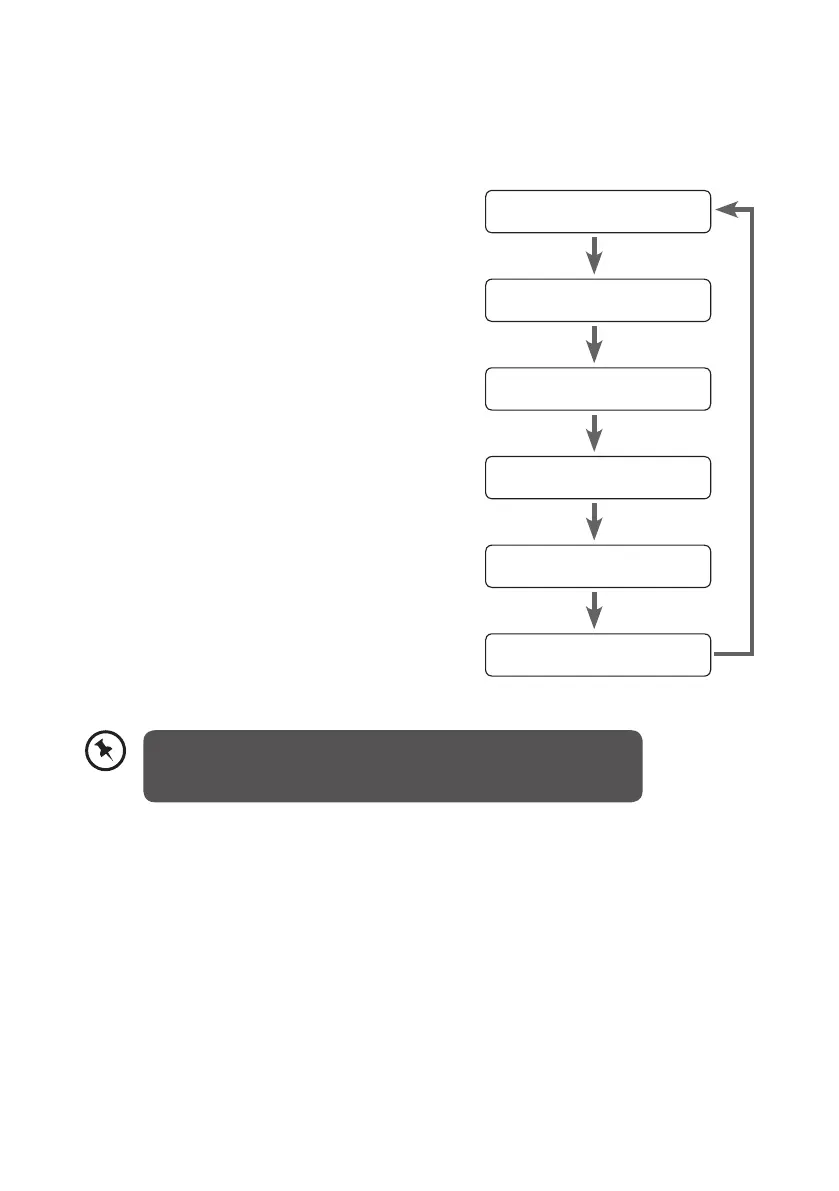
Every time you press the INFO button, the display will cycle through the following display
modes: Programme Type, Signal Strength, Time/Date, Channel Frequency, Audio Mode,
Radio Text.
Programme Type
Signal Strength
Time/Date
Channel Frequency
Audio Mode
Radio Text
Programme Type
This describes the “Style” or “genre” of music that is
being broadcast e.g. “Rock” or “Classical”.
Signal Strength
The slide bar indicates how strong the signal is, the
stronger the signal, the longer the bar will be.
Time/Date
The broadcaster (Radio station) provides clock and
date information automatically so there’s no need
to manually set this information. In the unlikely
event that the broadcaster does not transmit any
clock information; the display will show <Time/
Date>.
Channel Frequency
This shows the frequency of the current station e.g.
89.80MHz.
Audio Mode
When in FM mode, the display will show if the
station being received is in mono or stereo. The
receiver will automatically switch between Stereo
and Mono mode. You can however override this
function, so that you can manually switch between
Stereo and Mono mode, which is helpful if you’re
listening to a poor FM signal.
Radio Text
As with DAB, the broadcaster can include a
scrolling text that displays information about the
current program. If Radio text information is not
available, then the display with show <Radio
Text>.
To switch between mono and stereo, press the SELECT button
once, you will see on the display “Auto” or “Mono”. To toggle
between each mode just press the SELECT button again.
L22DAB10_IB_final110826_adaptor change.indd 13 26/08/2011 10:24 AM


 To Next Page