14
Software Version
1. Press and hold the INFO button for 2 seconds and then release it to view the software
version of this unit.
2. Press the INFO button again to display the Program Identication code (PI code).
3. The software version will automatically disappear after 5 seconds.
System Reset
There may be times when you need to reset your unit back to the factory settings. If you
experience reception problems you may want to reset and try again. If you move the unit
to another part of the country and pick up the local and national stations in that area, your
previously tuned channels may no longer be available.
To do the system reset, press and hold the DAB/FM button. Then press the SELECT button to
start the system reset. The unit will then start the Quick Scan for DAB channels immediately.
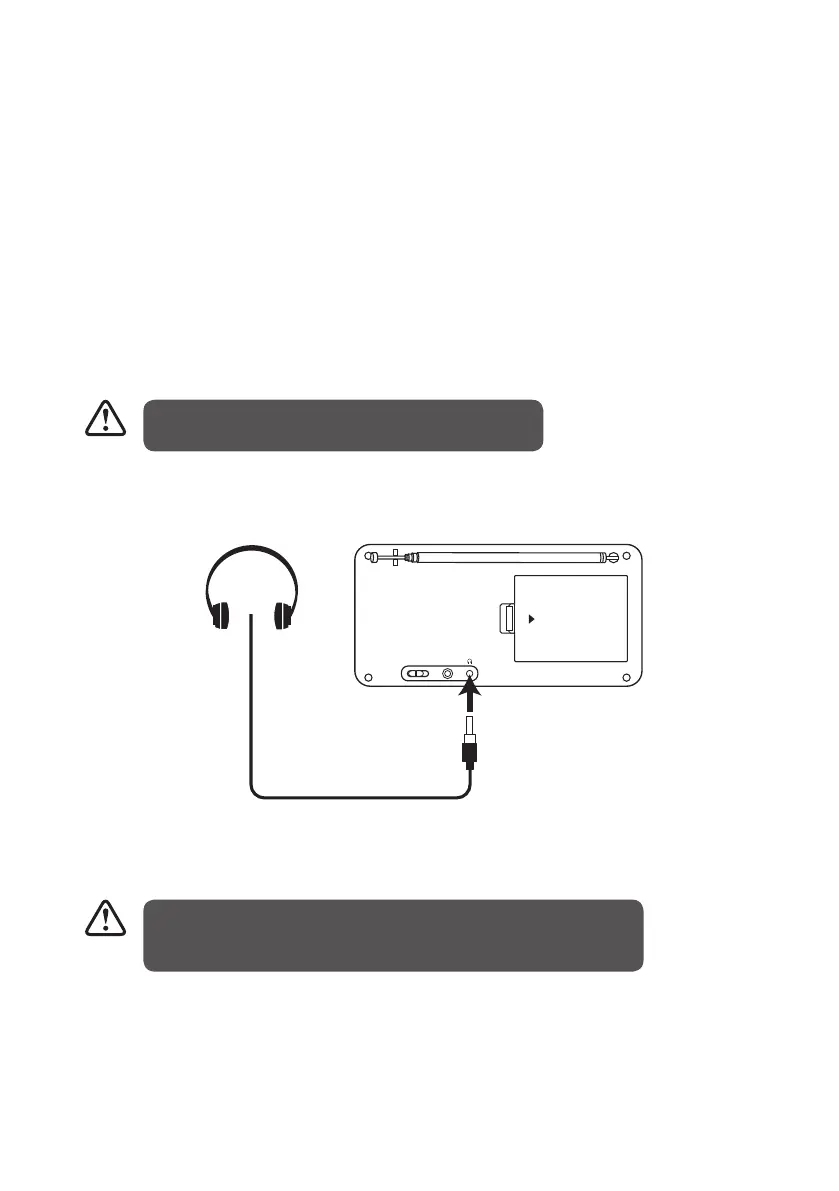
Using Earphones
OPEN
OFF ON
DC 6V IN
Turn down the volume before connecting the earphones. Slowly raise the volume with the
earphones on until you reach your desired volume. When earphones are connected, the
speaker is automatically disabled.
After the system reset, all the tuned stations, DAB &
FM preset stations and alarm settings will be erased.
Avoid listening to sound at excessive levels which could be harmful
to your ears. The prolonged listening at full volume can damage the
ears of the user.
L22DAB10_IB_final110826_adaptor change.indd 14 26/08/2011 10:24 AM


 To Next Page