Logosol Multifunctional Servo Drive LS-231SE
Doc # 712231004 / Rev. A, 05/05/2011
Logosol, Inc. • 1155 Tasman Drive • Sunnyvale, CA 94089 Tel: (408) 744-0974 • www.logosolinc.com
21
LOGOSOL LS-231SE QUICK START GUIDE
LDCN mode
1. Set DIP-switches 5 and 6 depending on the motor type.
2. Connect power supply to LS-231SE.
3. Connect your motor, encoder, hall sensors, and any other I/O you may have.
4. Connect RS-232 adapter and RJ-45 network cable between LS-231SE and your host computer.
Software installation
1. Insert Logosol Distributed Control Network Utility installation disk into the floppy drive.
2. Select RUN from the Windows 95/98/2000/NT/XP Start Menu.
3. Type a:\dcnsetup and then click OK (a: represents the drive letter).
4. The installation wizard will guide you through the setup process.
Initial Connection to the Host
1. Turn on the power supply.
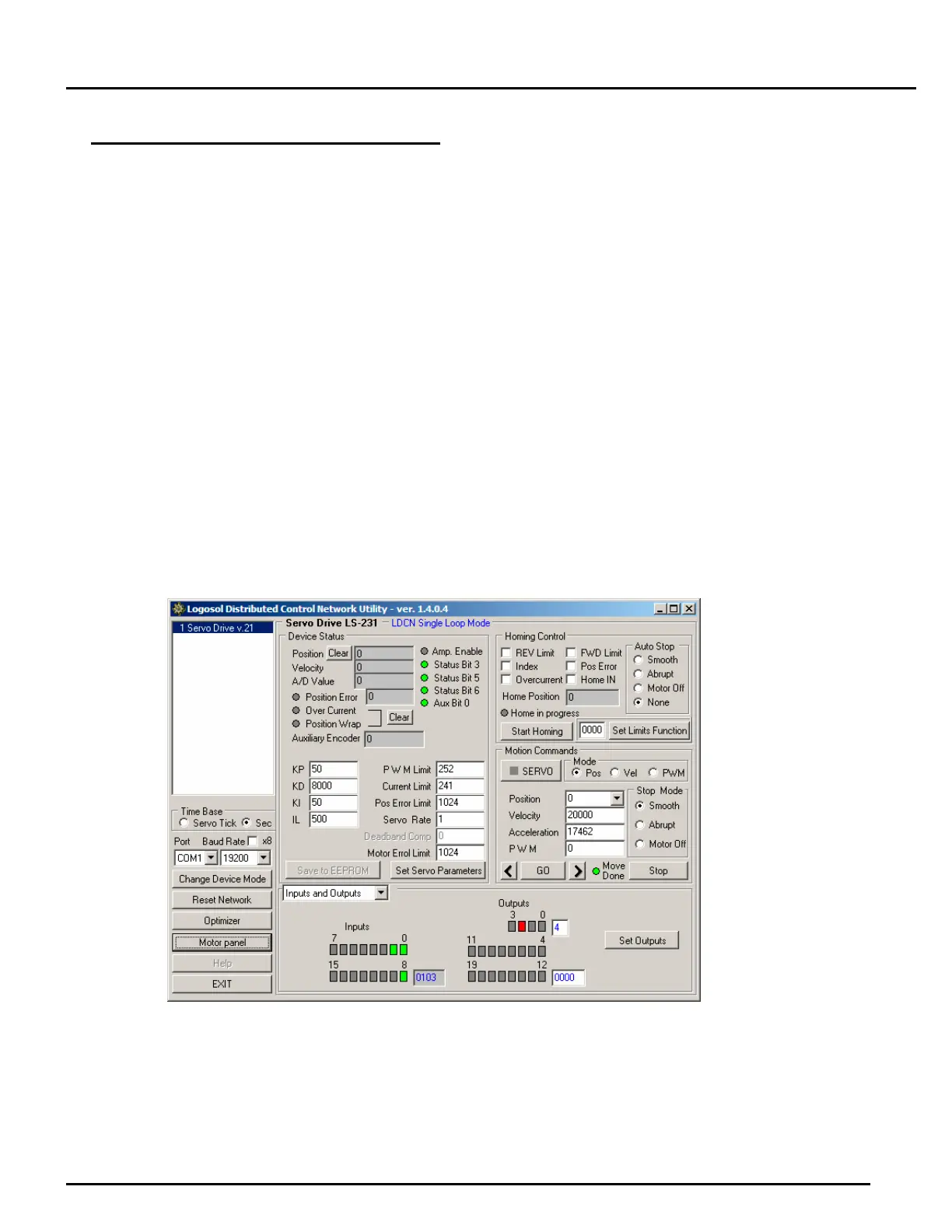
2. Run the Logosol Distributed Control Network Utility.
3. Choose the proper COM port.
4. Click Reset network button.
5. If the motor is not initialized complete Motor Initialization procedure.
6. Click SERVO button.
7. Click GO button. The motor should rotate slowly in positive direction. Click Stop to interrupt the
motion. More information about using LDCN utility is available in LDCN Help.


 To Next Page