Logosol Multifunctional Servo Drive LS-231SE
Doc # 712231004 / Rev. A, 05/05/2011
Logosol, Inc. • 1155 Tasman Drive • Sunnyvale, CA 94089 Tel: (408) 744-0974 • www.logosolinc.com
23
Motor Tuning – all modes
Setting Current loop parameters
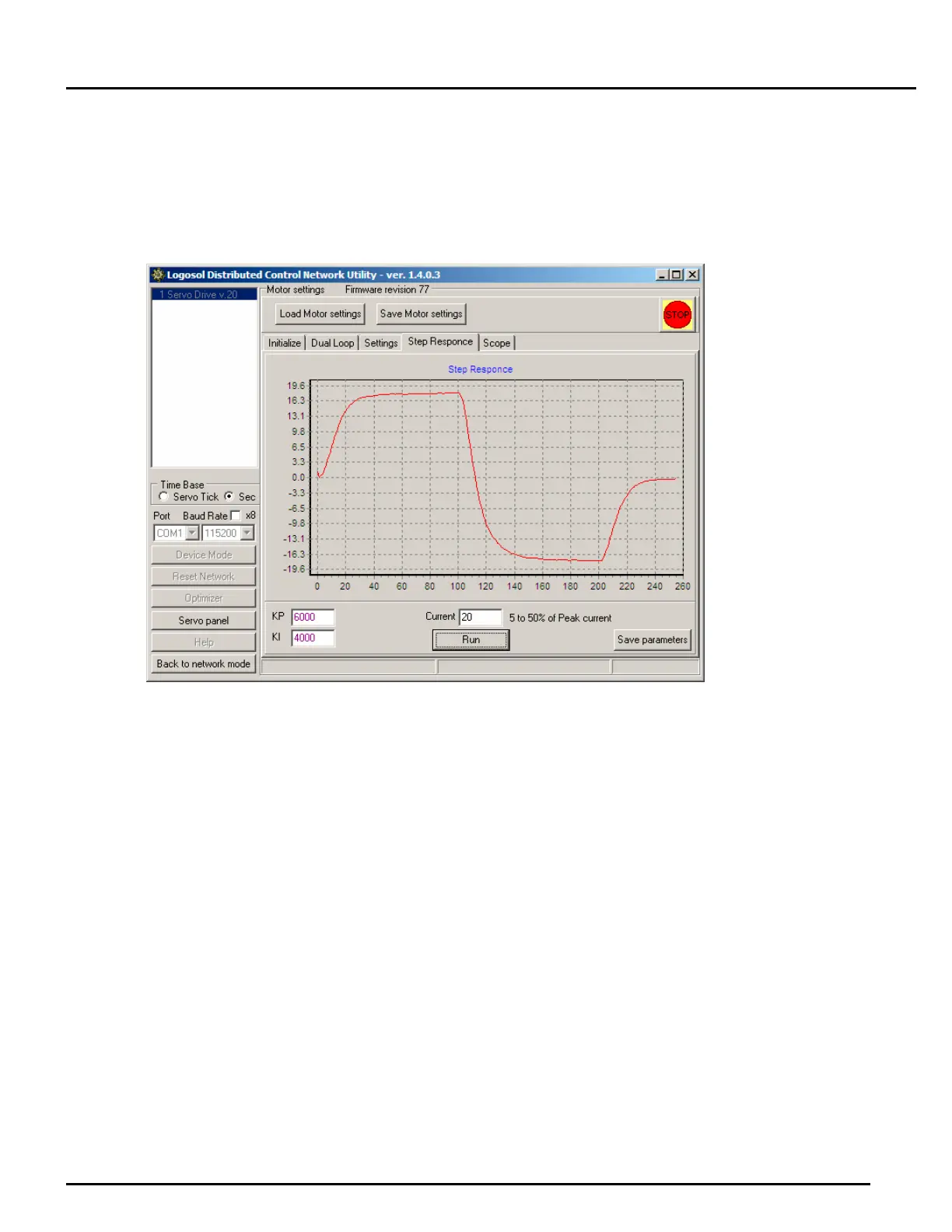
In some applications using “current loop” mode will improve the drive performance. Check Current
loop ON box and click Set button to activate this mode. To set KP and KI values select Step
Response window. Try to get the current chart as close as it is possible to square wave with
minimum overshooting and oscillation.
Setting the drive in dual servo loop mode
The drive should be initialized in single servo loop mode before setting it to dual loop mode.
1. Turn off the power supply.
2. Connect the master encoder and the dual loop master encoder interface module LS-2311
accordingly to one of the sample applications described earlier.
3. Turn on the power supply and run LDCN Utility.
4. While still in single loop mode, run the motor and make sure the auxiliary encoder position on the
screen changes.
5. Click Motor Panel button.
6. Calculate the ratio between the master encoder and the motor encoder and set the value in Set
To edit box. If the directions of the two encoders do not match, type in a negative value. To make
sure the ratio is correct, click Reset Positions button and using the Jog buttons on the screen,
move the motor. The utility calculates the ratio and displays its value on the screen. This value
should be approximately the same as the calculated ratio.
7. Select Master Encoder in the Position Feedback radio group and click Set button.
Note: The dual loop mode is available only in LDCN mode and in the standard Analog Input mode.
Switching between these two modes does not change the single/dual loop mode. However, setting
the drive in any other mode sets the drive in single loop mode.


 To Next Page