Appendix B
System Status
Main Menu
1
2
3
Games
Manual Mode
System Status
Main Menu
1
2
3
Games
Manual Mode
4
5
System Setup
Voice Mode OFF
4
5
System Setup
Voice Mode ON
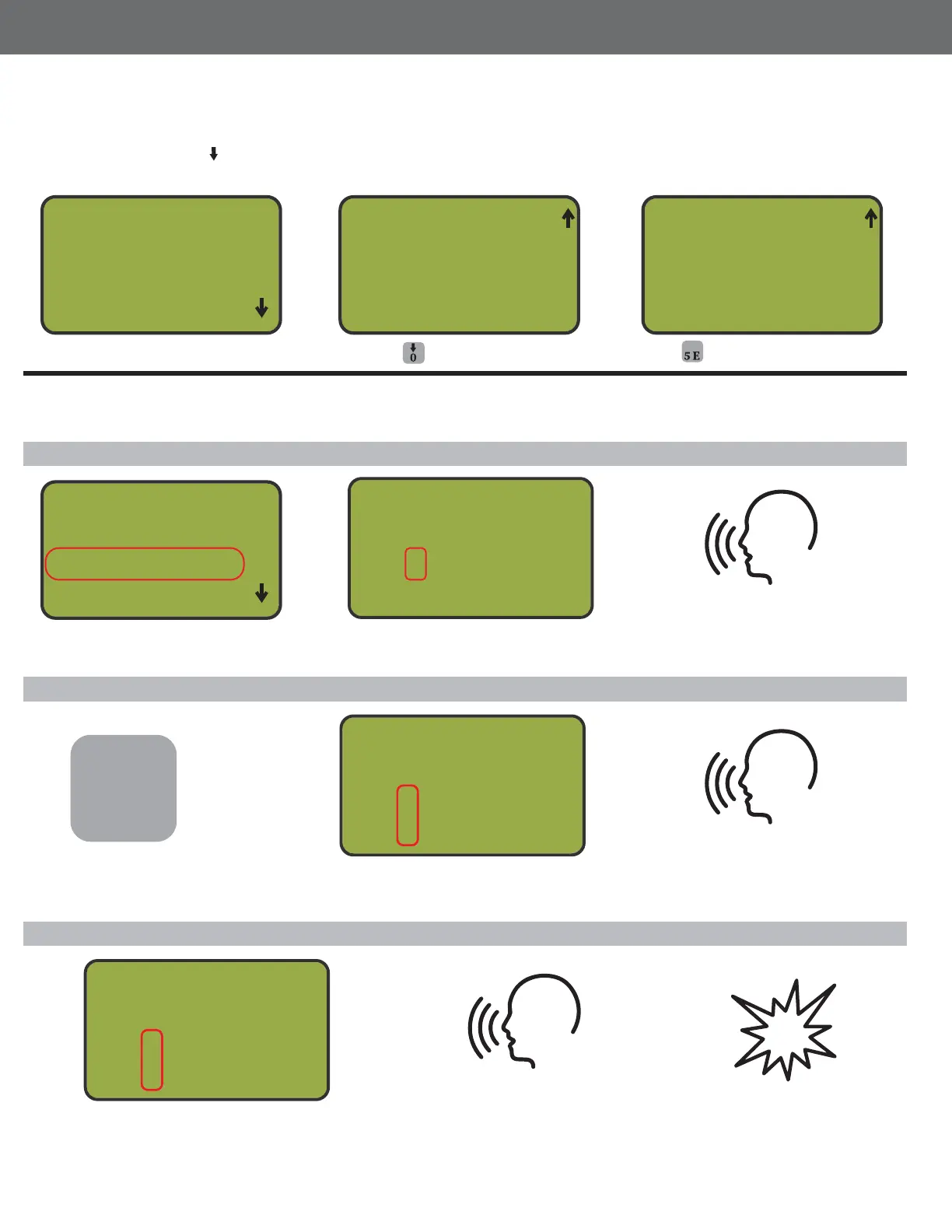
Turn Voice Mode On
Manual Mode Operation
Single Target
True Pair
Turn power on. Press /0 to navigate to lower menu. Press 5 to toggle Voice Mode off and on.
Fire singles, true pairs and report pairs
Select option 2 for Manual Mode Press trap number to arm
controller.
In Manual Mode, press the
True Pair button.
Request the target with microphone
and the selected trap will fire
Request the target with
microphone and the first
trap will fire
Request the target with microphone
and the selected trap will fire
Power on MT4300
Press to advance menu
Press to turn Voice Mode ON
Manual Mode V
1st 2
2nd _
Choose Trap #
Press the first and second trap
numbers to arm the controller
Manual Mode
1st 1
2nd 2
Choose Trap #
Report Pair
The second trap will fire on
the report of your gun
In Manual Mode, press the first and second
trap numbers to arm the controller
*Note: The first target will fire on the voice
command and the second on the report.
Manual Mode
1st 1
2nd 2
Choose Trap #
V
V
40



 To Next Page