9 10
If the actual volume is known in advance, enter the calibration interface and
input the actual volume directly.
Disp Vol 2.02mL
Disp T. 60.5"
:
:
Disp T. 60.5
Act Vol 2.020 mL
:
:
"
Act Vol :
Flow 2.043mL/min:
Pause T. :"1.0
Pause Time :
"1.1
Flowrate
Dispensing
Test T. 0.5 ’
Cal Vol 132.3 L
:
:μ
Test T.
Cal Vol 132.3 L
:
:μ
30"
2.02 mL
1.System Setting
2.Control Mode
3.Disp Setting
4.Calibration
1.System Setting
2.Control Mode
3.Disp Setting
4.Calibration
1.System Setting
2.Control Mode
3.Disp Setting
4.Calibration
Flow 2.043mL/min:
Pause T. :"1.0
Flow 2.043mL/min:
Pause T. :"1.0
Test T. 0.5 ’
Cal Vol 132.3 L
:
:μ
Test T. 0.5 ’
Cal Vol 132.3 L
:
:μ
Test T.
Cal Vol 133.0 L
:
:μ
30"
1.System Setting
2.Control Mode
3.Disp Setting
4.Calibration
Flowrate
Dispensing
Test T. 0.5 ’
Cal Vol 132.3 L
:
: μ
Test T. 0.5 ’
Cal Vol 132.3 L
:
: μ
:Act Vol
133.0 Lμ
Flowrate
Dispensing
Disp T. 60.5
Act Vol 2.040 mL
:
:
"
1.System Setting
2.Control Mode
3.Disp Setting
4.Calibration
Flowrate
Dispensing
Disp Vol 2.02mL
Disp T. 60.5"
:
:
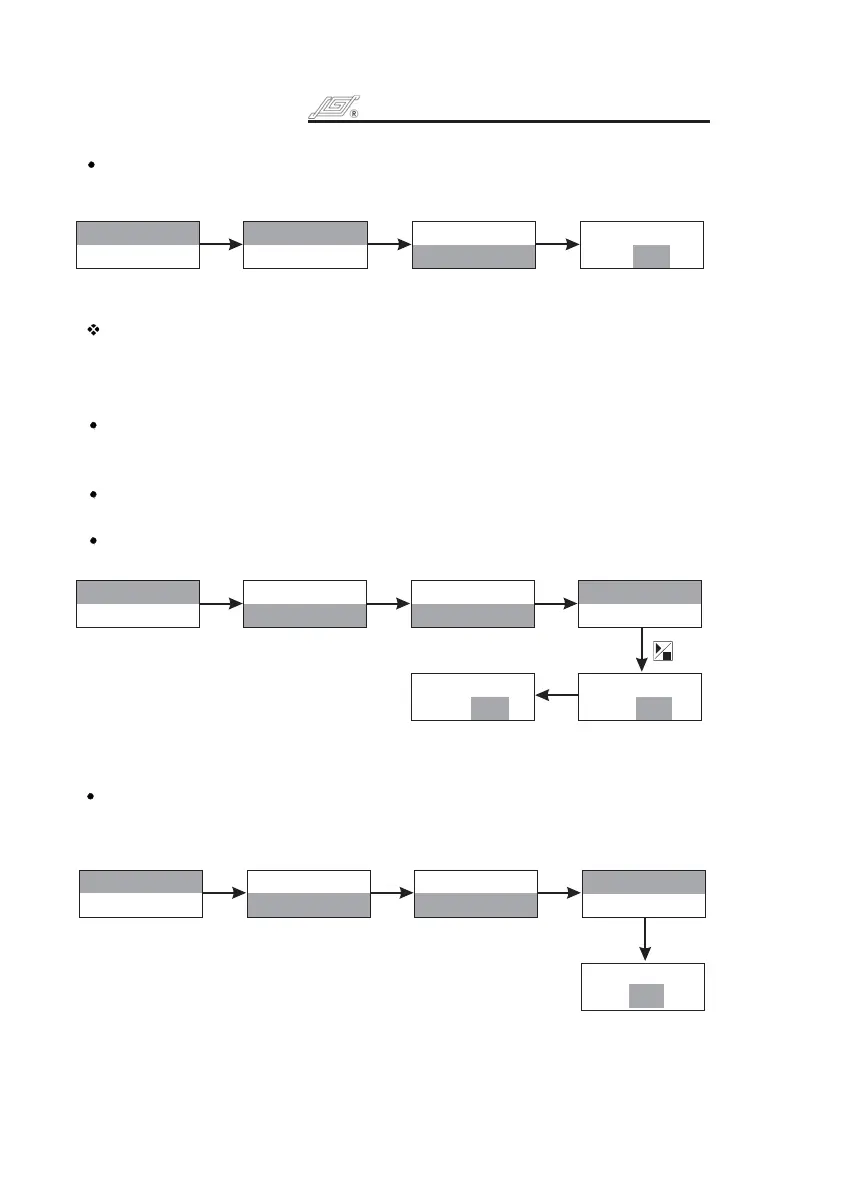
Flow Rate: Adjusting the dispensing flow rate can change the dispensing time.
Press and turn to highlight dispensing flow rate line. Press to enter
next interface, turn to select suitable flow rate. Press to confirm or
press to cancel the selection and return to previous menu.
Knob Knob
Knob Knob
Exit Key
Press
Knob
Pause Time: Time Interval between every dispense process.
Press and turn to highlight pause time line. Press to enter next
interface. Turn to select pause time. Press to confirm or press
to cancel the selection and return to previous menu.
Knob Knob
Knob Knob Exit
Key
Calibration
Pump should be calibrated when flow rate or dispense volume is beyond the
tolerance. Flow rate and dispensing volume can be calibrated separately in
different application.
Flow Rate Calibration
Press and turn to highlight calibration line. Press to enter next
interface. Turn to select Flowrate. Press to highlight test time line.
Press again to highlight the value of time. Turn to select test time
(its range is from 0.5 to 30 minutes). Press to confirm or press
to cancel the selection and return to previous menu.
Press Start/Stop Key, the LCD displays running time and actual volume.
Running time counts down.
Turn to input actual tested volume. Press to confirm. The
calibration operation can be repeated.
Knob Knob
Knob Knob
Knob Knob
Knob Exit Key
Knob Knob
Turn Knob to input
Actual Volume
If the actual volume is known in advance, enter the calibration interface and
input the actual volume directly.
Turn to input
Actual Volume
Knob
Dispensing Volume Calibration
The parameters can not be changed under dispensing volume calibration
operation. The defaulted parameters are the parameters set under Dispensing
Setting.
Pump stops under dispense mode, press and turn to highlight calibration
line. Press to enter next interface. Turn to select Dispensing. Press
to enter next interface.
Press Key, the LCD displays running time and actual volume.
Running time counts down.
Turn to input actual tested volume. Press to confirm.
Knob
Knob
Start/Stop
Knob Knob
Knob
Knob
Turn to input
actual volume
Knob
Turn to input
actual volume
Knob
BT100-1F OPERATING MANUAL
BT100-1F OPERATING MANUAL


 To Next Page