EasyManua.ls Logo

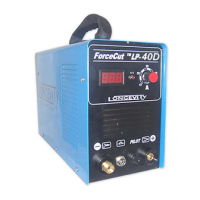
Longevity Forcecut 40D - User Manual

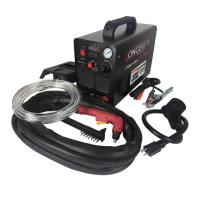
Longevity Forcecut 40D
34 pages
Print Icon
To Next Page IconTo Next Page
Loading...
Operating Manual
for
ForceCut 40i/50i
Constant Arc Pilot Arc
Plasma Cutters

Questions and Answers

  • V
    vjamesSep 23, 2025
    What does it mean when the O.C. Over Current LED lights up on my Longevity Welding System?
    • R
      Robert BentleySep 23, 2025
      The unit has reached its duty cycle. Leave the power of the machine on and allow the fans to cool it, or turn the machine off to cool it properly. Do not continue to weld until the light is off.
  • T
    torresdanielAug 23, 2025
    Why is the cut quality poor with my Longevity Welding System?
    • M
      Melissa ThompsonAug 23, 2025
      If you're experiencing poor cut quality with your Longevity Welding System, first check the air pressure. Make sure your unit can cut the material thickness you're using. Inspect the consumables to ensure they produce a stable arc. Replace the consumables and ensure you have the correct PSI at the regulator.
  • G
    Gloria ReevesAug 25, 2025
    How to reduce heavy underside slag (cutting) with Longevity Welding System?
    • E
      Evan BrooksAug 26, 2025
      If you're getting heavy underside slag when cutting with your Longevity Welding System, try increasing the travel speed or the amperage on the unit.
  • J
    jessica58Aug 26, 2025
    Why is the arc inconsistent on my Longevity Welding System?
    • M
      Marisa HallAug 26, 2025
      To fix an inconsistent arc with your Longevity Welding System, check and replace the consumables, and adjust the regulator to the proper PSI. This issue can arise from improper grounding or low air pressure.
  • T
    Theresa SmithAug 27, 2025
    What to do if the plasma cutter pilot does not ignite on Longevity Welding System?
    • R
      Rhonda MaldonadoAug 27, 2025
      If the plasma cutter pilot doesn't ignite on your Longevity Welding System, check the consumables to ensure they are very tight. Consider replacing the tips. Ensure compressed air is flowing to the unit and try dropping the PSI pressure.
  • K
    Kelly ClarkSep 16, 2025
    How to prevent consumables (tips) from being consumed too quickly on Longevity Welding System?
    • E
      eric33Sep 16, 2025
      Rapid consumption of consumables can be due to improper air flow. Increase the PSI on the regulator, check for leaks in the hose, and maintain a distance of 1/8” from the torch tip to the workpiece.
  • R
    Richard CarsonSep 13, 2025
    What to do if Longevity Welding System runs but nothing is happening?
    • N
      nicholsscottSep 13, 2025
      Check if the air regulator is set to the correct pressure. Make sure the regulator adjustment knob is turned clockwise to allow pressure. Then, check the consumables and make sure they are properly assembled. Verify the ground clamp is properly grounded to the unit and check the pilot arc wire to ensure it is properly connected to the unit.
  • R
    Robert CastilloSep 14, 2025
    Why does my Longevity Welding System have an inconsistent arc?
    • M
      Michael FordSep 14, 2025
      An inconsistent arc can be caused by improper grounding or a lack of air pressure. Check and replace consumables, and adjust the regulator to the proper PSI.
  • I
    ibellSep 5, 2025
    What to do if plasma cutter pilot does not ignite on Longevity Forcecut 40D Welding System?
    • P
      Paul MartinezSep 5, 2025
      If your Longevity Welding System's plasma cutter pilot does not ignite, ensure the consumables are very tight and replace the tips if necessary. Also, verify that compressed air is flowing to the unit and try dropping the PSI pressure.
  • C
    Christopher LopezSep 3, 2025
    How to improve cut quality on Longevity Welding System?
    • R
      Rebekah ZunigaSep 3, 2025
      To troubleshoot poor cut quality with your Longevity Welding System: * Check the air pressure. * Ensure your unit can handle the material thickness. * Check the consumables to ensure they produce a stable arc. * Replace consumables and ensure you have the correct PSI at the regulator.

Summary

Warranty and Shipping

Customer Service and Support

General Safety Warnings

Operational Hazards and Precautions

Covers warnings related to function modes, electric shock, smoke, arc light, and welding splash.

Machine Fault Handling

Provides guidance on troubleshooting machine faults by referring to the manual or contacting support.

Operational Safety Tips

Technical Specifications and Ratings

Installation and Setup

220 Volt Wiring Guide

Details on connecting the plasma cutter to a 220V power source, emphasizing safety and proper wiring.

Ground Wire Identification

Hot Wire Identification

110 Volt Wiring Introduction

Neutral Wire Identification

Pictured Installation Guide

Main Unit Controls and Indicators

Plasma Torch Assembly Instructions

Basic Plasma Cutting Operation

Cutting Techniques Explained

Plasma Cutting Best Practices

Pre-Operation Checklist

Advanced Plasma Cutting Tips

Amperage and Metal Cutting Strategies

Using Cutting Guides Effectively

Routine Machine Maintenance

Plasma Cutter Troubleshooting Guide

Longevity Forcecut 40D Specifications

General IconGeneral
Plasma Gas TypeCompressed Air
Input Voltage110/220V
Output Current40A
Duty Cycle60% @ 40A
Maximum Cutting Thickness12mm
Dimensions15 x 6 x 12 inches

Related product manuals