5.5.3 Display current values
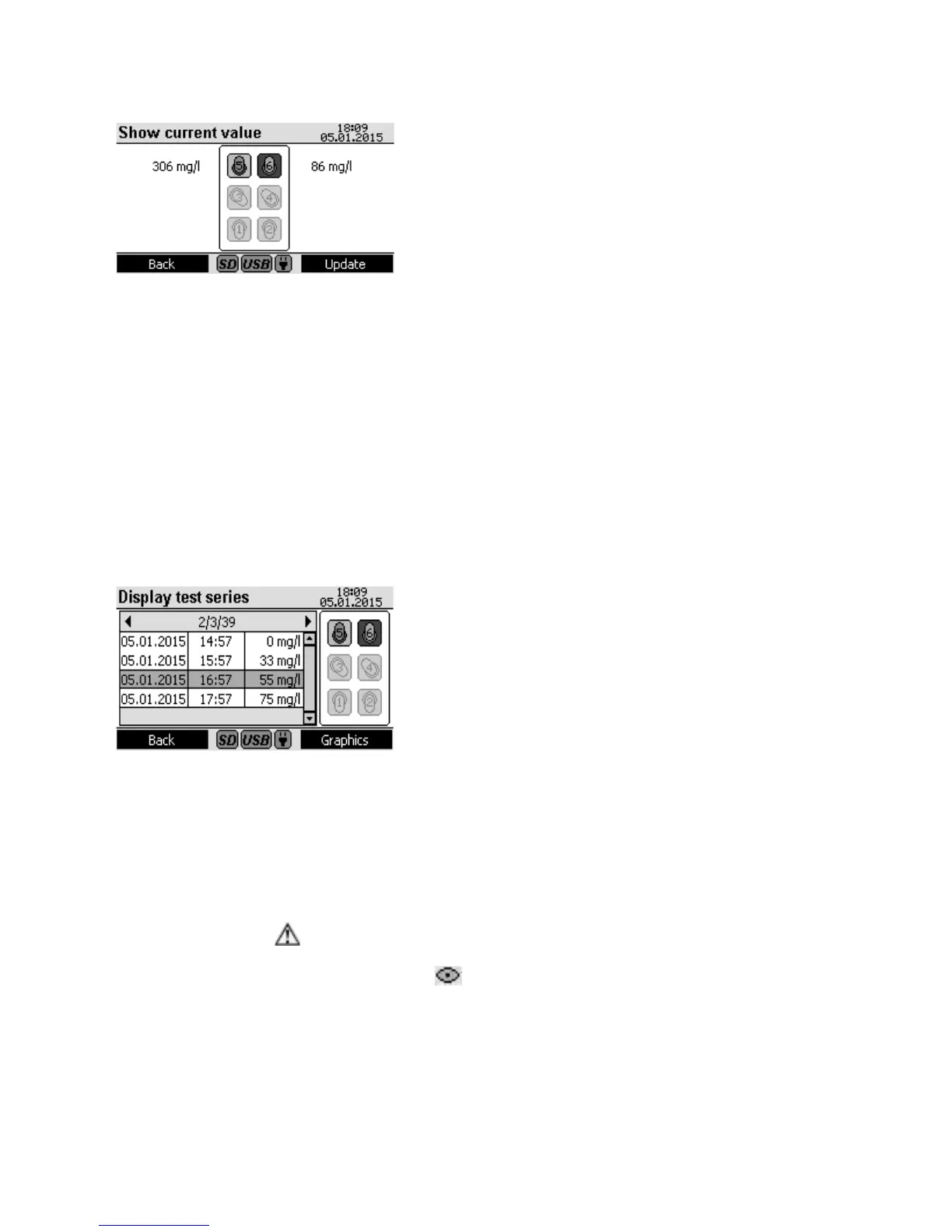
All six measurement positions are displayed with a symbol.
The corresponding current value is displayed next to them.
If no head is present, the symbol is completely grey and no
current value is displayed (Figure 7, Measurement positions
1 to 4).
If a head is recognised with a completed series of measure-
ments, the symbol is shown as normal and the last measure-
ment value is displayed (Figure 7, Measurement position 5).
If the symbol has a black background, it means that the
measurement series is not finished yet (Figure 7, Measure-
ment position 6).
The current value for each measurement position is deter-
mined by opening the menu. In order to update all measurements, press function key F2 (update).
Alternatively, the head keys can be used to update a specific measurement position.
Press function key F1 (back) to return to the main menu.
5.5.4 Display measurement values
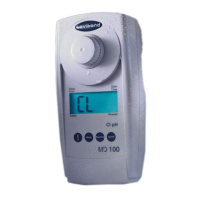
A schematic diagram of all measurement positions is shown to the right in the screen. The grey sym-
bols in Figure 6 for the measurement positions 1 to 4 indicate that no head was found there by the
device.
Recognised heads are represented by the symbol for measu-
rement position 5 as shown in Figure 8. In this example, the
selected head is in measurement position 8 and its measure-
ments are displayed in the left window.
A different measurement position can be selected with the
head keys.
You can switch through the list of measurements with the
up ▲ and down ▼ arrow keys.
The information x/y/z, shown in the figure as ‚2/3/39‘ as an
example, can be read in the corresponding header as fol-
lows:
x: Selected measurement in the measurement series; the
second measurement in this case
y: Number of measurements already performed in the measurement series; three measurements have
already been performed in the example
z: Number of total measurements to be performed for this measurement series; 39 in this case
If the warning symbol
appears here, the measurement series has been ended, although not all
measurements have been performed. This can occur for new heads for which a measurement series
has not been conducted yet. The eye symbol indicates that no usable measurement value was
recorded for at least one measurement.
Figure 7
Figure 8


 To Next Page