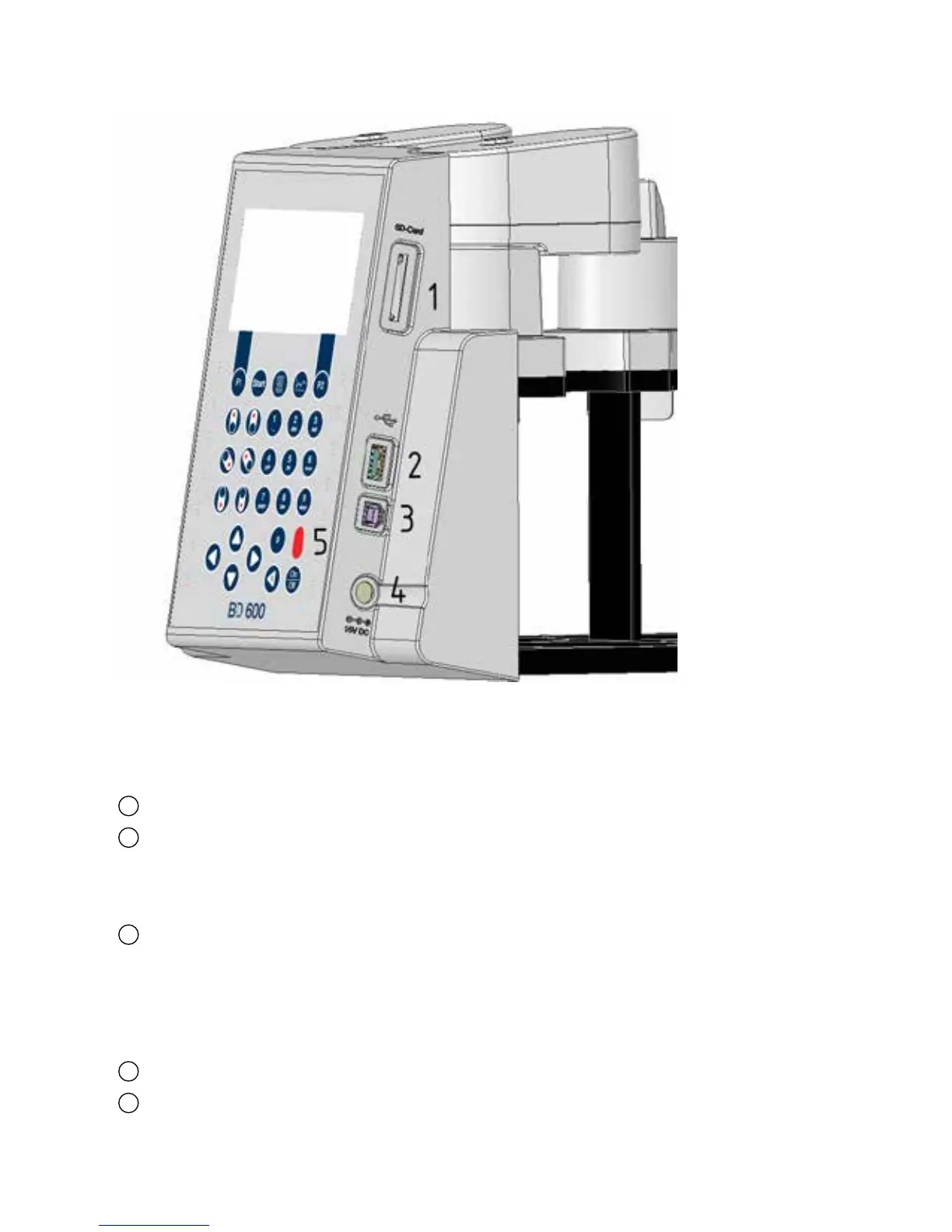
5.7 Interfaces
1
SD card holder
2
USB host interface
NOTE! The USB host interface is only intended for USB sticks. USB hubs, external hard disks, and
adapter sticks (e.g. USB SD card adapters) are not supported. Battery operation entails the limitation
that the host interface can only provide 200 mA.
3
USB device interface
The USB device interface is located under the USB host interface on the side of the front section of
the housing. It makes it possible to access data saved on the SD card with a PC.
For this purpose, connect the device to a PC via the appropriate USB cable. The device must be swit-
ched on. If necessary, deactivate the auto-off option. If there is an SD card in the card holder, the
device appears as mass storage on the PC.
4
Connection jack for the mains adapter
5
Window for the IR receiver for the remote control
Figure 18


 To Next Page