20
LOWRANCE
789
456
0
OFF
ON
MAP NAV STEER SONAR
MAN
OVERBOARD
EVENT
MARKER
ZOOM OUT
ZOOM IN
MENU
CENTER
CURSOR
WAYPT
WAYPT/ROUTE
LIGHT
20002000
20002000
2000
CLR
ENT
123
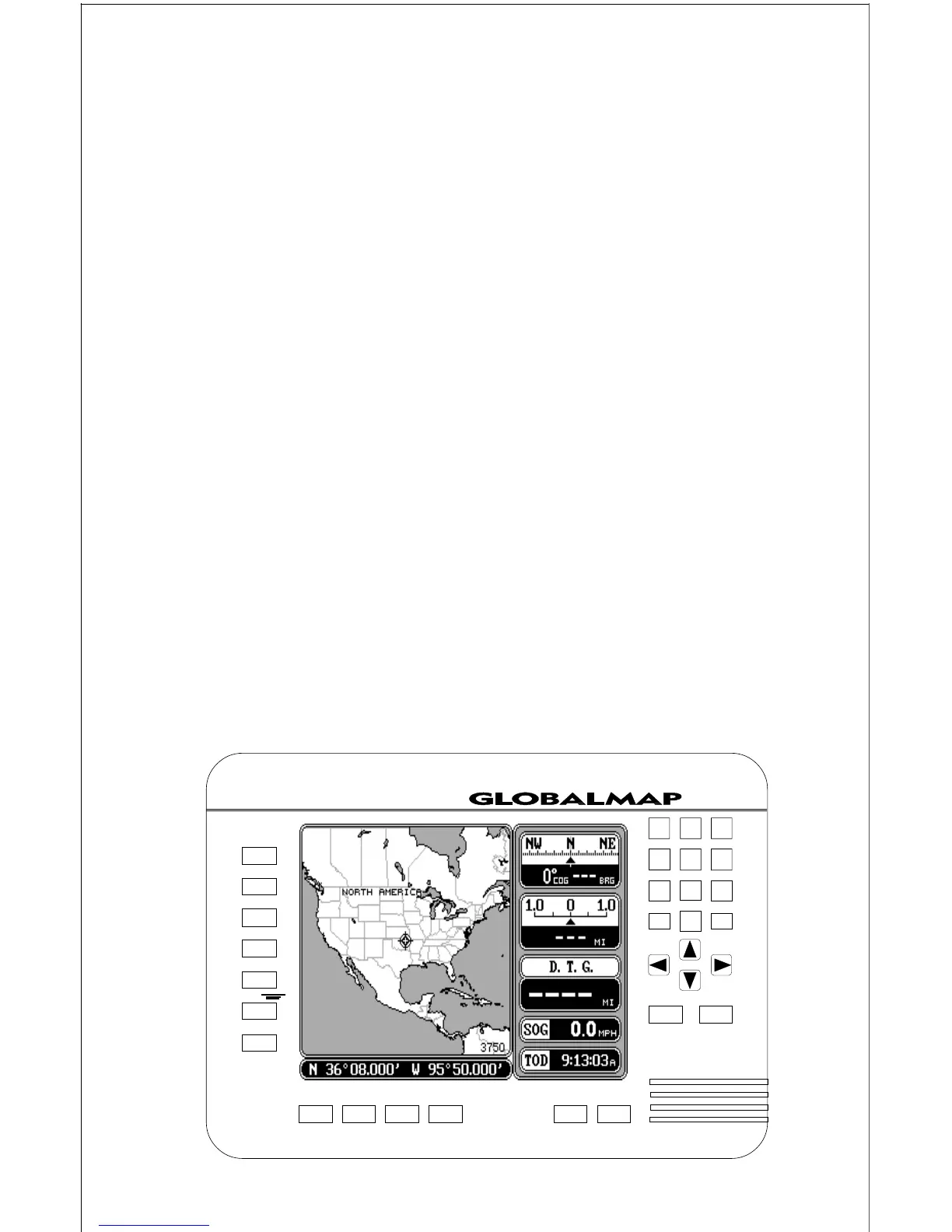
STEER - Press this key to show the Steering Screen.
SONAR - This key switches the unit to the sonar displays.
ZOOM IN - Expand the map to see more detail by pressing this key.
ZOOM OUT - To see a wider area of the map, press this key.
CENTER - Centers the map around your present position.
CURSOR - Pressing this key activates the moveable cursor lines.
WAYPT/ROUTE - This key lets you save or recall a waypoint or route.
WAYPOINT QUICK SAVE - Pressing this key instantly saves your
position.
EVENT MARKER - To mark a location on the plotter screen, use this key.
MAN OVERBOARD - Pressing this key instantly saves your present
position and switches the unit into a mode that shows navigation data to
the last saved position.
ARROW KEYS - These keys are used to make menu selections and to
move the cursor lines on the screen.












 To Next Page