
 Need help?
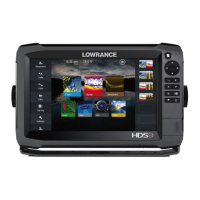
Do you have a question about the Lowrance HDS Gen3 and is the answer not in the manual?
Manual disclaimer, owner responsibility, and product/company trademarks.
Lists Navico products that the manual may refer to.
Details regulatory statements, manual assumptions, and version.
Explains how to operate the HDS Gen3 using keys and touchscreen.
Identifies and describes the functions of the front panel buttons.
Details the layout and function of the Home page.
Explains how applications are presented in panels and split pages.
Accessing and using the quick system settings dialog.
Instructions for turning the unit on, off, and entering standby mode.
Adjusting screen brightness and locking the touchscreen.
Guidance on navigating menus, dialogs, and using the cursor.
Explains the elements and symbology displayed on the chart panel.
Information on available chart data, sources, and showing dual chart types.
How to orient the chart and display vessel position.
Instructions for measuring distances and creating navigation routes.
Details of the Steer panel and its data fields.
Procedures for navigating to cursor positions or predefined routes.
Setup and operation of trolling and outboard motor autopilots.
Explains the Sonar image, its components, and basic interpretation.
How to adjust range, frequency, sensitivity, and other sonar settings.
Details on StructureScan images, zooming, and setup options.
Covers surface clarity, noise rejection, and image flipping.
Connecting to wireless networks and using GoFree features.
Explains the Radar panel, modes, range, and image adjustment.
Basic touchscreen gestures and their functions.
Covers preventive maintenance, calibration, and data backup.
 General
| Touchscreen | Yes |
|---|---|
| Waterproof | IPX7 |
| Ethernet Ports | 1 |
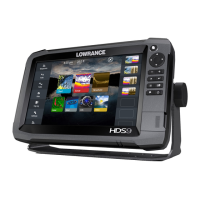
| Display Size | 7, 9, 12 inches |
| Sonar | CHIRP, StructureScan HD |
| GPS | Yes, built-in |
| Networking | Ethernet, NMEA 2000 |
| Frequency | 50/83/200 kHz |
| Power Output | 500W RMS |
| Operating Voltage | 12V DC |
| Card Slots | Yes, microSD |
| Operating Temperature | -15°C to +55°C (5°F to 131°F) |
| Dimensions | Varies by model |
| Weight | Varies by model |
| Display Resolution | 800 x 480 pixels |
| Storage Temperature | -20°C to +60°C |




 To Next Page
