RUN STOP/RST
FWD
REV
min max
Easy Start Guide
7. How to operate the Inverter
Page 8
This guide has been produced by The Inverter Drive Supermarket Ltd.
All content, including but not limited to graphics, text and procedures copyright The Inverter
Drive Supermarket and must not be reproduced or altered without prior written permission.
©
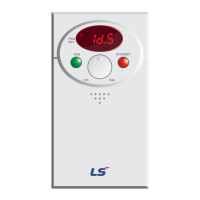
7.1 Use the dial to set the required speed.
Turn the dial clockwise to increase speed and anti-
clockwise to decrease speed.
The display will change to show the current speed
frequency reference in Hz.
7.2 Press the green “Run” button to start the motor.
The green “Run” button will start the motor. The motor will
accelerate to the speed set by the dial (see step 1 above) in
the time defined by the “ACC” parameter found in the
“Drive” parameter group.
Motor speed can be changed whilst the motor is running by
turning the dial clockwise (faster) or anti-clockwise (slower).
When the motor is running, the “FWD” light will be
displayed.
7.3 Press the red “Stop/Rst” button to stop the motor.
The red “Stop/Rst” button will stop the motor.
The time taken (in seconds) to stop the motor is determined
by the “dEC” parameter which can be found in the “Drive”
parameter group.
LS Industrial Systems SV-iC5
RUN STOP/RST
FWD
REV
min max
RUN STOP/RST
FWD
REV
min max


 To Next Page
 Loading...