EasyManua.ls Logo

LSC Minim - MINIM Front Panel Layout and Controls

LSC Minim
31 pages
Print Icon
To Next Page IconTo Next Page
To Previous Page IconTo Previous Page
Loading...
Front Panel Layout MINIM Operator Manual V1.0
Page 6 of 27 LSC Lighting Systems (Aust) Pty. Ltd.
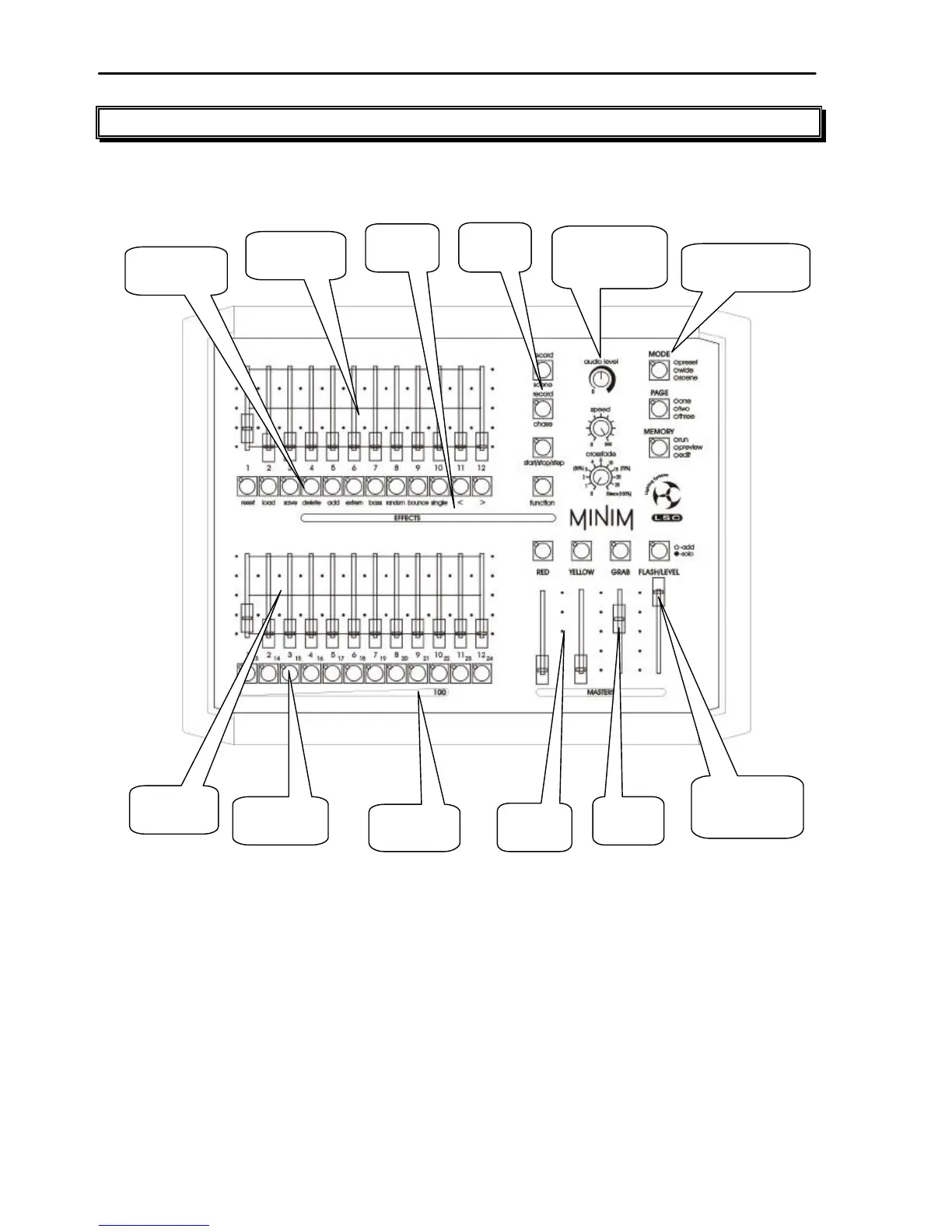
3.0 FRONT PANEL LAYOUT
Mode, Page and
Memory buttons
and Crossfade
Rotary faders
Record
Buttons
Yellow Bank
Faders
Yellow Bank
F/A buttons
Preset
Masters
Edit Value
Scale
Red Bank
F/A buttons
Red Bank
Faders
Effects
menu
Grab
Master
Flash Level
and Add/Solo
button
The front panel of the
MINIM
can de divided up into two areas:
Preset Fader banks (red and yellow), and
Master section (programming, editing and replaying)
Many of the buttons associated with each fader can have multiple functions. These functions
are described in more detail under the relevant chapters within this manual.
All functions for the MINIM are laid out in front of the operator in a clear and concise
arrangement. The following chapters will now deal with each function.


Related product manuals