13
VI. OPERATION GUIDE
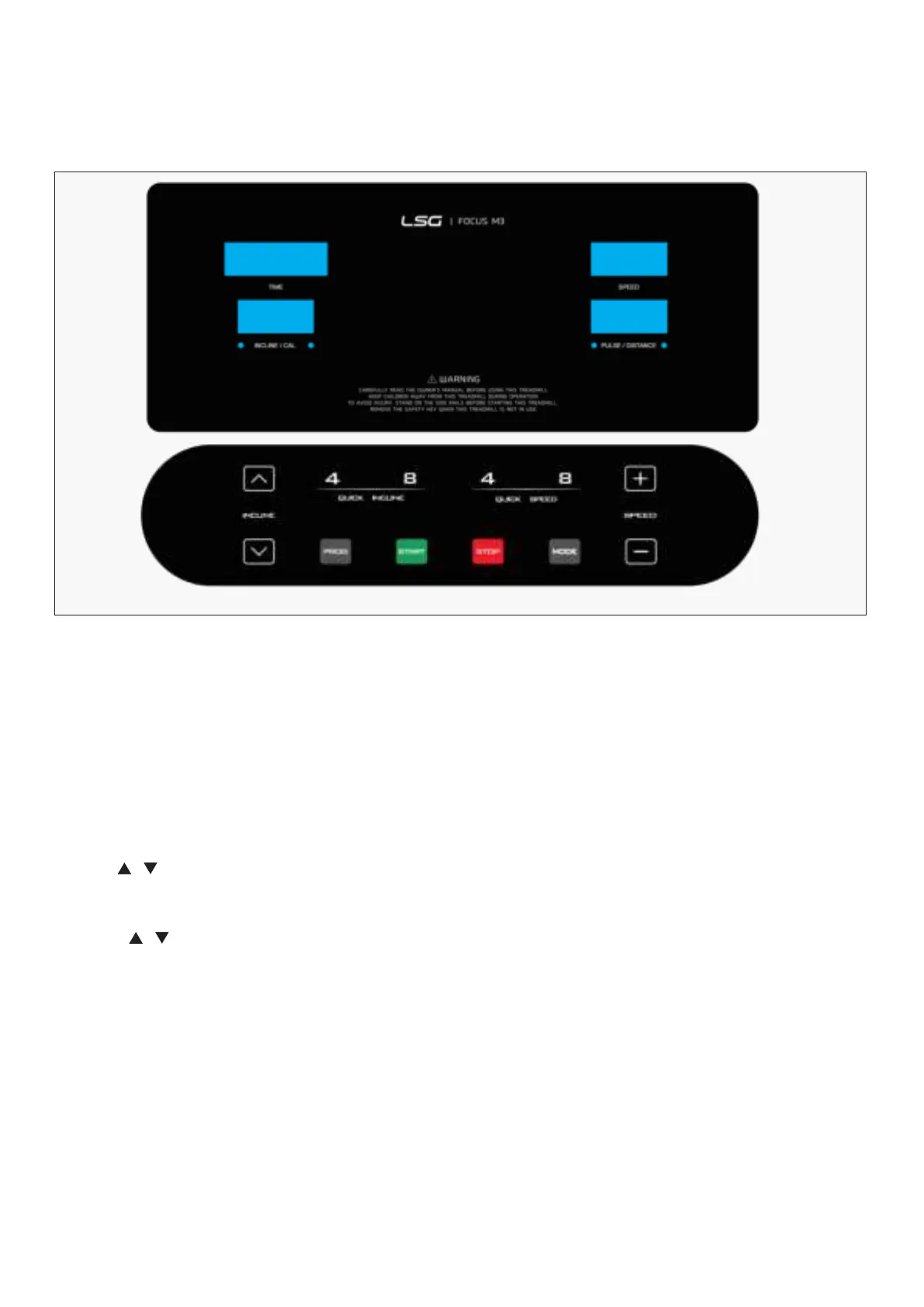
1. DISPLAY WINDOW
"START" button: Press this button to start the machine, the machine will run at the lowest speed
or at the speed of default program after 3 seconds time count down.
"STOP" button: Press this button to stop the machine, the machine will slow the speed still stop.
"PROG" button: Press this button to choose program from manual mode—P1----P20---FAT.
"MODE" button: When machine in standby state, press this button to choose the mode: Manual
mode-time count down mode-distance count down mode-calories count down.
SPEED , : Adjust the speed. Press the button to adjust the speed when running and adjust
the data when stop.
INCLINE , : Adjust the incline. Press the button to adjust the incline when running and adjust
the data when stop.
SPEED (4 , 8) : Adjust the speed quickly.
INCLINE (4 , 8) : Adjust the incline quickly.
When any key is pressed effectively, it will be accompanied by a prompt tone, and when the parameter
adjustment of the key exceeds the limit, it will be accompanied by a long tone prompt. There will be no
prompt tone when the key press is invalid.
OPERATION GUIDE |


 To Next Page