② KEY INTERFACE
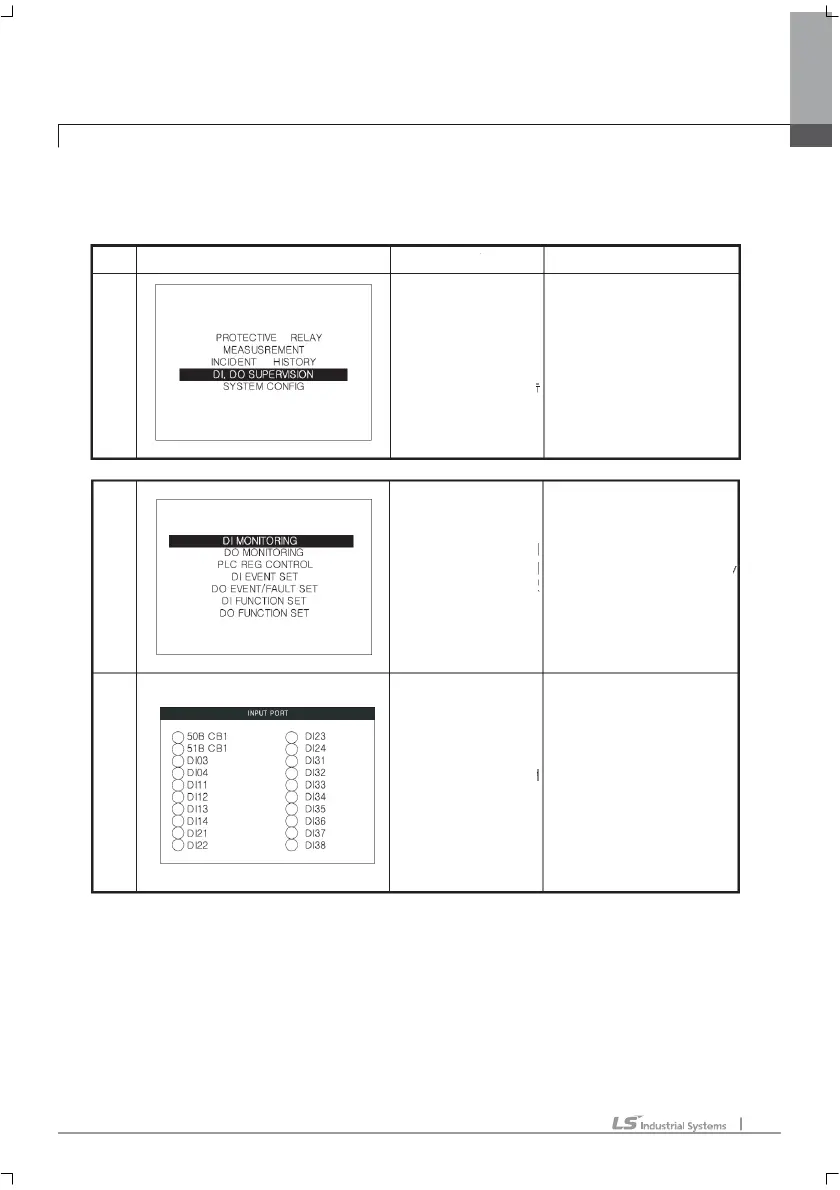
DI MONITORING, DO MONITORING
DISPLAY
EXPLAN
HANDLING
M
E
N
U
L
O
W
E
R
M
E
N
U
1
L
O
W
E
R
M
E
N
U
2
The primary menu
of GIPAM.
This menu is the
top menu.
status and user can set up in
this menu
This menu displays DO status
with picture
Moving up/down :
Up, down directional
Key.
Moving to lower menu:
Select the menu user
wants and put the enter key.
Moving menu to menu:
Up, down directional key
Moving to top menu: cancel key
Moving to detail setting menu:
Select the menu user want and
put the enter key.
Moving to upper menu: cancel key
DI MORNITORING and DO MORNITORING is a supervision menu. It renews the
DO/DI status at 1 second interval.
1
11
1.
. .
. MMI
MMIMMI
MMI



 To Next Page