23
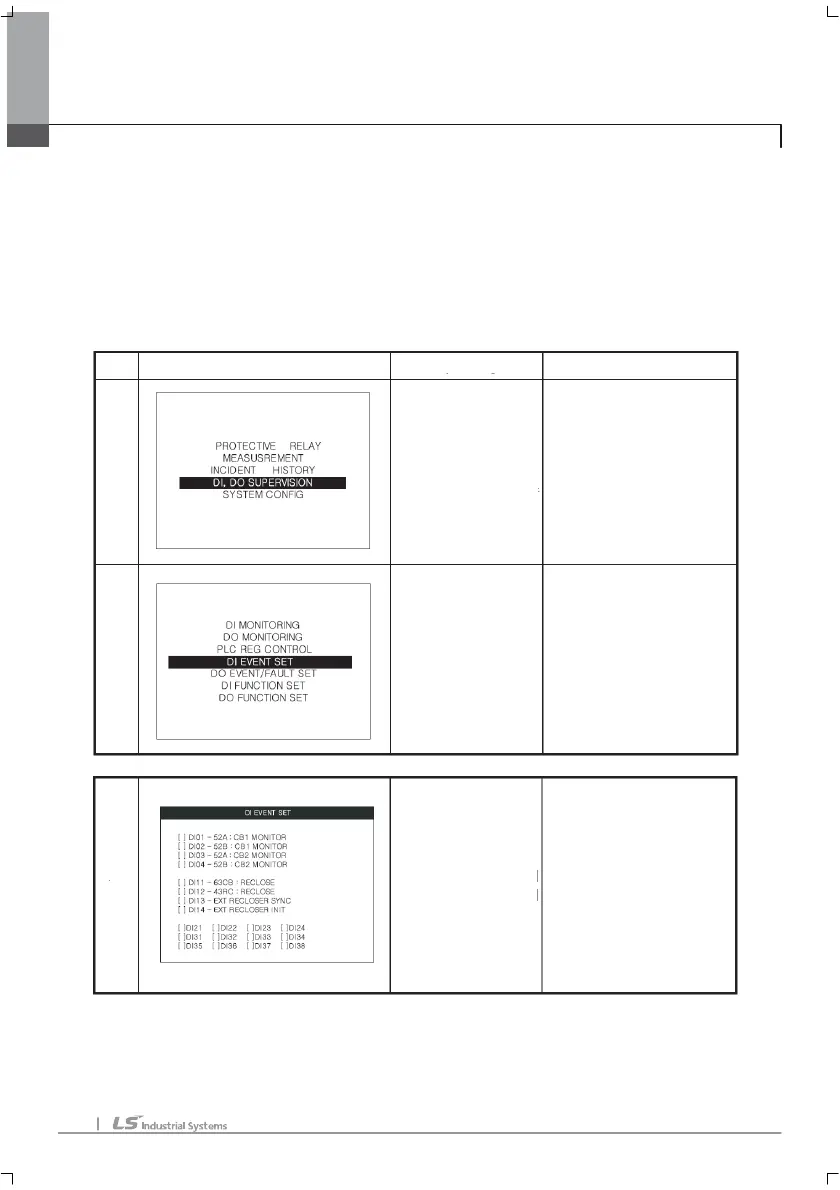
DI MORNITORING and DO MORNITORING is a supervision menu. It renews the
DO/DI status at 1 second interval.
PLC REG CONTROL, DI EVENT SETE, DO EVENT/FAULT SET
DI FUNCTION SET, DO FUNCTION SET menu.
DISPLAY
EXPLAN
HANDLING
M
E
N
U
L
O
W
E
R
M
E
N
U
D
E
T
A
I
L
The primary menu
of GIPAM.
This menu is the
top menu.
User can save the value of
PLC input register value and
set the DI,DO point which
will be saved in history.
This menu displays the use of
DI,DO.
U
ser can set the PLC control
contact and the use of
point.
Moving to upper menu: cancel key
Moving up/down :
Up, down directional
Key.
Moving to lower menu:
Select the menu user
wants and put the enter key.
Moving menu to menu:
Up, down directional key
Moving to top menu: cancel key
Moving to detail setting menu:
Select the menu user want and
put the enter key.
1
11
1.
. .
. MMI
MMIMMI
MMI



 To Next Page