27
PASSWORD INPUT MENU
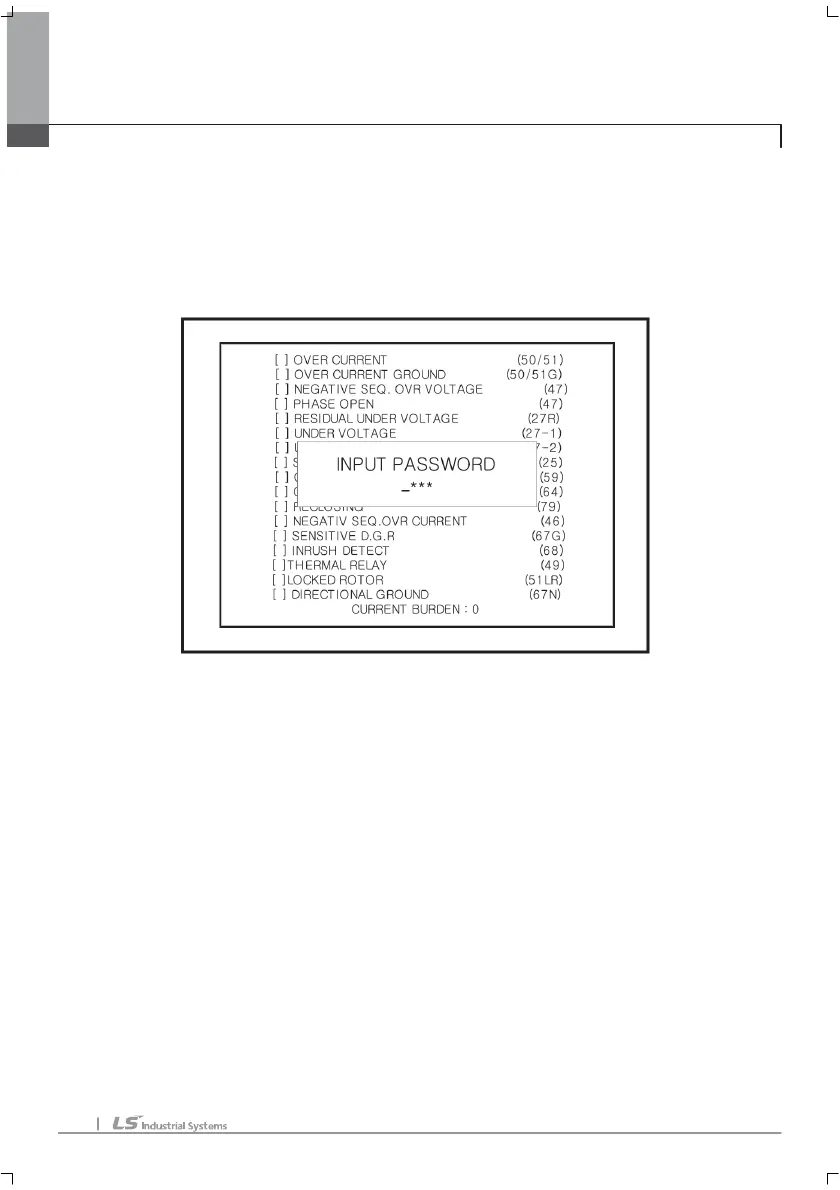
User can see following picture ‘input password’ when user change values or erase
data. And for 10 minutes, it is unnecessary to input password. (The password can be
changed at ENVIRONMENT CONFIG MENU.)
PASSWORD INPUT interface
Left/right key: moving the cursor.
Up/down key: changing the value.
E key: input complete.
C key: cancel
※ E key is enable when the cursor is right end.
LCD BACK LIGHT
If there is not command inputting for 15 minutes, the LCD back light will be turned off.
And if user input command again, it will be turned on.
※ If WIRING setting or communication setting is changed, user must RESET the
1
11
1.
. .
. MMI
MMIMMI
MMI



 To Next Page