8
1
11
1-
--
- 2
2 2
2 The
The The
The input de vice
input de vice input de vice
input de vice of
of of
of GIPAM
GIPAMGIPAM
GIPAM-
--
- 2000
2000 2000
2000
key name Operation
F1
Function key1
Display mimic diagram
F2
Function key2
Display all menu Save the setting
Incident history
Event & fault menu. user can
delete the accumulated data on
Demand menu.
F3
Function key3
measurement Clear the accumulated data
F4
Function key4
Protective relay
Set up the trip assign
LED
F5
Function key5
Reset the relay trip or device errors.
R/L Remote/local
Changing the remote/local.
Red is local and green is remote.
E enter Confirming or entering the menu.
C cancel Cancellation or moving to upper menu.
DIRECTIONAL
KEY
- Moving or change the values.
CB1 ON
- CB1 ON
CB1 OFF
- CB1 OFF
CB2 ON
- CB2 ON
CB2 OFF
- CB2 OFF
It doesn’t operate in
case that CB2 is set up
to PO.
1
11
1.
. .
. MMI
MMIMMI
MMI
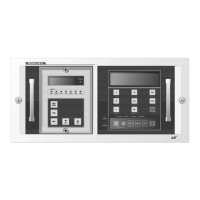
User can set up or operate GIPAM2000 with front key. Gipam2000 has 16 keys and each
has specific functions
.
If the GIPAM2000 is on the ‘remote’ mode, user can’t control the device by front keys. If
want to control the device, user should set the GIPAM on ‘local’ mode.
All keys operate when user puts the key within 0.2 seconds. And the values of inputs by
keys are not saved on buffer.
※ CB ON/OFF keys don’t operate within 3 seconds after operation of CB. It is for the



 To Next Page