The LTECH Super Panel 4S (Model: SP-GW-4S) is a 4-inch smart home touchscreen control panel designed to integrate and manage various smart home devices and systems. It functions as a smart gateway, supporting multiple communication protocols and offering a range of control capabilities for both smart and traditional home appliances.
Function Description:
The Super Panel 4S serves as a central hub for smart home automation. It features built-in smart gateway functions, making it compatible with Bluetooth 5.0 SIG Mesh, 2.4G+5G dual-band Wi-Fi, and Ethernet communication. This broad compatibility allows it to connect and control a wide array of devices, including constant voltage drivers (LM-36, LM-75, LM-150, LM-240 series), constant current drivers (SE-12, SE-20, SE-30, SE-40 series), smart switches (Premium, Activated, Creativity series), smart sensors (Microwave motion sensor, Infrared motion sensor), and various wireless modules (DMX/0-10V, DMX/DALI/0-10V, DALI, Triac).
Beyond smart device integration, the Super Panel 4S can act as a 2-channel relay, enabling direct control of load lamps. Its infrared (IR) capability allows it to control traditional IR home appliances, effectively transforming them into smart devices. This means users can manage their TVs, air conditioners, fans, set-top boxes, projectors, air cleaners, and water heaters through the panel.
The device incorporates a 2-in-1 light and proximity sensor. This sensor facilitates automatic screen brightness adjustment based on ambient light and enables the screen to wake up automatically when a person approaches, enhancing user convenience and energy efficiency.
Interaction with the Super Panel 4S is possible through its touchscreen interface and a dedicated mobile application. It supports the creation and execution of multi-function scenes, allowing users to automate complex sequences of actions across different devices. A key feature is its ability to support local control without requiring a network connection, ensuring faster and more stable performance.
The panel is designed for installation in an 86-type junction box and offers flexibility with over 400 possible panel combinations using unified panel mounting frames. It can control lamps directly, integrate traditional lamps into the smart home ecosystem via the app, and enable remote control through 4G/5G/Wi-Fi, alongside local control. Control options extend to the app, the Super Panel 4S itself, a remote, or a wireless switch.
Important Technical Specifications:
- Model: SP-GW-4S
- Wireless network: Bluetooth 5.0 SIG Mesh, Wi-Fi 2.4G+5G
- Wired network: Ethernet
- Input voltage: 100-240V~, 50/60Hz
- Display: 4-inch full lamination, 480×480 resolution
- Touchpad: Capacitive multi-touch screen, anti-fingerprint coating
- Materials: PC+V0 fireproof grade
- Single load: LED≤200W, ≤400W
- Channel of load: 2 Channels
- Inrush current in loads: Max.65A@2ms
- Working environment: -15°C~50°C, Humidity≤85%RH
- Dimensions: L86×W86×H41(mm)
- Package size: L110×W110×H59(mm)
- Colors: Grey, Gold, White
Usage Features:
- Intuitive Interface: The 4-inch touchscreen displays essential information like time, date, and weather, along with virtual buttons for controlling connected devices (e.g., "Switch 1," "Switch 2").
- Device Management: After adding devices and scenes via the app, the system automatically generates different pages, allowing users to swipe left and right to navigate between device control pages.
- Control Center Access: Swiping down from the top of the screen reveals a control center for quick adjustments, which can be closed by swiping up.
- App Integration: The device pairs with a mobile application (downloadable via QR code) for account registration, device binding, and advanced configuration.
- Infrared Device Control: Users can add infrared appliances through the app by selecting the appliance type and brand, then control them directly from the Super Panel 4S.
- Displayed Devices: The app allows users to select which devices are displayed and controllable from the Super Panel 4S interface.
- Scene Control: Scenes created in the app can be added to and controlled from the Super Panel 4S, enabling one-touch activation of predefined actions.
- Relay Configuration: The two built-in relays (Switch 1/Switch 2) can be quickly controlled via a pop-up in the app's "Room" interface or directly from the Super Panel 4S interface. Users can also name these relays in the panel's settings.
- Power Off Memory: The device retains the state of the relays before a power off, restoring them to that state upon power-on.
Maintenance Features:
- System Reboot: A long press (6 seconds) of the reset key using an ejection pin will restart the system.
- Factory Reset: To restore factory settings, long press the reset key for 6 seconds until the LTECH logo appears, then release. Within 30 seconds, press the reset key again for 6 seconds. The device will restart, indicating a successful factory reset.
- Professional Installation: LTECH emphasizes that products should be installed by qualified professionals to ensure proper setup and safety.
- Environmental Considerations: The device is not waterproof or lightning-proof (except for special models). It should be protected from sun and rain, and if installed outdoors, it requires a waterproof enclosure and lightning protection.
- Ventilation: Good heat dissipation is crucial for extending product life, so adequate ventilation should be ensured.
- Wiring Integrity: Users must verify that the working voltage complies with product requirements, the wire diameter is sufficient for the connected light fixtures, and all wiring is firm and correct before powering on to prevent damage.
- Troubleshooting: In case of a fault, users are advised not to attempt repairs themselves but to contact their suppliers for assistance.
- Warranty: The product comes with a 2-year warranty from the date of delivery, covering free repair or replacement for quality problems. Exclusions include damage beyond warranty periods, artificial damage (high voltage, overload, improper operations), severe physical damage, natural disasters, force majeure, damaged warranty labels/barcodes, or absence of a signed contract with LTECH. LTECH reserves the right to amend warranty terms.

 Need help?
 General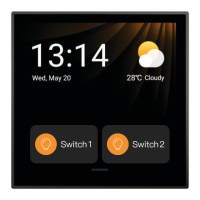

 To Next Page
