INSTALLATION INSTRUCTIONS
Connecting the Adaptor
DANGER: RISK OF FIRE OR
EXPLOSION
WARNING: RISK OF ELECTRIC
SHOCK
Do not use if the equipment is damaged.
Always inspect all parts of the equipment
before installing or using. Installing or
using damaged equipment can increase
risk of electrical shock or fire.
CAUTION: RISK OF PERSONAL
INJURY
CAUTION: RISK OF DAMAGE TO THE
EQUIPMENT
DANGER: RISK OF FIRE OR
EXPLOSION
WARNING: RISK OF ELECTRIC
SHOCK
Do not use extension cables, a multi-
outlet adaptor, a multi-plug, a conversion
plug, or a power strip. Using these items
can cause damage to the equipment and
increase the risk of electric shock or fire.
WARNING: RISK OF ELECTRIC
SHOCK
Connect only to properly grounded
outlets. Improper connection can cause
electric shock and damage to the
electrical outlet and equipment. Check
with a licensed electrician or serviceman
if there is doubt that the product is
properly grounded.
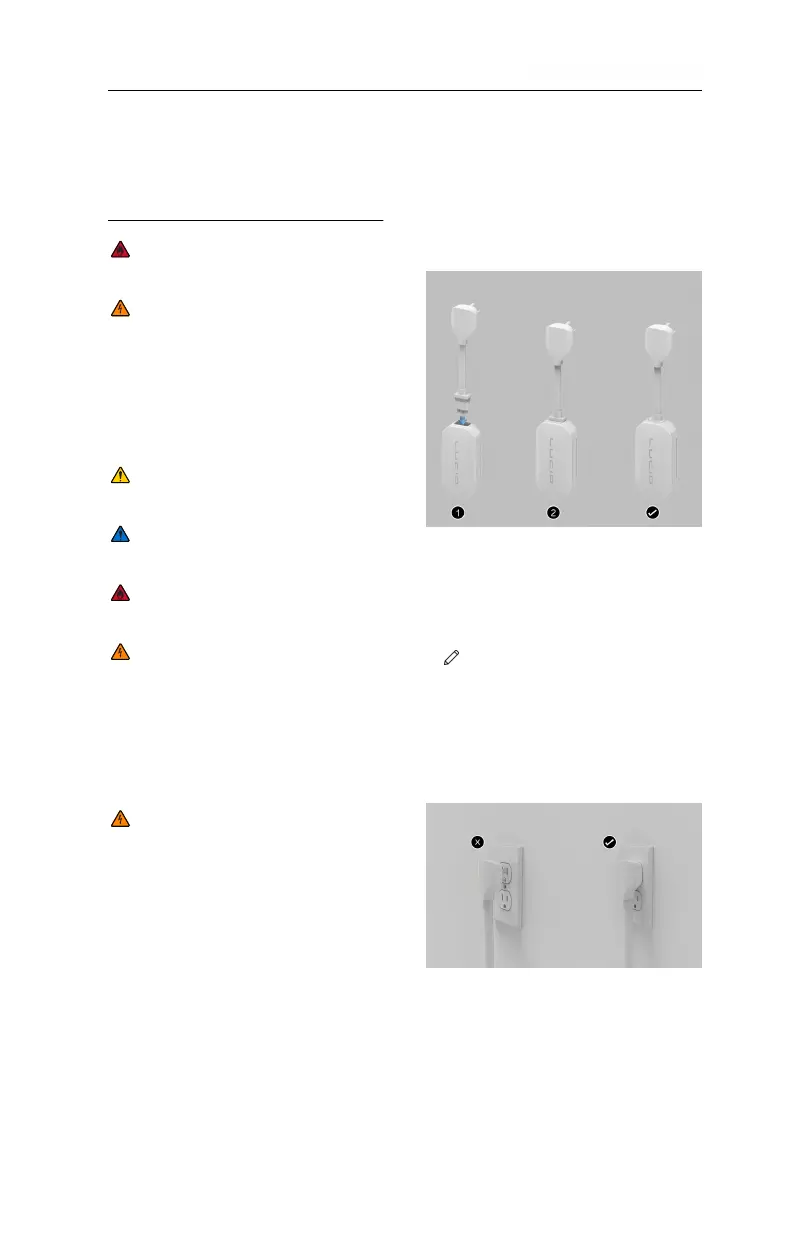
Attaching
To attach an adaptor, line up the adaptor
plug with the control box of the Mobile
Charging Cable and push it into the
socket until flush with the control box
and snugly fit.
Removing
To remove the adaptor, firmly grasp the
adaptor and pull it from its socket.
NOTE: The Mobile Charging
Cable automatically detects the
attached adaptor and sets the
appropriate charging amperage.
Ensure that the plug is fully
inserted into the outlet.
INSTALLATION INSTRUCTIONS 10



 To Next Page