23 Operating manual – multifunction measuring meter XA1000 / XP200 / XP400 • 08_2015 GB
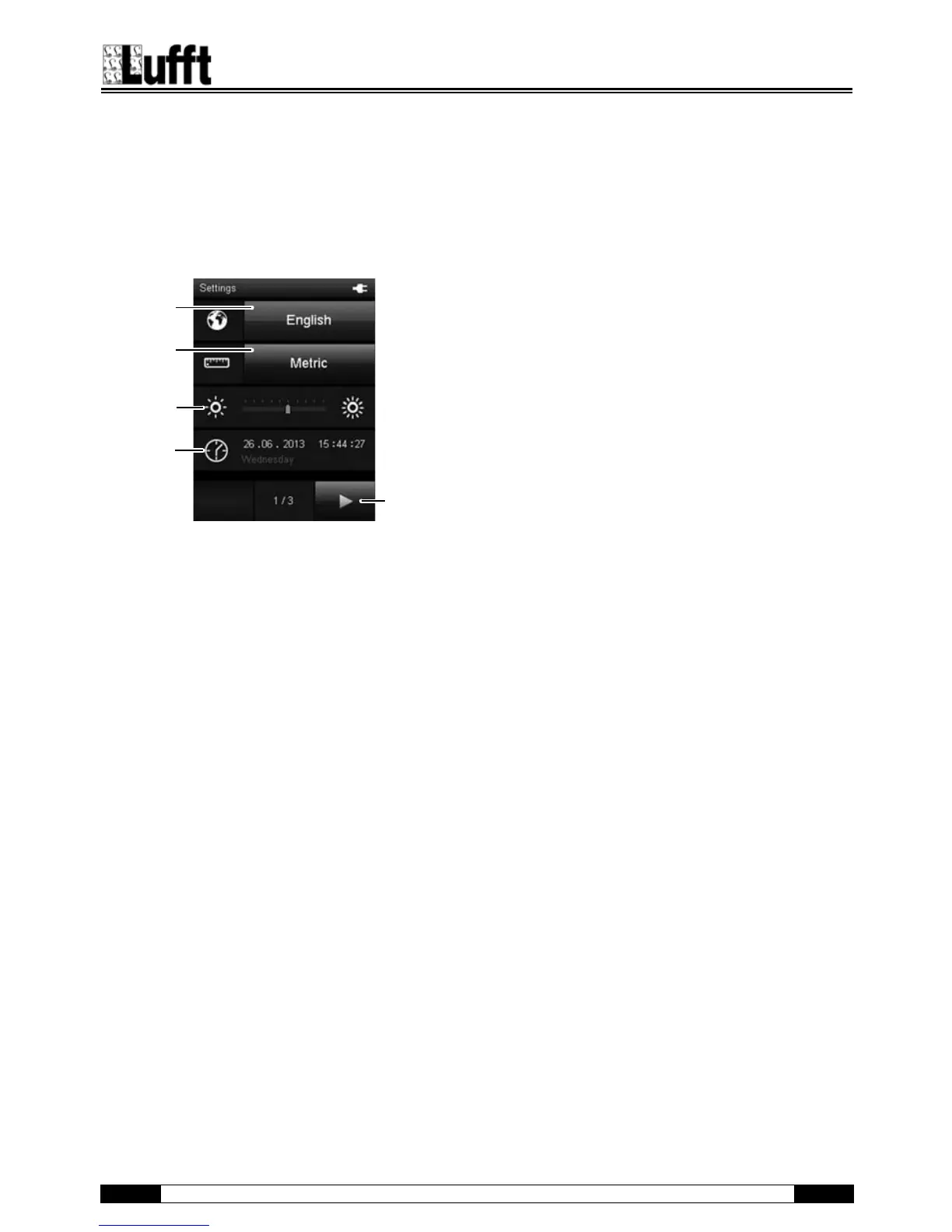
"Settings" screen
You can configure the device as follows in the
"Settings" screen:
Settings 1/3:
92 Selects the screen language (see chapter "Setting the
language").
93 Selects the unit system:
Metric: Activates the metric unit system for all available
measured values (e.g. for use in continental
Europe).
Imperial: Activates the imperial unit system for all
available measured values (e.g. for use in the
USA).
94 Sets the screen brightness.
This option can only be selected by using the cross control
below the colour display.
1. Press the "Down" key on the cross control until the scale is
selected.
2. Press the "Left" or "Right" keys on the cross control to
reduce (left) or increase (right) the screen brightness.
95 Sets the date and time.
This option can only be selected by using the cross control
below the colour display.
1. Press the "Down" key on the cross control until the date is
selected.
2. Press the "OK" key on the cross control.
The entire row is selected.
3. Press the "Left" or "Right" keys on the cross control to
select the value to be configured.
4. Press the "Up" or "Down" keys on the cross control to
increase or reduce the value to be configured.
5. Press the "OK" key on the cross control.
The row is deselected.
96 Opens the next screen.



 To Next Page