EasyManua.ls Logo

Lumiax MC4010 - User Manual

Default Icon
23 pages
Print Icon
To Next Page IconTo Next Page
Loading...
User Manual
User Manual_Magicube series_KE
CE, Rohs, ISO9001:2015
Subject to change without notice!
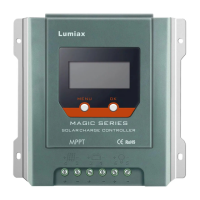
MPPT Solar Controller
12/24V20/40A,
260/520/1KW
Magicube series
Magic your solar life
Lumiax
www.lum iax.co m
1.03.02.10043-1

Questions and Answers

  • M
    Matthew HaynesJul 25, 2025
    What to do if my Lumiax MC4010 Controller shows a short circuit?
    • R
      Ricky DeleonJul 25, 2025
      If your Lumiax Controller indicates a short circuit, switch off all loads and remove the short circuit. The load will automatically reconnect after 1 minute.
  • L
    Lee RobinsonJul 31, 2025
    What to do if my Lumiax MC4010 displays an over current?
    • J
      James KingJul 31, 2025
      If the Lumiax Controller is showing an over current, reduce the load. The controller will resume working after 1 minute, and the load will be reconnected when the battery is recharged.
  • A
    Amanda WilliamsAug 6, 2025
    Why is the battery voltage too high on my Lumiax Controller?
    • J
      Jeremy GrantAug 6, 2025
      If the battery voltage is too high on your Lumiax Controller, check if other sources are overcharging the battery or if the battery parameter is set correctly. If neither of these is the cause, the controller might be damaged.
  • K
    kimberlyleeAug 13, 2025
    What to do if my Lumiax MC4010 is over temperature?
    • J
      joshuawatkinsAug 13, 2025
      If your Lumiax Controller is experiencing over temperature, it will return to normal operation after the temperature decreases.
  • G
    gmillerAug 18, 2025
    What to do if the Lumiax MC4010 Controller shows abnormal battery voltage at start-up?
    • T
      Tracy StephensonAug 18, 2025
      If the Lumiax Controller displays an abnormal battery voltage at start-up, charge or discharge the battery so that the battery voltage is within the normal operating range (8.5~15.5V or 20~30V).

Summary

1. Safety Instructions and Waiver of Liability

1.1 Safety Instructions

Provides warnings and cautions using symbols for potentially dangerous conditions and critical procedures.

1.2 Liability Exclusion

Details manufacturer's non-liability for damages due to improper use, installation, or unauthorized repair.

2. Overview

2.2 MPPT

Explains the Maximum Power Point Tracking (MPPT) technology and its profile, including current boost.

High Voltage Strings and Grid-Tie Modules

Discusses charging batteries with higher voltage arrays and using grid-tie modules with MPPT.

An Advantage Over Traditional Controllers

Compares MPPT controllers with traditional PWM controllers, highlighting energy efficiency gains.

Conditions That Limit the Effectiveness of MPPT

Discusses factors like module temperature affecting MPPT effectiveness and when it's still beneficial.

2.3 MPPT-Four Charging Stage

Details the four-stage battery charging algorithm: MPPT, Boost, Float, and Equalize charges.

3. Dimensions

3.1 The dimensions of MC2010

Provides detailed dimensional drawings and measurements for the MC2010 model in millimeters.

3.2 The dimensions of MC4010

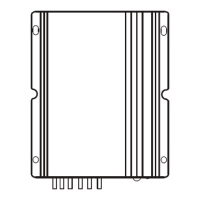
Provides detailed dimensional drawings and measurements for the MC4010 model in millimeters.

4. Structure & Accessory

4.1 Structure & Characteristics of MC2010

Details the structural components and characteristics of the MC2010 model with numbered labels.

4.2 Structure & Characteristics of MC4010

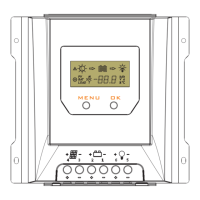
Details the structural components and characteristics of the MC4010 model with numbered labels.

4.3 Temperature Sensor

Details how the temperature sensor connects via interface 5 for accurate battery temperature compensation.

4.4 RS485

Defines the RJ11 interface pinout for RS485 communication and applicable protocol.

4.5 Option Accessories

Covers optional Bluetooth and IoT wireless communication modules and their features.

5. Installation

5.1 Installation Notes

Provides crucial cautions and recommendations for safe and proper installation procedures.

5.2 Mounting Location Requirements

Specifies ideal mounting conditions, clearance, and orientation for optimal controller performance and longevity.

5.3 Connection Procedure

Details the step-by-step connection process for loads, battery, and solar modules with polarity and safety notes.

5.4 Wiring Specifications

Provides recommended wire diameters (mm²/AWG) for solar, battery, and load connections based on model.

5.5 Grounding

Explains grounding procedures, especially for common-negative systems, and cautions against improper grounding.

6. Operation

6.1 LED Indicators

Details the meaning of the Solar, Battery, Load, and Communication LEDs and their status indications.

6.2 Key Functions

Explains the functions of the MENU and OK buttons for browsing, setting, and controlling the load.

6.3 LCD Display and Interface Navigation

Details the LCD interface, status descriptions, automatic cycling, and manual browsing of displayed data.

6.3.4 Fault Indication

Lists fault codes (E1-E5) with descriptions for short circuit, over current, low/over voltage, and over temperature.

6.4 Parameter Settings

Covers setting low voltage protection/reconnect, clearing Bluetooth password, battery type, and load modes.

Street Lamp Function Features

Details Day/Night threshold voltage, delay time, test function, and user-defined mode for street lighting.

7. Troubleshooting, Protections and Maintenance

7.1 Troubleshooting

Lists common faults (E1-E5), their reasons, and recommended troubleshooting steps for the controller.

7.2 Protection

Details various protection mechanisms including PV/Battery Over Current, Short Circuit, Polarity, Over Voltage/Discharge, and Over Temperature.

7.3 Maintenance

Provides essential maintenance checks for airflow, wires, terminals, LCD, system connections, and grounds.

8. Technical Data

8.1 MC2010;4010 Specifications

Provides detailed technical specifications for MC2010 and MC4010 models including parameters, dimensions, and environmental data.

8.2 MC2010;4010-BT Specifications

Lists technical specifications for MC2010-BT and MC4010-BT models, including Bluetooth communication features.

9. Conversion Efficiency Curves

MC2010 Efficiency Curves

Presents 12V and 24V conversion efficiency curves for the MC2010 model based on charging power.

MC4010 Efficiency Curves

Shows 12V and 24V conversion efficiency curves for the MC4010 model versus charging power.

Lumiax MC4010 Specifications

General IconGeneral
Rated Voltage12V/24V Auto
Max. Charge Current40A
Max. Input Power520W(12V) / 1040W(24V)
Max. PV Input Voltage100V
Equalization Charging Voltage14.6V
Boost Charging Voltage14.4V
Low Voltage Reconnection Voltage12.6V
USB Output5V
Operating Temperature-20℃~+55℃
Storage Temperature+80℃

Related product manuals