
 Need help?
Do you have a question about the Lunatico AAG CloudWatcher Solo and is the answer not in the manual?
Access the primary web interface to view real-time data and graphs from the Solo device.
Detailed explanation of the data presented in graphs, including current and historical readings.
Access single line data files for integration with automation software and drivers.
Use the specific CSV file format required by ScopeDome software for data access.
Use the Solo as a master unit to connect remote CloudWatcher instances.
Record data to a USB stick in CSV format using the Solo's data logger feature.
Configure Solo settings, system details, network, and manage reboot/shutdown.
Check and manage the status of connected USB devices, including unmounting for safe removal.
Check for and apply new software versions to update the Solo system.
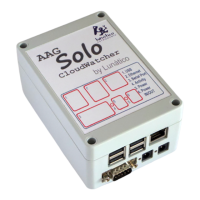
The SOLO device, developed by Lunático Astronomía, serves as an enhancement for the AAG CloudWatcher, providing advanced monitoring, control, and data publication capabilities. It acts as a data visualizer and management unit, designed to improve the overall usefulness of the CloudWatcher by making its information accessible in various ways and enabling additional functionalities like heater adjustment and data logging.
The primary function of the SOLO is to interface with an AAG CloudWatcher, collect its environmental data (such as sky temperature, humidity, rain, wind speed, and lightness), and then process and publish this information through a local network. It essentially transforms the CloudWatcher into a network-enabled device, allowing users to access real-time and historical weather data remotely.
The SOLO operates as a "Master" for other CloudWatcher Windows applications running in "Remote" mode, enabling a distributed monitoring setup where multiple instances of the software can connect to the SOLO to retrieve sensor data. This is particularly useful in observatory environments where various automation programs might need access to weather safety information.
A key feature is its ability to publish weather data in specific file formats required by popular astronomy automation software, such as CCDAutopilot, CCDCommander, and ASCOM safety monitor drivers. This ensures compatibility and seamless integration into existing observatory control systems.
Furthermore, the SOLO includes a data logger function, allowing it to record CloudWatcher data onto a user-supplied USB stick in CSV format. This provides a convenient way to store historical data locally for later analysis or archiving.
The device also incorporates a heater adjustment mechanism for the CloudWatcher, which it monitors and controls to ensure optimal performance of the sensors, especially the rain sensor. This proactive management helps maintain the accuracy and reliability of the weather readings.
For network connectivity, the SOLO can obtain an IP address automatically via DHCP or be configured with a static IP address, making it flexible for various network setups, including those requiring internet accessibility for remote monitoring. It also supports secure communication using HTTPS for its configuration pages, ensuring that sensitive settings are protected.
The SOLO is designed for indoor installation and offers a straightforward setup process. Users simply connect their CloudWatcher to the SOLO using the provided cables, power the SOLO, and connect it to their local network via an RJ45 cable. An "activity" LED on the SOLO blinks to indicate successful communication with the CloudWatcher.
Data access is primarily through a web interface, accessible by typing "http://aagsolo" (or its IP address) into a web browser. This main web page displays current readings and graphical representations of environmental data over the past 24 hours. The graphs are interactive, allowing users to rearrange them and view data from the current day and the day before.
The web interface provides several control buttons:
For automation software, the SOLO publishes data files in a shared network folder, typically accessible at "\aagsolo". Users can browse this network location to find files like "aag_sld.dat" (Single Line Data) and "scopedome.csv" (for ScopeDome software), which can then be configured in their respective automation programs. There's also "aag_cwnetdata.dat" for other AAG CloudWatcher Windows applications running in remote mode.
The data logger feature is activated by inserting a FAT-formatted USB stick into one of the SOLO's USB ports. The SOLO automatically detects the stick, mounts it, and begins appending data to a "userdata.csv" file. To safely remove the USB stick, users must "unmount" it via the configuration pages, similar to Windows' "safely remove hardware" function.
The SOLO also supports push notifications for weather changes (from SAFE to UNSAFE and vice versa) through services like Pushbullet and Pushover. Users can configure this by entering their service token (prefixed with "pb-" or "po-") in the SOLO's settings.
The SOLO's configuration pages are accessible via a secure HTTPS connection ("https://aagsolo/config/"). Access requires a username ("solo") and password ("cloudwatcher"), which can be changed by the user. These pages allow for various adjustments and system management:
A notable design aspect for maintenance and longevity is the SOLO's use of an SD card as its storage, which is mounted in "read-only" mode. This design choice significantly enhances reliability and durability:
The SOLO is based on a Raspberry Pi model "B" and has a low power consumption (approximately < 2 W), contributing to its energy efficiency and potentially reducing operational costs.
For advanced users, the system is "hacker friendly," allowing login via SSH with the username "pi" and password "cloudwatcher." This provides the flexibility to tweak web pages or perform other custom modifications, though this is done under the user's responsibility.
The device also provides access to raw data and historical data through specific CGI-BIN URLs (e.g., http://aagsolo/cgi-bin/cgiLastData for the last reading and http://aagsolo/cgi-bin/cgiHistData for up to 48 hours of historical data), which can be useful for custom integrations or personal web projects.
The SOLO's design prioritizes ease of use, robust data handling, and long-term reliability, making it a valuable addition for any AAG CloudWatcher user seeking enhanced control and accessibility of their weather data.
 General
| Model | AAG CloudWatcher Solo |
|---|---|
| Connectivity | USB |
| Power | 1.5W |
| Sensor Type | Rain |
| Compatibility | Windows, Linux, Mac |

 To Next Page